
Copperplane

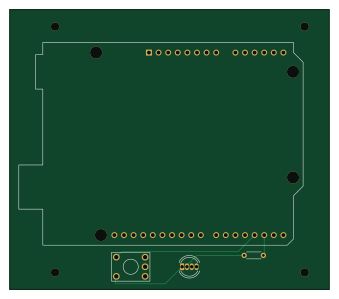
About the Copperplane PCB
Copperplane is an open source PCB design by GittieLabs, published on GitHub under the Apache-2.0 license. It is a 2-layer board measuring 84.5 × 74 mm, with 3 components from 3 distinct parts.
By type, the board carries 1 switch, 1 diode and 1 resistor.
From the project
Hardware Agent Studio is an open-source, local-first AI assistant that bridges the gap between PCB design (KiCad) and Mechanical CAD (FreeCAD).
Real KiCad projects the documentation walks through. Small on purpose: three files each, no build artifacts, no local settings.
An Arduino UNO shield — an RGB LED, a resistor, a tactile switch and four M2 mounting holes. It is the subject of Your first board check.
It is not a clean board, and that is the point. Measured with kicad-cli against the files in this directory:
Copperplane bill of materials (BOM)
3 components, 3 distinct parts.
| Qty | Part | Footprint | Refs |
|---|---|---|---|
| 1 | SW_Push | KSA_Tactile_SPST | SW1 |
| 1 | LED | LED_D5.0mm-4_RGB | D1 |
| 1 | R | R_Axial_DIN0204_L3.6mm_D1.6mm_P5.08mm_Horizontal | R1 |
Copperplane design files
The KiCad project lives in the GittieLabs/copperplane repository on GitHub; these links point at the commit this page was built from.
Copperplane: common questions
How big is the Copperplane PCB?
The Copperplane measures 84.5 × 74 mm, has 2 copper layers and is 1.6 mm thick.
How many components are on the Copperplane?
3 components, from 3 distinct parts. The full bill of materials is listed on this page.
Where can I download the Copperplane design files?
From the GittieLabs/copperplane repository on GitHub, which has the KiCad layout and the schematic; the links under Design files point to each one.
Can I use the Copperplane design in my own project?
Yes, under the terms of its Apache-2.0 license, which GittieLabs chose for the repository.