
F16SimPit

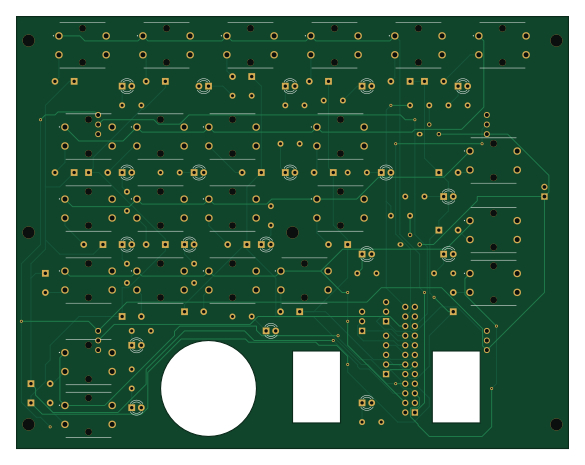
About the F16SimPit PCB
F16SimPit is an open source PCB design by MrBuzzKillington, published on GitHub. It is a 4-layer board measuring 146.1 × 114.3 mm, with 97 components from 11 distinct parts.
By type, the board carries 42 diodes, 23 switches, 21 resistors, 5 connectors and 2 transistors.
From the project
Files for F16 sim pit
F16SimPit bill of materials (BOM)
97 components, 11 distinct parts.
| Qty | Part | Footprint | Refs |
|---|---|---|---|
| 2 | 2N2219 | TO-39-3 | Q1, Q2 |
| 1 | Conn_01x02 | PinSocket_1x02_P2.54mm_Vertical | J1 |
| 1 | Conn_02x12_Odd_Even | PinSocket_2x12_P2.54mm_Vertical | J2 |
| 1 | Conn_01x05 | PinSocket_1x05_P2.54mm_Vertical | J3 |
| 2 | Conn_01x03 | PinSocket_1x03_P2.54mm_Vertical | J4, J5 |
| 23 | SKHCBEA010 | SKHCBEA010 | S1, S2, S3, S4, S5, S6, S7, S8 +15 |
| 4 | 91A1A-B28-B13L | 91A1AB28B13L | VR1, VR2, VR3, VR4 |
| 23 | D | D_A-405_P5.08mm_Vertical_AnodeUp | D1, D2, D3, D4, D5, D6, D7, D8 +15 |
| 19 | LED | LED_D3.0mm | D18, D19, D20, D21, D22, D23, D24, D25 +11 |
| 19 | 520 | R_Axial_DIN0309_L9.0mm_D3.2mm_P5.08mm_Vertical | R1, R2, R3, R4, R5, R6, R7, R8 +11 |
| 2 | 1000 | R_Axial_DIN0309_L9.0mm_D3.2mm_P5.08mm_Vertical | R9, R15 |
F16SimPit design files
The KiCad project lives in the MrBuzzKillington/f16SimPit repository on GitHub; these links point at the commit this page was built from.
F16SimPit: common questions
How big is the F16SimPit PCB?
The F16SimPit measures 146.1 × 114.3 mm, has 4 copper layers and is 1.6 mm thick.
How many components are on the F16SimPit?
97 components, from 11 distinct parts. The full bill of materials is listed on this page.
Where can I download the F16SimPit design files?
From the MrBuzzKillington/f16SimPit repository on GitHub, which has the KiCad layout; the links under Design files point to each one.
Can I use the F16SimPit design in my own project?
The repository has no license, so all rights stay with MrBuzzKillington. Use it as a reference, and ask the author before reusing the design.