
CodeKittyNanoBreakout

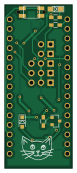
About the CodeKittyNanoBreakout PCB
CodeKittyNanoBreakout is an open source AVR/Arduino PCB design by dmiracle, published on GitHub. It is a 2-layer board measuring 17.8 × 43.2 mm, with 16 components from 12 distinct parts.
Its main chip is the ArduinoNano, from the AVR/Arduino family. By type, the board carries 5 connectors, 3 resistors, 2 switches, 2 diodes, 1 IC and 1 transistor.
From the project
Created this file locally, then got it onto github. 133t
Main components on the CodeKittyNanoBreakout
CodeKittyNanoBreakout bill of materials (BOM)
16 components, 12 distinct parts.
| Qty | Part | Footprint | Refs |
|---|---|---|---|
| 1 | ArduinoNano | ArduinoNano | U1 |
| 1 | MMBT3904 | SOT-23 | Q1 |
| 2 | CONN_01X02 | Pin_Header_Straight_1x02_Pitch2.54mm | P1, P2 |
| 3 | CONN_01X03 | Pin_Header_Straight_1x03_Pitch2.54mm | P3, P4, P5 |
| 1 | F_Small | DM_FUSE_PTC0ZCG | F1 |
| 1 | PIEZO | DM_PiezSMD_PMKCS0909E4000-R1 | SP1 |
| 1 | SW_PUSH_SMALL_H | DM_SMD_BUTTON_PTS810 | SW1 |
| 1 | Switch_SPDT_x2 | DM_SPDT_RTAngle_JS102011SAQN | SW2 |
| 1 | LED | LED_0805_HandSoldering | D1 |
| 1 | D | D_SOD-323_HandSoldering | D2 |
| 2 | R | R_0603_HandSoldering | R1, R2 |
| 1 | 1K | R_0603_HandSoldering | R4 |
CodeKittyNanoBreakout design files
The KiCad project lives in the dmiracle/PCBs repository on GitHub; these links point at the commit this page was built from.
CodeKittyNanoBreakout: common questions
What microcontroller does the CodeKittyNanoBreakout use?
The CodeKittyNanoBreakout is built around the ArduinoNano, from the AVR/Arduino family.
How big is the CodeKittyNanoBreakout PCB?
The CodeKittyNanoBreakout measures 17.8 × 43.2 mm, has 2 copper layers and is 1.6 mm thick.
How many components are on the CodeKittyNanoBreakout?
16 components, from 12 distinct parts. The full bill of materials is listed on this page.
Where can I download the CodeKittyNanoBreakout design files?
From the dmiracle/PCBs repository on GitHub, which has the KiCad layout; the links under Design files point to each one.
Can I use the CodeKittyNanoBreakout design in my own project?
The repository has no license, so all rights stay with dmiracle. Use it as a reference, and ask the author before reusing the design.
Can I test firmware for the CodeKittyNanoBreakout without the hardware?
Yes. HardLabs builds a simulation of the board from its netlist and BOM, so you can run and debug AVR/Arduino firmware against it before you order a PCB.
More boards in PCBs
 AVR/Arduino
Patriot Companion
104.7 × 84.8 mm82 parts2LNo license0
Chua
60 × 33.5 mm20 parts2LNo license0 AVR/Arduino
ISP Programmer
35 × 29 mm20 parts2LNo license0
LM358MicAmp
22.9 × 14 mm9 parts2LNo license0
GettingToBlinky
38.1 × 33.7 mm7 parts2LNo license0
LM317Breakout
22.1 × 9.9 mm6 parts2LNo license0
Similar boards
 AVR/Arduino
Redox keyboard
mattdibi
162.2 × 126.5 mm77 parts2LMIT2.0k AVR/Arduino
ModuleV450
stuartpittaway
30 × 61.4 mm39 parts2LCC-BY-NC-4.01.1k AVR/Arduino
V4
30 × 50 mm38 parts2LCC-BY-NC-4.01.1k AVR/Arduino
Discipline
coseyfannitutti
304.9 × 122.8 mm170 parts2LCC-BY-NC-4.01.0k AVR/Arduino
Megadesk
gcormier
41.7 × 32.2 mm23 parts2LGPL-3.0818 AVR/Arduino
Easyduino Atmega Nano
Hanqaqa
43.4 × 18 mm30 parts4LCERN-OHL-P-2.0746