
Fluid-Simulation-Pendant

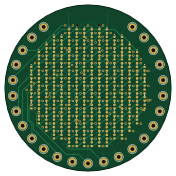
About the Fluid-Simulation-Pendant PCB
Fluid-Simulation-Pendant is an open source STM32 PCB design by EmperorMurfy, published on GitHub under the MIT license. It is a 4-layer board measuring 44 × 44 mm, with 271 components from 19 distinct parts.
Its main chip is the STM32U575RGTX, from the STM32 family. Other key parts include the ADXL363, USBLC6-2P6, MCP73832-2-MC and TPS7A20XXXDQN. By type, the board carries 203 diodes, 26 connectors, 24 resistors, 12 capacitors and 5 ICs.
From the project
A Fluid Simulation Pendant Inspired by Mitxela
As a beginner, I was thoroughly intrigued. This came at the perfect opportunity as I sought to enter electronic design. So, with no former experience, I set out to build my own from scratch.
You can find my full devlog at Blueprint --
OBTAIN PCB 1) Download project files from Github. Use KiCAD to open hardware files. 2) Export & Upload to JLCPCB through Fabrication Toolkit 3) Select PCBA. Make sure you click on Standard + assemble on both sides. 4) Follow on screen instructions. Verify BOM contents. 5) Purchase and await arrival.
Main components on the Fluid-Simulation-Pendant
Fluid-Simulation-Pendant bill of materials (BOM)
271 components, 19 distinct parts — part numbers from the project's BOM.
| Qty | Part | Footprint | Refs |
|---|---|---|---|
| 1 | STM32U575RGTX STM32U575RGTx STMicroelectronics | LQFP-64_10x10mm_P0.5mm | U1 |
| 1 | ADXL363 Analog Devices Inc. | Analog_LGA-16_3.25x3mm_P0.5mm_LayoutBorder3x5y | U2 |
| 1 | USBLC6-2P6 STMicroelectronics | SOT-666 | U3 |
| 1 | MCP73832-2-MC Microchip Tech | DFN-8-1EP_3x2mm_P0.5mm_EP1.7x1.4mm | U4 |
| 1 | TPS7A20XXXDQN TPS7A20xxxDQN Texas Instruments | Texas_X2SON-4_1x1mm_P0.65mm | U5 |
| 25 | CONN_01X01_PIN Conn_01x01_Pin ~ | TestPoint_THTPad_D2.0mm_Drill1.0mm | J2, J3, J4, J5, J6, J7, J8, J9 +17 |
| 1 | CONN_01X02_SOCKET Conn_01x02_Socket | JST_PH_B2B-PH-SM4-TB_1x02-1MP_P2.00mm_Vertical | J44 |
| 1 | TYPE-C_16P_QTWT SHOU HAN | TYPE-C_16P_QTWT | USB1 |
| 202 | Green 0402 LED Everlight Electronics Co Ltd | LED_0402_1005Metric | D6, D7, D8, D9, D10, D11, D20, D21 +194 |
| 1 | Red 0402 LED Everlight Electronics Co Ltd | LED_0402_1005Metric | D257 |
| 2 | 4.7UF-0402 4.7uF-0402 Murata Electronics | C_0402_1005Metric | C1, C8 |
| 6 | 100NF-0402 100nF-0402 Murata Electronics | C_0402_1005Metric | C2, C3, C4, C5, C6, C7 |
| 2 | 1UF 1uF Murata Electronics | C_0402_1005Metric | C9, C10 |
| 2 | 1UF-0402 1uF-0402 Murata Electronics | C_0402_1005Metric | C11, C12 |
| 17 | 22 YAGEO | R_0402_1005Metric | R1, R2, R3, R4, R5, R6, R7, R8 +9 |
| 1 | 20K | R_0402_1005Metric | R18 |
| 1 | 1k YAGEO | R_0402_1005Metric | R19 |
| 3 | 10K | R_0402_1005Metric | R20, R21, R22 |
| 2 | 5.1K | R_0402_1005Metric | R23, R24 |
Fluid-Simulation-Pendant design files
The KiCad project lives in the EmperorMurfy/Fluid-Simulation-Pendant repository on GitHub; these links point at the commit this page was built from.
Fluid-Simulation-Pendant: common questions
What microcontroller does the Fluid-Simulation-Pendant use?
The Fluid-Simulation-Pendant is built around the STM32U575RGTX, from the STM32 family.
How big is the Fluid-Simulation-Pendant PCB?
The Fluid-Simulation-Pendant measures 44 × 44 mm, has 4 copper layers and is 1.6 mm thick.
How many components are on the Fluid-Simulation-Pendant?
271 components, from 19 distinct parts, with part numbers taken from the project's own BOM. The full bill of materials is listed on this page.
Where can I download the Fluid-Simulation-Pendant design files?
From the EmperorMurfy/Fluid-Simulation-Pendant repository on GitHub, which has the KiCad layout, the schematic and the BOM; the links under Design files point to each one.
Can I use the Fluid-Simulation-Pendant design in my own project?
Yes, under the terms of its MIT license, which EmperorMurfy chose for the repository.
Can I test firmware for the Fluid-Simulation-Pendant without the hardware?
Yes. HardLabs builds a simulation of the board from its netlist and BOM, so you can run and debug STM32 firmware against it before you order a PCB.
Similar boards
 STM32
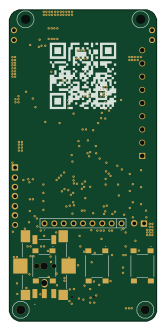
STM32AxxSolder
AxxAxx
39 × 82.5 mm122 parts2LGPL-3.01.7k STM32
STM32AIOC
skuep
21 × 31.5 mm47 parts2LMIT1.4k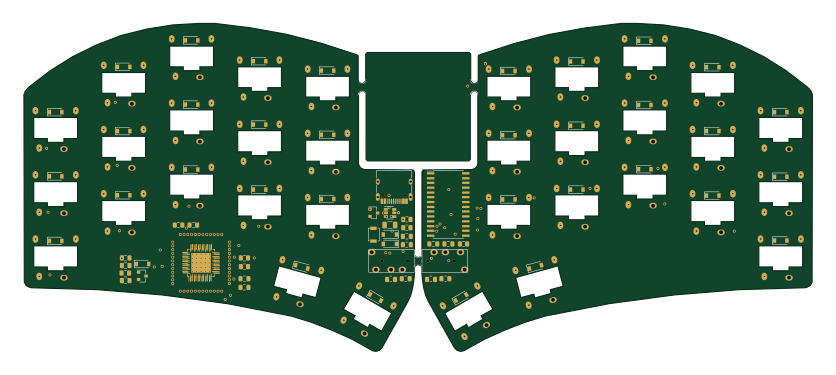 STM32
STM32Ferris
pierrechevalier83
208.8 × 86.8 mm102 parts2LSHL-2.11.3k STM32
STM32Module 16S
stuartpittaway
71.1 × 89.6 mm113 parts4LCC-BY-NC-4.01.1k STM32
STM32Djinn
tzarc
192.3 × 150.5 mm216 parts2LCERN-OHL-S-2.0988 STM32
STM32Ghoul
228.6 × 79.4 mm163 parts2LCERN-OHL-S-2.0988