
Arduino-Ornament

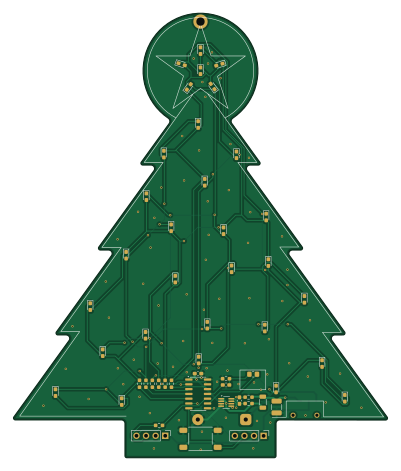
About the Arduino-Ornament PCB
Arduino-Ornament is an open source AVR/Arduino PCB design by madcow4242, published on GitHub. It is a 2-layer board measuring 99 × 117.7 mm, with 53 components from 17 distinct parts.
Its main chip is the ATtiny414-SS, from the AVR/Arduino family. Other key parts include the INA190A3IDDFR. By type, the board carries 30 diodes, 11 resistors, 4 capacitors, 2 ICs, 2 connectors and 2 switches.
It belongs with the wearables, displays & leds and power & battery designs in this gallery.
From the project
Arduino ATTiny414 (814/1614/424/824/1624/3224) powered 30-LED programmable Christmas Ornament (or badge, etc.)
A custom LED Christmas ornament with advent calendar functionality, built using Arduino and KiCad. This project can easily be adapted to other formats such as a badge by changing the PCB layout.
This project is organized into three main directories:
The PCB layout can be easily customized with your own text, or into a different physical format or size (like a badge) using KiCad - however if modifying the layout you'll have to re-route the board as well of course. I chose to put the control electronics on the front of the board (to be geeky), but they could easily be moved to the back to…
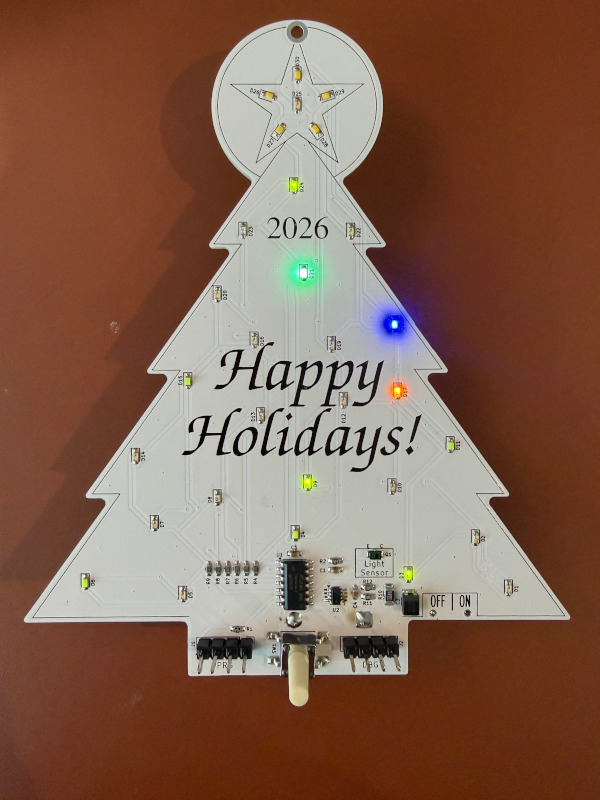
Main components on the Arduino-Ornament
Arduino-Ornament bill of materials (BOM)
53 components, 17 distinct parts — part numbers from the project's BOM.
| Qty | Part | Footprint | Refs |
|---|---|---|---|
| 1 | ATtiny414-SS | SOIC-14_3.9x8.7mm_P1.27mm | U1 |
| 1 | INA190A3IDDFR | SOT-23-8_Handsoldering | U2 |
| 1 | TEMT6200FX01 | R_0805_2012Metric_Pad1.20x1.40mm_HandSolder | Q1 |
| 2 | CONN_01X04_PIN Conn_01x04_Pin | PinHeader_1x04_P2.54mm_Vertical | J1, J2 |
| 1 | Battery_Cell | BatteryHolder_Keystone_2479_3xAAA-NoHoles | BT1 |
| 1 | SW_Push | SW_Push_1P1T_NO_E-Switch_TL3301NxxxxxG | SW1 |
| 1 | SW_SPDT | CSS1210TB | SW2 |
| 30 | LED | LED_0603_1608Metric_Pad1.05x0.95mm_HandSolder | D1, D2, D3, D4, D5, D6, D7, D8 +22 |
| 1 | C10NF C10nF | C_0603_1608Metric_Pad1.08x0.95mm_HandSolder | C1 |
| 1 | C220uF or 470uF low-ESR Polymer or Tantalum | C_1210_3225Metric_Pad1.33x2.70mm_HandSolder | C3 |
| 1 | C1NF C1nF | C_0603_1608Metric_Pad1.08x0.95mm_HandSolder | C4 |
| 1 | C1UF C1uF | C_0603_1608Metric_Pad1.08x0.95mm_HandSolder | C5 |
| 1 | R4.7K R4.7k | R_0603_1608Metric_Pad0.98x0.95mm_HandSolder | R1 |
| 1 | R10K R10k | R_0603_1608Metric_Pad0.98x0.95mm_HandSolder | R2 |
| 6 | R82 | R_0603_1608Metric_Pad0.98x0.95mm_HandSolder | R4, R5, R6, R7, R8, R9 |
| 1 | R1 | R_1206_3216Metric | R10 |
| 2 | R100 | R_0603_1608Metric_Pad0.98x0.95mm_HandSolder | R11, R12 |
Arduino-Ornament design files
The KiCad project lives in the madcow4242/Arduino-Ornament repository on GitHub; these links point at the commit this page was built from.
Arduino-Ornament: common questions
What microcontroller does the Arduino-Ornament use?
The Arduino-Ornament is built around the ATtiny414-SS, from the AVR/Arduino family.
How big is the Arduino-Ornament PCB?
The Arduino-Ornament measures 99 × 117.7 mm, has 2 copper layers and is 1.6 mm thick.
How many components are on the Arduino-Ornament?
53 components, from 17 distinct parts, with part numbers taken from the project's own BOM. The full bill of materials is listed on this page.
Where can I download the Arduino-Ornament design files?
From the madcow4242/Arduino-Ornament repository on GitHub, which has the KiCad layout, the schematic and the BOM; the links under Design files point to each one.
Can I use the Arduino-Ornament design in my own project?
The repository has no license, so all rights stay with madcow4242. Use it as a reference, and ask the author before reusing the design.
Can I test firmware for the Arduino-Ornament without the hardware?
Yes. HardLabs builds a simulation of the board from its netlist and BOM, so you can run and debug AVR/Arduino firmware against it before you order a PCB.
Similar boards
 AVR/Arduino
Magspoof
samyk
35 × 29 mm11 parts2LNo license4.2k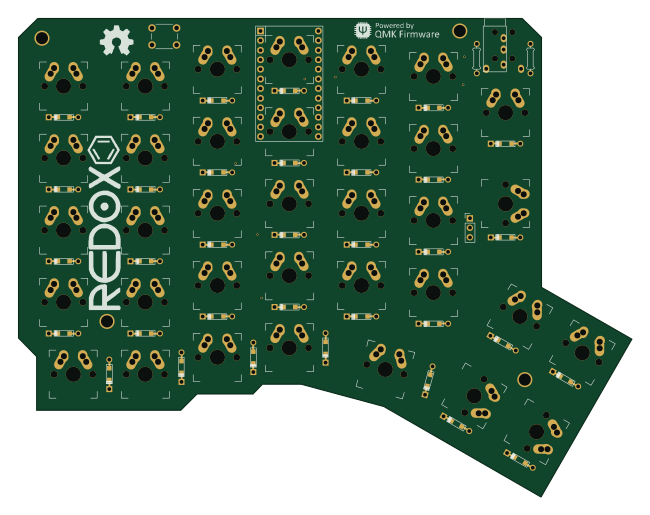 AVR/Arduino
Redox keyboard
mattdibi
162.2 × 126.5 mm77 parts2LMIT2.0k AVR/Arduino
Labrador
espotek-org
36.8 × 34.7 mm75 parts2LNo license1.2k AVR/Arduino
ModuleV450
stuartpittaway
30 × 61.4 mm39 parts2LCC-BY-NC-4.01.1k AVR/Arduino
V4
30 × 50 mm38 parts2LCC-BY-NC-4.01.1k AVR/Arduino
Discipline
coseyfannitutti
304.9 × 122.8 mm170 parts2LCC-BY-NC-4.01.0k