
STM32TestBoard-PCB

About the STM32TestBoard-PCB
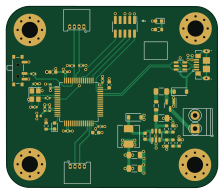
STM32TestBoard-PCB is an open source STM32 PCB design by PrincyNagara369, published on GitHub. It is a 4-layer board measuring 56 × 48 mm, with 46 components from 35 distinct parts.
Its main chip is the STM32F405RGT6, from the STM32 family. Other key parts include the USBLC6-2SC6. By type, the board carries 16 capacitors, 11 resistors, 5 connectors, 4 diodes, 3 ICs and 3 inductors.
From the project
1. Install KiCad: If you haven't already, download and install the KiCad software from the official KiCad website (https://www.kicad-pcb.org/download/).
1. Install KiCad: If you haven't already, download and install the KiCad software from the official KiCad website (https://www.kicad-pcb.org/download/).
2. Create a New Project: - Open KiCad and create a new project for your STM32 test board. - Choose a suitable project name and location.
3. Schematic Design: - Start by creating a new schematic sheet in your project. - Add components to the schematic, including the STM32 microcontroller, power supply components, connectors, and any other peripherals you plan to include. - Connect the components by adding wires and creating appropriate nets.
Main components on the STM32TestBoard-PCB
STM32TestBoard-PCB bill of materials (BOM)
46 components, 35 distinct parts.
| Qty | Part | Footprint | Refs |
|---|---|---|---|
| 1 | ~ | SOT-23-6 | U1 |
| 1 | STM32F405RGT6 | LQFP-64_10x10mm_P0.5mm | U2 |
| 1 | USBLC6-2SC6 | SOT-23-6 | U3 |
| 1 | AO3401A | SOT-23 | Q1 |
| 1 | 16MHz | Crystal_SMD_3225-4Pin_3.2x2.5mm | Y1 |
| 1 | Screw_Terminal_01x02 | TerminalBlock_Phoenix_PT-1,5-2-3.5-H_1x02_P3.50mm_Horizontal | J1 |
| 1 | SWD | PinSocket_2x05_P1.27mm_Vertical_SMD | J2 |
| 2 | Conn_01x04 | Molex_PicoBlade_53048-0410_1x04_P1.25mm_Horizontal | J3, J4 |
| 1 | USB_B_Micro | USB_Micro-B_GCT_USB3076-30-A | J5 |
| 1 | 250mA | Fuse_1206_3216Metric | F1 |
| 1 | SW_SPDT | SW_SPDT_PCM12 | SW1 |
| 2 | B5819W | D_SOD-123 | D1, D2 |
| 1 | RED | LED_0603_1608Metric | D3 |
| 1 | BLUE | LED_0603_1608Metric | D4 |
| 1 | 600 @ 600MHz | L_0805_2012Metric | FB1 |
| 1 | 10u | L_Sunlord_MWSA0518S | L1 |
| 1 | 39n | L_0402_1005Metric | L2 |
| 3 | 10u | C_1206_3216Metric | C1, C2, C3 |
| 1 | 10n | C_0603_1608Metric | C4 |
| 1 | 4u7 | C_0603_1608Metric | C5 |
Show 15 more
| Qty | Part | Footprint | Refs |
|---|---|---|---|
| 5 | 100n | C_0402_1005Metric | C6, C7, C8, C9, C10 |
| 1 | 1u | C_0402_1005Metric | C11 |
| 1 | 10n | C_0402_1005Metric | C12 |
| 2 | 2u2 | C_0603_1608Metric | C13, C14 |
| 2 | 12p | C_0402_1005Metric | C15, C16 |
| 1 | 100k | R_0603_1608Metric | R1 |
| 1 | 68k | R_0603_1608Metric | R2 |
| 1 | 47k | R_0603_1608Metric | R3 |
| 1 | 15k | R_0603_1608Metric | R4 |
| 1 | 270 | R_0603_1608Metric | R5 |
| 1 | 1k | R_0603_1608Metric | R6 |
| 1 | 10k | R_0402_1005Metric | R7 |
| 1 | 47 | R_0402_1005Metric | R8 |
| 1 | 1k5 | R_0603_1608Metric | R9 |
| 2 | 2k2 | R_0402_1005Metric | R10, R11 |
STM32TestBoard-PCB design files
The KiCad project lives in the PrincyNagara369/STM32TestBoard-PCB-KiCAD repository on GitHub; these links point at the commit this page was built from.
- LayoutSTM32F4_REV2.kicad_pcb
- SchematicSTM32F4_REV2.kicad_sch
STM32TestBoard-PCB: common questions
What microcontroller does the STM32TestBoard-PCB use?
The STM32TestBoard-PCB is built around the STM32F405RGT6, from the STM32 family.
How big is the STM32TestBoard-PCB?
The STM32TestBoard-PCB measures 56 × 48 mm, has 4 copper layers and is 1.59 mm thick.
How many components are on the STM32TestBoard-PCB?
46 components, from 35 distinct parts. The full bill of materials is listed on this page.
Where can I download the STM32TestBoard-PCB design files?
From the PrincyNagara369/STM32TestBoard-PCB-KiCAD repository on GitHub, which has the KiCad layout and the schematic; the links under Design files point to each one.
Can I use the STM32TestBoard-PCB design in my own project?
The repository has no license, so all rights stay with PrincyNagara369. Use it as a reference, and ask the author before reusing the design.
Can I test firmware for the STM32TestBoard-PCB without the hardware?
Yes. HardLabs builds a simulation of the board from its netlist and BOM, so you can run and debug STM32 firmware against it before you order a PCB.
Similar boards
 STM32
STM32LumenPnP Motherboard
opulo-inc
149 × 95 mm296 parts4LCC-BY-SA-4.03.7k STM32
STM32Type c
google
188 × 30 mm17 parts2LApache-2.02.9k STM32
STM32Main panel
234 × 84 mm26 parts4LApache-2.02.9k STM32
STM32Base
52.3 × 52.3 mm36 parts2LApache-2.02.9k STM32
STM32Type a
150 × 30 mm14 parts2LApache-2.02.9k STM32
STM32Type e
140.5 × 30 mm13 parts2LApache-2.02.9k