
Lo-Key

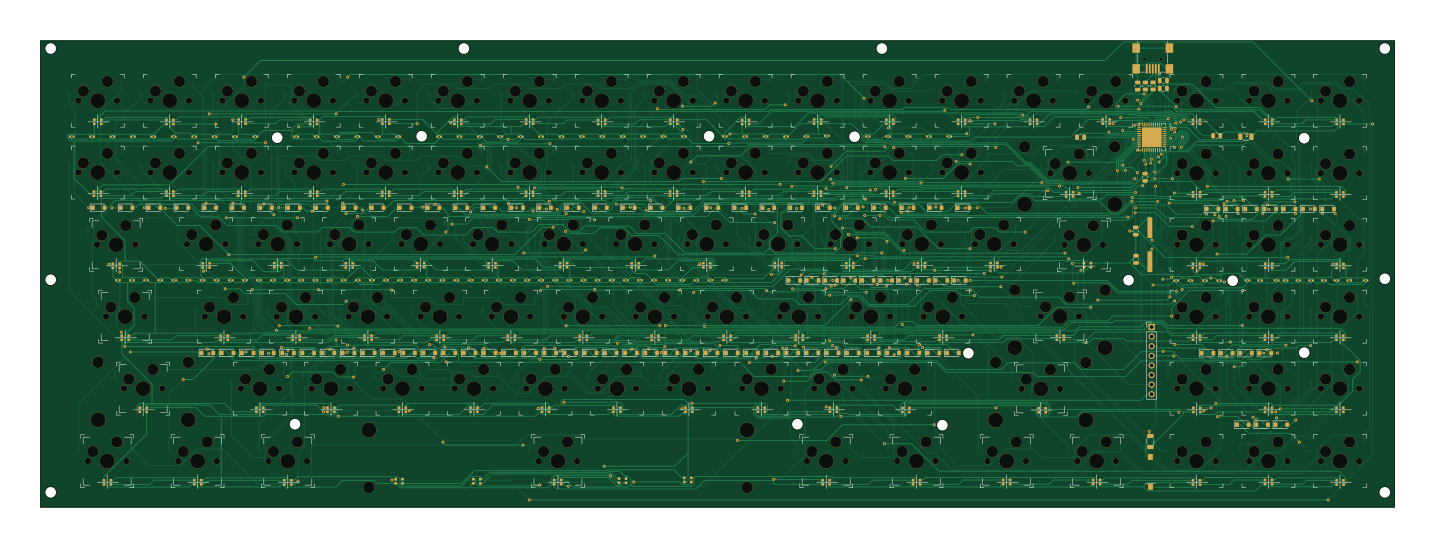
About the Lo-Key PCB
Lo-Key is an open source AVR/Arduino PCB design by chgray, published on GitHub. It is a 2-layer board measuring 358.3 × 123.4 mm, with 401 components from 107 distinct parts.
Its main chip is the ATmega32U4-MU, from the AVR/Arduino family. By type, the board carries 192 diodes, 106 capacitors, 79 switches, 4 resistors, 2 connectors and 1 IC.
It belongs with the keyboards designs in this gallery.
From the project
Dropping Areay for custom keyboard
https://github.com/freerouting/freerouting
https://caniusevia.com/docs/specification/
qmk c2json -km default -kb handwired/ckey -o foo.json ./keyboards/handwired/ckey/keymaps/default/keymap.c
- to make the BOM load eeschema and then do the button ("generate bill of material") BOM -> bom2csv you're looking for chgray-keyboard.csv A) Change Reference to "Designator" B) Change Datasheet to "JLCPCB Part #" C) Value to Comment
Main components on the Lo-Key
Lo-Key bill of materials (BOM)
401 components, 107 distinct parts.
| Qty | Part | Footprint | Refs |
|---|---|---|---|
| 1 | ATmega32U4-MU | QFN-44-1EP_7x7mm_P0.5mm_EP5.2x5.2mm | U1 |
| 1 | Crystal | JLC_PCB_C111377 | Y1 |
| 1 | Conn_01x07_Female | PinHeader_1x08_P2.54mm_Vertical | J1 |
| 1 | USB_B_Mini | USB_Mini-B_Wuerth_65100516121_Horizontal | J2 |
| 1 | 59 | Stabilizer_MX_2u | Backspace1 |
| 1 | 20 | Stabilizer_MX_1.75u | CAPS1 |
| 1 | 011 | Stabilizer_MX_2.25u | ENTER1 |
| 1 | 31 | Stabilizer_MX_2.25u | LEFT-SHIFT1 |
| 1 | 44 | Kailh_socket_MX | LEFT-SPACE1 |
| 1 | 43 | Kailh_socket_MX | LEFT_ALT1 |
| 1 | 40 | Stabilizer_MX_1.25u | LEFT_CTRL1 |
| 1 | 41 | Stabilizer_MX_1.25u | LEFT_FN1 |
| 1 | 55 | Stabilizer_MX_2.75u | RIGHT-SHIFT1 |
| 1 | 65 | Kailh_socket_MX | RIGHT-SHIFT2 |
| 1 | 47 | Stabilizer_MX_1.25u | RIGHT-SPACE1 |
| 1 | 311 | Stabilizer_MX_1.25u | RightMeta1 |
| 1 | 012 | Kailh_socket_MX | S1 |
| 1 | 013 | Kailh_socket_MX | S2 |
| 1 | 30 | Kailh_socket_MX | SW1 |
| 1 | 50 | Kailh_socket_MX | SW2 |
Show 87 more
| Qty | Part | Footprint | Refs |
|---|---|---|---|
| 1 | 60 | Kailh_socket_MX | SW3 |
| 1 | 00 | Kailh_socket_MX | SW4 |
| 1 | 01 | Kailh_socket_MX | SW5 |
| 1 | 11 | Kailh_socket_MX | SW6 |
| 1 | 21 | Kailh_socket_MX | SW7 |
| 1 | 51 | Kailh_socket_MX | SW8 |
| 1 | 61 | Kailh_socket_MX | SW9 |
| 1 | 22 | Kailh_socket_MX | SW10 |
| 1 | 32 | Kailh_socket_MX | SW11 |
| 1 | 52 | Kailh_socket_MX | SW12 |
| 1 | 62 | Kailh_socket_MX | SW13 |
| 1 | 02 | Kailh_socket_MX | SW14 |
| 1 | 12 | Kailh_socket_MX | SW15 |
| 1 | 03 | Kailh_socket_MX | SW16 |
| 1 | 13 | Kailh_socket_MX | SW17 |
| 1 | 23 | Kailh_socket_MX | SW18 |
| 1 | 33 | Kailh_socket_MX | SW19 |
| 1 | 53 | Kailh_socket_MX | SW20 |
| 1 | 63 | Kailh_socket_MX | SW21 |
| 1 | 24 | Kailh_socket_MX | SW22 |
| 1 | 34 | Kailh_socket_MX | SW23 |
| 1 | 54 | Kailh_socket_MX | SW24 |
| 1 | 64 | Kailh_socket_MX | SW25 |
| 1 | 04 | Kailh_socket_MX | SW26 |
| 1 | 14 | Kailh_socket_MX | SW27 |
| 1 | 05 | Kailh_socket_MX | SW28 |
| 1 | 15 | Kailh_socket_MX | SW29 |
| 1 | 25 | Kailh_socket_MX | SW30 |
| 1 | 35 | Kailh_socket_MX | SW31 |
| 1 | 45 | Kailh_socket_MX | SW32 |
| 1 | 26 | Kailh_socket_MX | SW33 |
| 1 | 36 | Kailh_socket_MX | SW34 |
| 1 | 46 | Kailh_socket_MX | SW35 |
| 1 | 56 | Kailh_socket_MX | SW36 |
| 1 | 66 | Kailh_socket_MX | SW37 |
| 1 | 06 | Kailh_socket_MX | SW38 |
| 1 | 16 | Kailh_socket_MX | SW39 |
| 1 | 07 | Kailh_socket_MX | SW40 |
| 1 | 17 | Kailh_socket_MX | SW41 |
| 1 | 27 | Kailh_socket_MX | SW42 |
| 1 | 37 | Kailh_socket_MX | SW43 |
| 1 | 57 | Kailh_socket_MX | SW44 |
| 1 | 67 | Kailh_socket_MX | SW45 |
| 1 | 28 | Kailh_socket_MX | SW46 |
| 1 | 38 | Kailh_socket_MX | SW47 |
| 1 | 48 | Stabilizer_MX_1.25u | SW48 |
| 1 | 58 | Kailh_socket_MX | SW49 |
| 1 | 68 | Kailh_socket_MX | SW50 |
| 1 | 08 | Kailh_socket_MX | SW51 |
| 1 | 18 | Kailh_socket_MX | SW52 |
| 1 | 09 | Kailh_socket_MX | SW53 |
| 1 | 19 | Kailh_socket_MX | SW54 |
| 1 | 29 | Kailh_socket_MX | SW55 |
| 1 | 39 | Kailh_socket_MX | SW56 |
| 1 | 49 | CHERRY_PCB_625H | SW57 |
| 1 | 69 | Stabilizer_MX_1.25u | SW58 |
| 1 | 010 | Kailh_socket_MX | SW59 |
| 1 | 110 | Kailh_socket_MX | SW60 |
| 1 | 210 | Kailh_socket_MX | SW61 |
| 1 | 310 | Kailh_socket_MX | SW62 |
| 1 | 410 | Kailh_socket_MX | SW63 |
| 1 | 510 | Kailh_socket_MX | SW64 |
| 1 | 211 | Kailh_socket_MX | SW65 |
| 1 | 411 | Kailh_socket_MX | SW66 |
| 2 | 511 | Kailh_socket_MX | SW67, SW77 |
| 1 | 112 | Kailh_socket_MX | SW68 |
| 1 | 212 | Kailh_socket_MX | SW69 |
| 1 | 312 | Kailh_socket_MX | SW70 |
| 1 | 412 | Kailh_socket_MX | SW71 |
| 1 | 512 | Kailh_socket_MX | SW72 |
| 1 | 113 | Kailh_socket_MX | SW73 |
| 1 | 213 | Kailh_socket_MX | SW74 |
| 1 | 313 | Kailh_socket_MX | SW75 |
| 1 | 413 | Kailh_socket_MX | SW76 |
| 1 | SW_Push | SW_SPST_JLC_PCB_C520860 | SW_RESET1 |
| 1 | 111 | Stabilizer_MX_1.5u | Slash1 |
| 1 | 10 | Stabilizer_MX_1.5u | TAB1 |
| 1 | 42 | Stabilizer_MX_1.25u | WinKey1 |
| 94 | DIODE | D_SOD-123FL | D1, D2, D3, D4, D5, D6, D7, D8 +86 |
| 98 | LED | LED_WS2812-2020 | D95, D96, D97, D98, D99, D100, D101, D102 +90 |
| 98 | C104 0.1uF 100nF | C_0402_1005Metric | C1, C2, C3, C4, C5, C6, C7, C8 +90 |
| 4 | 0.1u | C_0805_2012Metric | C102, C103, C104, C105 |
| 1 | 10u | C_0805_2012Metric | C106 |
| 2 | 22p | C_0805_2012Metric | C107, C108 |
| 1 | 1u | C_0805_2012Metric | C109 |
| 2 | R10k | R_1206_3216Metric | R1, R4 |
| 2 | 22R | R_0805_2012Metric | R2, R3 |
Lo-Key design files
The KiCad project lives in the chgray/LG-Yeet-Keyboard repository on GitHub; these links point at the commit this page was built from.
Lo-Key: common questions
What microcontroller does the Lo-Key use?
The Lo-Key is built around the ATmega32U4-MU, from the AVR/Arduino family.
How big is the Lo-Key PCB?
The Lo-Key measures 358.3 × 123.4 mm, has 2 copper layers and is 1.6 mm thick.
How many components are on the Lo-Key?
401 components, from 107 distinct parts. The full bill of materials is listed on this page.
Where can I download the Lo-Key design files?
From the chgray/LG-Yeet-Keyboard repository on GitHub, which has the KiCad layout; the links under Design files point to each one.
Can I use the Lo-Key design in my own project?
The repository has no license, so all rights stay with chgray. Use it as a reference, and ask the author before reusing the design.
Can I test firmware for the Lo-Key without the hardware?
Yes. HardLabs builds a simulation of the board from its netlist and BOM, so you can run and debug AVR/Arduino firmware against it before you order a PCB.
Similar boards
 AVR/Arduino
Magspoof
samyk
35 × 29 mm11 parts2LNo license4.2k AVR/Arduino
Redox keyboard
mattdibi
162.2 × 126.5 mm77 parts2LMIT2.0k AVR/Arduino
Labrador
espotek-org
36.8 × 34.7 mm75 parts2LNo license1.2k AVR/Arduino
V4
stuartpittaway
30 × 50 mm38 parts2LCC-BY-NC-4.01.1k AVR/Arduino
ModuleV450
30 × 61.4 mm39 parts2LCC-BY-NC-4.01.1k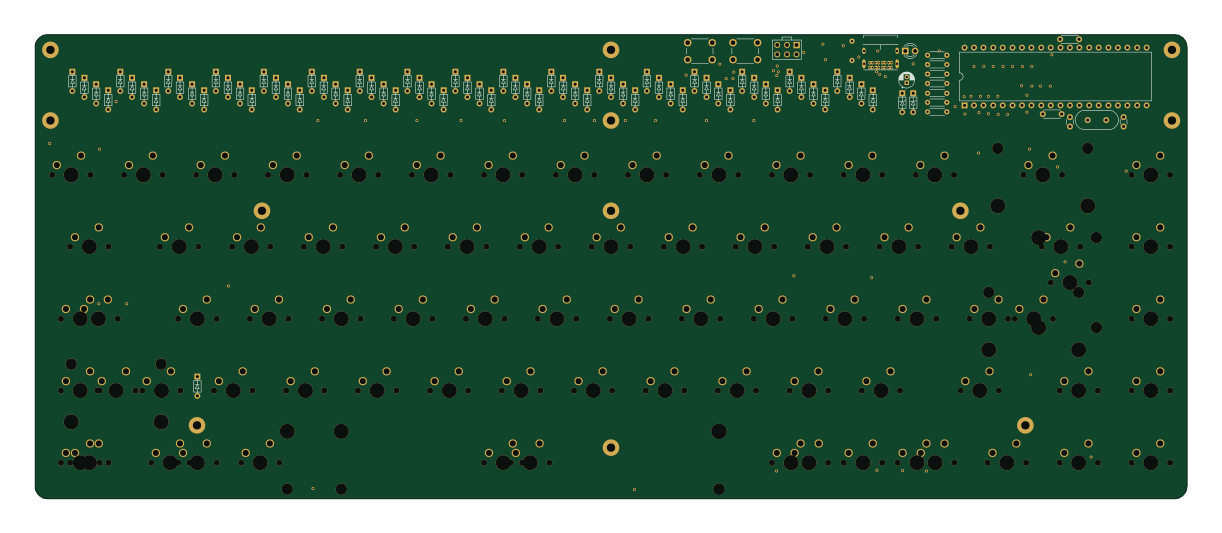 AVR/Arduino
Discipline
coseyfannitutti
304.9 × 122.8 mm170 parts2LCC-BY-NC-4.01.0k