
Profile emulator

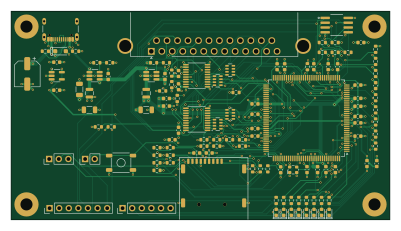
About the Profile emulator PCB
Profile emulator is an open source FPGA PCB design by JorjBauer, published on GitHub under the MIT license. It is a 4-layer board measuring 100 × 55 mm, with 123 components from 47 distinct parts.
Its main chip is the Lattice LFE5U-12F-6TG144C, from the FPGA family. Other key parts include the TI SN74LVC245APWR, Winbond W25Q128JVSIQ, TI TPS62A01APDDCR and TI TLV73325PDBVR. By type, the board carries 56 resistors, 39 capacitors, 9 diodes, 7 ICs, 7 connectors and 3 inductors.
From the project
This is the FPGA version of the drive. It answers the ProFile's DB-25 protocol and serves blocks from an SD card, on a ULX3S or on the r2 board in hw-r2/. The top-level README has the backstory and says where to start; this is the technical notebook.
This is the FPGA version of the drive. It answers the ProFile's DB-25 protocol and serves blocks from an SD card, on a ULX3S or on the r2 board in hw-r2/. The top-level README has the backstory and says where to start; this is the technical notebook.
PROTOCOL.md and HARDWARE.md below are the ones in profile-dumper.
Format the card FAT32, put your images in a directory called HD, and then create /profile.cfg in the root of the card by hand, with any text editor and any non-zero-length content, so the drive can remember its state.
Main components on the Profile emulator
Profile emulator bill of materials (BOM)
123 components, 47 distinct parts — part numbers from the project's BOM.
| Qty | Part | Footprint | Refs |
|---|---|---|---|
| 1 | Lattice LFE5U-12F-6TG144C LFE5U-12F-6TG144C | TQFP-144_20x20mm_P0.5mm | U1 |
| 1 | TI SN74LVC245APWR 74LVC245A DATA | TSSOP-20_4.4x6.5mm_P0.65mm | U2 |
| 1 | TI SN74LVC245APWR 74LVC245A CTRL-IN | TSSOP-20_4.4x6.5mm_P0.65mm | U3 |
| 1 | Winbond W25Q128JVSIQ W25Q128JVSIQ | SOIC-8_Dual_150-208mil_P1.27mm | U4 |
| 1 | TI TPS62A01APDDCR TPS62A01A 1V1 | SOT-23-6_Handsoldering | U5 |
| 1 | TI TPS62A01APDDCR TPS62A01A 3V3 | SOT-23-6_Handsoldering | U6 |
| 1 | TI TLV73325PDBVR TLV73325PDBV 2V5 | SOT-23-5_HandSoldering | U7 |
| 1 | ECS ECS-2520MV-250-BN-TR 25MHz XO 2520 3V3 | Oscillator_SMD_ECS_2520MV-xxx-xx-4Pin_2.5x2.0mm | X1 |
| 1 | GCT USB4105-GF-A USB-C 16p | USB_C_Receptacle_GCT_USB4105-xx-A_16P_TopMnt_Horizontal | J1 |
| 1 | NorComp 182-025-213R561 | DSUB-25_Female_Horizontal_NorComp_182-025-213R561 | J2 |
| 1 | GCT MEM2075-00-140-01-A microSD MEM2075 | microSD_GCT_MEM2075 | J3 |
| 1 | JTAG 1x6 | PinHeader_1x06_P2.54mm_Vertical | J4 |
| 1 | console UART 1x3 | PinHeader_1x03_P2.54mm_Vertical | J5 |
| 1 | flash service 1x7 | PinHeader_1x07_P2.54mm_Vertical | J6 |
| 1 | PROGRAMN button header (optional) | PinHeader_1x02_P2.54mm_Vertical | J7 |
| 1 | Same Sky TS18-5-15-SL-260-SMT-TR PROGRAMN button | SW_Push_SameSky_TS18-5 | SW1 |
| 1 | C2286 LED0 | LED_0603_1608Metric | D1 |
| 1 | C2286 LED1 | LED_0603_1608Metric | D2 |
| 1 | C2286 LED2 | LED_0603_1608Metric | D3 |
| 1 | C2286 LED3 | LED_0603_1608Metric | D4 |
Show 27 more
| Qty | Part | Footprint | Refs |
|---|---|---|---|
| 1 | C2286 LED4 | LED_0603_1608Metric | D5 |
| 1 | C2286 LED5 | LED_0603_1608Metric | D6 |
| 1 | C2286 LED6 | LED_0603_1608Metric | D7 |
| 1 | C2286 LED7 | LED_0603_1608Metric | D8 |
| 1 | Littelfuse SMF5.0A SMF5.0A | D_SOD-123F | D9 |
| 1 | Murata BLM18PG121SN1D 120R@100M | L_0603_1608Metric | FB1 |
| 2 | Murata DFE252012F-1R0M=P2 1u0 | L_Murata_DFE252012F | L1, L2 |
| 9 | Murata GRM188R61E106MA73D 10u | C_0603_1608Metric | C1, C7, C9, C18, C19, C33, C34, C38 +1 |
| 3 | Samsung CL31A226KAHNNNE 22u | C_1206_3216Metric | C2, C3, C4 |
| 24 | Samsung CL10B104KO8NNNC 100n | C_0603_1608Metric | C5, C6, C8, C11, C12, C13, C14, C15 +16 |
| 2 | Samsung CL10B105KA8NNNC 1u | C_0603_1608Metric | C10, C37 |
| 1 | Panasonic EEE-FK1C101P 100u | CP_Elec_6.3x5.8 | C40 |
| 3 | Yageo RC0603FR-07220RL 220R | R_0603_1608Metric | R1, R2, R3 |
| 2 | Yageo RC0603FR-072K2L 2k2 | R_0603_1608Metric | R4, R53 |
| 6 | Yageo RC0603FR-07100KL 100k | R_0603_1608Metric | R5, R32, R49, R50, R51, R52 |
| 10 | Yageo RC0603FR-0710KL 10k | R_0603_1608Metric | R6, R7, R8, R13, R27, R28, R44, R45 +2 |
| 4 | Yageo RC0603FR-0733RL 33R | R_0603_1608Metric | R9, R10, R11, R12 |
| 1 | Yageo RC0603FR-0747KL 47k | R_0603_1608Metric | R14 |
| 9 | Yageo RC0603FR-074K7L 4k7 | R_0603_1608Metric | R16, R17, R18, R19, R20, R21, R22, R23 +1 |
| 9 | Yageo RC0603FR-071KL 1k | R_0603_1608Metric | R25, R35, R36, R37, R38, R39, R40, R41 +1 |
| 1 | Yageo RC0603FR-0722RL 22R | R_0603_1608Metric | R26 |
| 2 | Yageo RC0603FR-075K1L 5k1 | R_0603_1608Metric | R29, R30 |
| 1 | Yageo RC0603FR-0784K5L 84.5k | R_0603_1608Metric | R31 |
| 1 | Yageo RC0603FR-07274KL 274k | R_0603_1608Metric | R33 |
| 1 | Yageo RC0603FR-0760K4L 60k4 | R_0603_1608Metric | R34 |
| 2 | Yageo RC0603FR-07100RL 100R | R_0603_1608Metric | R43, R48 |
| 4 | Yageo YC164-FR-0747RL 47R | R_Array_Convex_4x0603_Yageo_YC164 | RN1, RN2, RN3, RN4 |
Profile emulator design files
The KiCad project lives in the JorjBauer/profile-emulator repository on GitHub; these links point at the commit this page was built from.
Profile emulator: common questions
What microcontroller does the Profile emulator use?
The Profile emulator is built around the Lattice LFE5U-12F-6TG144C, from the FPGA family.
How big is the Profile emulator PCB?
The Profile emulator measures 100 × 55 mm, has 4 copper layers and is 1.6 mm thick.
How many components are on the Profile emulator?
123 components, from 47 distinct parts, with part numbers taken from the project's own BOM. The full bill of materials is listed on this page.
Where can I download the Profile emulator design files?
From the JorjBauer/profile-emulator repository on GitHub, which has the KiCad layout, the schematic and the BOM; the links under Design files point to each one.
Can I use the Profile emulator design in my own project?
Yes, under the terms of its MIT license, which JorjBauer chose for the repository.
Can I test firmware for the Profile emulator without the hardware?
Yes. HardLabs builds a simulation of the board from its netlist and BOM, so you can run and debug FPGA firmware against it before you order a PCB.
Similar boards
 FPGA
Base board
GlasgowEmbedded
80 × 49 mm222 parts4L0BSD2.2k FPGA
Thunderscope Rev5.3
EEVengers
122.5 × 103.5 mm817 parts6LMIT1.3k FPGA
Usb sniffer
ataradov
58.2 × 38.1 mm86 parts2LBSD-3-Clause1.3k FPGA
Tomu, I'm
theacodes
13 × 9.4 mm40 parts4LMIT1.1k FPGA
Icepi zero
cheyao
65 × 30 mm143 parts4LSHL-2.1865 FPGA
Gcvideo
ikorb
49 × 30 mm44 parts4LNo license765