
ARviewer

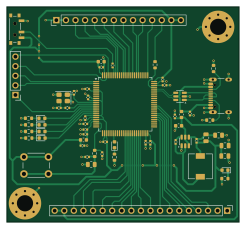
About the ARviewer PCB
ARviewer is an open source STM32 PCB design by mcbearfish, published on GitHub. It is a 2-layer board measuring 61.5 × 57 mm, with 59 components from 34 distinct parts.
Its main chip is the C92002, from the STM32 family. Other key parts include the C1883519 and C7519. By type, the board carries 25 capacitors, 15 resistors, 6 diodes, 4 connectors, 3 ICs and 3 inductors.
It belongs with the sensors and displays & leds designs in this gallery.
From the project
If you stumble across this project feel free to use it for educational purposes. If you find errors or have questions about the circuit design or code feel free to reach out. Please cite this repository as a source if you plan to use it.
If you stumble across this project feel free to use it for educational purposes. If you find errors or have questions about the circuit design or code feel free to reach out. Please cite this repository as a source if you plan to use it.
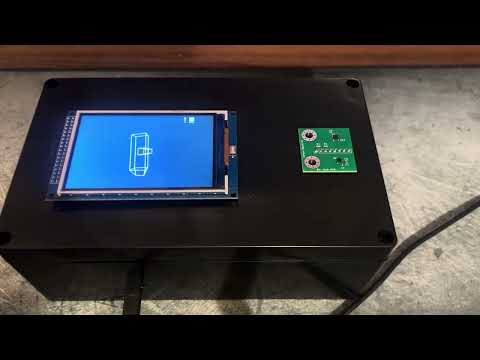
When placed on a flat surface, the device on startup will create a window into a 3D scene of a hammer (Boiler Up and Hail Purdue!). After startup, tilting and rotating the device updates the view of a 3D hammer while the virtual position remains anchored.
Main components on the ARviewer
ARviewer bill of materials (BOM)
59 components, 34 distinct parts — part numbers from the project's BOM.
| Qty | Part | Footprint | Refs |
|---|---|---|---|
| 1 | C92002 STM32F429VIT6 | LQFP-100_14x14mm_P0.5mm | U1 |
| 1 | C1883519 AP62300TWU-7 | TSOT-23-6 | U2 |
| 1 | C7519 USBLC6-2SC6 | SOT-23-6 | U3 |
| 1 | C9006 25MHz | Crystal_SMD_3225-4Pin_3.2x2.5mm | Y1 |
| 1 | Conn_01x14 | PinHeader_1x14_P2.54mm_Vertical | J1 |
| 1 | C3020560 USB_C_Receptacle_USB2.0_16P | USB_C_Receptacle_GCT_USB4105-xx-A_16P_TopMnt_Horizontal | J2 |
| 1 | Conn_01x19 | PinHeader_1x19_P2.54mm_Vertical | J3 |
| 1 | Conn_01x05 | PinHeader_1x05_P2.54mm_Vertical | J4 |
| 1 | C557623 SW_Push | SW_PUSH_6mm | SW1 |
| 1 | C221841 SW_SPDT | SW_SPDT_PCM12 | SW2 |
| 2 | C2286 GREEN | LED_0603_1608Metric | D1, D6 |
| 1 | C2286 ORANGE | LED_0603_1608Metric | D2 |
| 1 | C2286 BLUE | LED_0603_1608Metric | D3 |
| 1 | C2286 YELLOW | LED_0603_1608Metric | D4 |
| 1 | C2286 RED | LED_0603_1608Metric | D5 |
| 2 | C14709 120R | L_0603_1608Metric | FB1, FB2 |
| 1 | C206311 3.3u | L_6.3x6.3_H3 | L1 |
| 2 | C19702 10u | C_0603_1608Metric | C1, C19 |
| 13 | C1525 100n | C_0402_1005Metric | C2, C3, C4, C5, C6, C8, C10, C11 +5 |
| 2 | C12530 2u2 | C_0402_1005Metric | C7, C9 |
Show 14 more
| Qty | Part | Footprint | Refs |
|---|---|---|---|
| 1 | C15195 10n | C_0402_1005Metric | C12 |
| 2 | C52923 1u | C_0402_1005Metric | C13, C14 |
| 2 | C458857 14pF | C_0402_1005Metric | C16, C18 |
| 1 | C32949 10p | C_0402_1005Metric | C21 |
| 2 | C45783 22u | C_0805_2012Metric | C24, C25 |
| 1 | C149504 100k | R_0805_2012Metric | R1 |
| 1 | C21190 1k | R_0603_1608Metric | R2 |
| 1 | C159027 450 | R_0402_1005Metric | R3 |
| 6 | C22843 1k5 | R_0603_1608Metric | R4, R5, R6, R8, R9, R15 |
| 1 | C25744 10k | R_0402_1005Metric | R7 |
| 1 | C23345 22 | R_0603_1608Metric | R10 |
| 2 | C23186 5k1 | R_0603_1608Metric | R11, R12 |
| 1 | C37252 33k2 | R_0805_2012Metric | R13 |
| 1 | C17414 10k | R_0805_2012Metric | R14 |
ARviewer design files
The KiCad project lives in the mcbearfish/Mini-3D-Window-Viewer repository on GitHub; these links point at the commit this page was built from.
ARviewer: common questions
What microcontroller does the ARviewer use?
The ARviewer is built around the C92002, from the STM32 family.
How big is the ARviewer PCB?
The ARviewer measures 61.5 × 57 mm, has 2 copper layers and is 1.6 mm thick.
How many components are on the ARviewer?
59 components, from 34 distinct parts, with part numbers taken from the project's own BOM. The full bill of materials is listed on this page.
Where can I download the ARviewer design files?
From the mcbearfish/Mini-3D-Window-Viewer repository on GitHub, which has the KiCad layout, the schematic and the BOM; the links under Design files point to each one.
Can I use the ARviewer design in my own project?
The repository has no license, so all rights stay with mcbearfish. Use it as a reference, and ask the author before reusing the design.
Can I test firmware for the ARviewer without the hardware?
Yes. HardLabs builds a simulation of the board from its netlist and BOM, so you can run and debug STM32 firmware against it before you order a PCB.
More boards in Mini-3D-Window-Viewer
Similar boards
 STM32
STM32LumenPnP Motherboard
opulo-inc
149 × 95 mm296 parts4LCC-BY-SA-4.03.7k STM32
STM32AxxSolder
AxxAxx
39 × 82.5 mm122 parts2LGPL-3.01.7k STM32
STM32AIOC
skuep
21 × 31.5 mm47 parts2LMIT1.4k STM32
STM32Ferris
pierrechevalier83
208.8 × 86.8 mm102 parts2LSHL-2.11.3k STM32
STM32176 pin board
rusefi
61.8 × 73.2 mm76 parts2LGPL-3.01.2k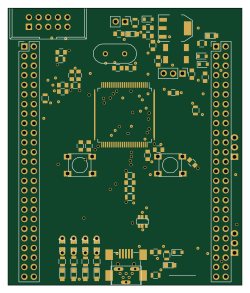 STM32
STM32Brain board STM32F407
61.8 × 73.2 mm69 parts2LGPL-3.01.2k