
SparkFun Red Vision Touch Display for RedBoard

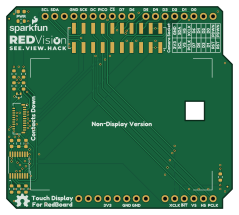
About the SparkFun Red Vision Touch Display for RedBoard PCB
SparkFun Red Vision Touch Display for RedBoard is an open source AVR/Arduino PCB design by sparkfun, published on GitHub under the MIT license. It is a 4-layer board measuring 59.7 × 53.3 mm, with 26 components from 19 distinct parts.
Its main chip is the Arduino_Uno_R3_Shield, from the AVR/Arduino family. Other key parts include the 2" LCD-TFT 240x320 and PCA9534PW. By type, the board carries 11 resistors, 7 jumpers, 2 ICs, 2 connectors, 1 transistor and 1 diode.
It belongs with the displays & leds designs in this gallery.
From the project
Transform your RP2350 RedBoard into a standalone machine-vision platform with this 2.0-inch capacitive touch display, featuring built-in support for the Red Vision Camera and OpenCV.
The SparkFun Red Vision Kit for RedBoard comes with the Red Vision Touch Display for RedBoard and Red Vision Camera Board - HM01B0 (Color) to add machine vision capabilities to the RedBoard IoT - RP2350. This kit comes with everything you need to quickly and easily add a camera and touchscreen display to your RedBoard IoT - RP2350 with no soldering required. Using the SparkFun MicroPython Red Vision code package, a MicroPython port of the popular OpenCV image processing library, you can add live image processing as well as advanced features such as object and contour detection.
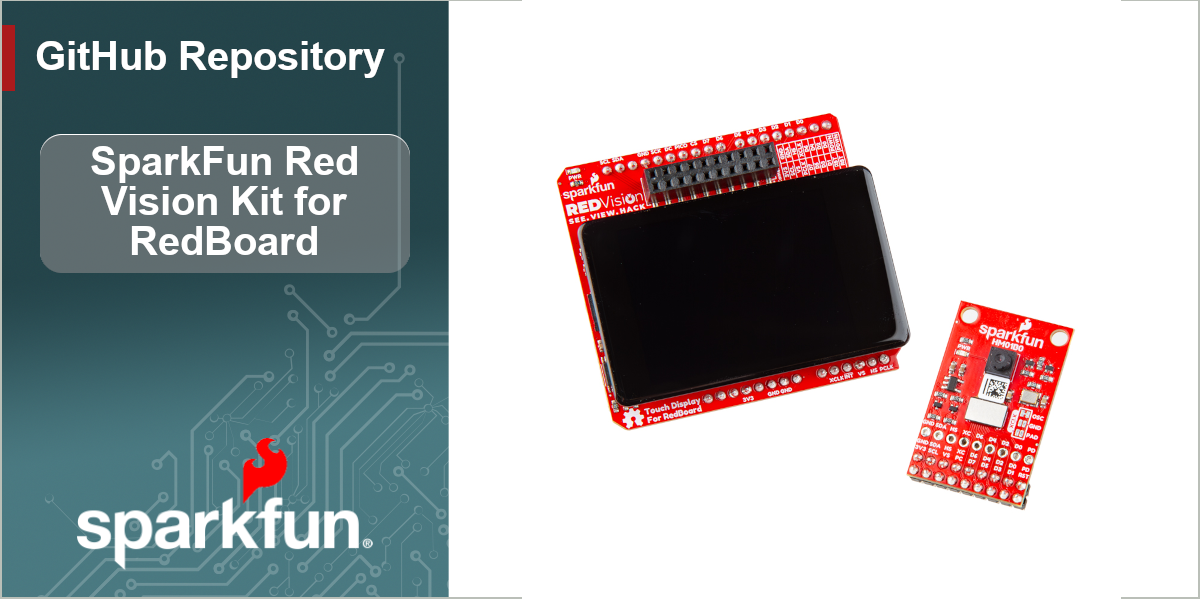
Main components on the SparkFun Red Vision Touch Display for RedBoard
SparkFun Red Vision Touch Display for RedBoard bill of materials (BOM)
26 components, 19 distinct parts.
| Qty | Part | Footprint | Refs |
|---|---|---|---|
| 1 | 2" LCD-TFT 240x320 | LCD_TFT_2.0in_Waveshare_Outline | U1 |
| 1 | PCA9534PW | TSSOP-16_4.4x5mm_P0.65mm | U2 |
| 1 | RE1C002UNTCL | SC-89 SOT-490 | Q1 |
| 1 | Conn_02x10_2.54mm_SMD | 2x10_P2.54mm_Socket_Vertical_SMD | J1 |
| 1 | Conn_01x21_FPC | FPC_1x21_P0.3mm_Horizontal_DualContact | J4 |
| 1 | Arduino_Uno_R3_Shield | Uno_R3_Shield_NoLabels | B1 |
| 1 | I2C | Jumper_3_NC-2_Trace | JP1 |
| 1 | XCLK | Jumper_2_NO | JP13 |
| 1 | A0 | Jumper_2_NO | JP14 |
| 1 | A1 | Jumper_2_NO | JP15 |
| 1 | A2 | Jumper_2_NO | JP16 |
| 1 | PWR | Jumper_2_NC_Trace | JP21 |
| 1 | ~{INT} | Jumper_2_NO | JP22 |
| 1 | Red | LED_0603_1608Metric_Red | D1 |
| 1 | 0.1uF | C_0603_1608Metric | C2 |
| 1 | 10 | R_0603_1608Metric | R1 |
| 7 | 100k | R_0603_1608Metric | R2, R6, R7, R8, R9, R11, R12 |
| 2 | 2.2k | R_0603_1608Metric | R3, R4 |
| 1 | 4.7k | R_0603_1608Metric | R5 |
SparkFun Red Vision Touch Display for RedBoard design files
The KiCad project lives in the sparkfun/SparkFun_Red_Vision_Kit_for_RedBoard repository on GitHub; these links point at the commit this page was built from.
SparkFun Red Vision Touch Display for RedBoard: common questions
What microcontroller does the SparkFun Red Vision Touch Display for RedBoard use?
The SparkFun Red Vision Touch Display for RedBoard is built around the Arduino_Uno_R3_Shield, from the AVR/Arduino family.
How big is the SparkFun Red Vision Touch Display for RedBoard PCB?
The SparkFun Red Vision Touch Display for RedBoard measures 59.7 × 53.3 mm, has 4 copper layers and is 1.6 mm thick.
How many components are on the SparkFun Red Vision Touch Display for RedBoard?
26 components, from 19 distinct parts. The full bill of materials is listed on this page.
Where can I download the SparkFun Red Vision Touch Display for RedBoard design files?
From the sparkfun/SparkFun_Red_Vision_Kit_for_RedBoard repository on GitHub, which has the KiCad layout and the schematic; the links under Design files point to each one.
Can I use the SparkFun Red Vision Touch Display for RedBoard design in my own project?
Yes, under the terms of its MIT license, which sparkfun chose for the repository.
Can I test firmware for the SparkFun Red Vision Touch Display for RedBoard without the hardware?
Yes. HardLabs builds a simulation of the board from its netlist and BOM, so you can run and debug AVR/Arduino firmware against it before you order a PCB.
More boards in SparkFun_Red_Vision_Kit_for_RedBoard
Similar boards
 AVR/Arduino
Magspoof
samyk
35 × 29 mm11 parts2LNo license4.2k AVR/Arduino
Redox keyboard
mattdibi
162.2 × 126.5 mm77 parts2LMIT2.0k AVR/Arduino
Labrador
espotek-org
36.8 × 34.7 mm75 parts2LNo license1.2k AVR/Arduino
ModuleV450
stuartpittaway
30 × 61.4 mm39 parts2LCC-BY-NC-4.01.1k AVR/Arduino
V4
30 × 50 mm38 parts2LCC-BY-NC-4.01.1k AVR/Arduino
Discipline
coseyfannitutti
304.9 × 122.8 mm170 parts2LCC-BY-NC-4.01.0k