
Keyboardinator

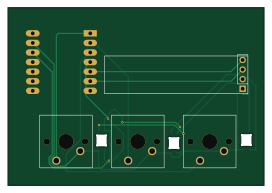
About the Keyboardinator PCB
Keyboardinator is an open source PCB design by Tei-Pancake, published on GitHub. It is a 2-layer board measuring 67.9 × 47.1 mm, with 8 components from 4 distinct parts.
Other key parts include the MOUDLE-SEEEDUINO-XIAO. By type, the board carries 3 switches, 3 diodes, 1 IC and 1 connector.
It belongs with the keyboards and displays & leds designs in this gallery.
From the project
Welcome to the Keyboardinator repository.
Welcome to the Keyboardinator repository.
The Keyboardinator is a small 3-key macropad I made because apparently having a normal keyboard wasn't enough. It's built around a XIAO RP2040, three mechanical switches, and a tiny OLED screen.
The idea is pretty simple: three keys, three shortcuts, and hopefully a little less clicking around.
Key 1 — Work Simulator: Win + D Makes the desktop appear. Very useful. Definitely not suspicious. Key 2 — History Cleaner: Ctrl + W Closes the current browser tab. Key 3 — Security Lock: Win + L Locks the computer.
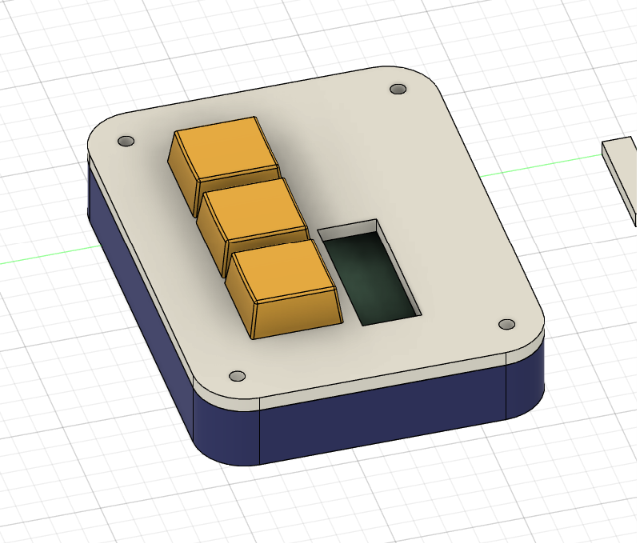
Main components on the Keyboardinator
Keyboardinator bill of materials (BOM)
8 components, 4 distinct parts.
| Qty | Part | Footprint | Refs |
|---|---|---|---|
| 1 | MOUDLE-SEEEDUINO-XIAO | XIAO-Generic-Hybrid-14P-2.54-21X17.8MM | U1 |
| 1 | Conn_01x04_Pin | PinHeader_1x04_P2.54mm_Vertical | J1 |
| 3 | SW_Push | SW_Cherry_MX_1.00u_PCB | SW1, SW2, SW3 |
| 3 | SK6812MINI-E | SK6812MINI-E_fixed | D1, D2, D3 |
Keyboardinator design files
The KiCad project lives in the Tei-Pancake/Keyboardinator repository on GitHub; these links point at the commit this page was built from.
- LayoutPCB/Teclado3Teclas.kicad_pcb
- SchematicPCB/Teclado3Teclas.kicad_sch
Keyboardinator: common questions
How big is the Keyboardinator PCB?
The Keyboardinator measures 67.9 × 47.1 mm, has 2 copper layers and is 1.6 mm thick.
How many components are on the Keyboardinator?
8 components, from 4 distinct parts. The full bill of materials is listed on this page.
Where can I download the Keyboardinator design files?
From the Tei-Pancake/Keyboardinator repository on GitHub, which has the KiCad layout and the schematic; the links under Design files point to each one.
Can I use the Keyboardinator design in my own project?
The repository has no license, so all rights stay with Tei-Pancake. Use it as a reference, and ask the author before reusing the design.
Similar boards
View base
scottbez1
81.2 × 81.2 mm81 parts2LApache-2.022.2k
BM28B0.6-24DSBreakout
15.2 × 35.6 mm3 parts2LApache-2.022.2k
View screen
35 × 35 mm12 parts2LApache-2.022.2k
LevelShifterBreakout
15.2 × 20.3 mm5 parts2LApache-2.022.2k
Anyon e motherboard
byrantech
133 × 92 mm258 parts6LMIT4.3k
Switch
18.5 × 11.1 mm5 parts2LMIT4.3k