
Comscicalc hil tester

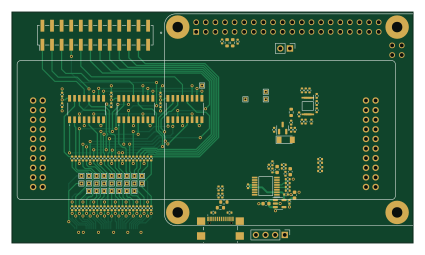
About the Comscicalc hil tester PCB
Comscicalc hil tester is an open source Raspberry Pi PCB design by oskarvh, published on GitHub. It is a 4-layer board measuring 106 × 61 mm, with 116 components from 42 distinct parts.
Its main chip is the RASPBERRY_PI_3_MODEL_B_, from the Raspberry Pi family. Other key parts include the ADC088S022CIMTX/NOPB, 74HC4052D,653, LM358ADGKR, USBLC6-2SC6 and TLV70033_SOT23-5. By type, the board carries 87 resistors, 13 capacitors, 8 ICs, 6 connectors, 1 transistor and 1 diode.
From the project
Code for the computer scientists calculator
The computer scientist calculator is a modern take on the HP 16C. It was born out of frustration of the terrible windows calculator, and since it's aimed at EE's, it also has to have hardware.
The software is in a semi-stable phase at the moment. The core of the calculator, the software/comSciCalc_lib has had the ground work made. Fluffy features such as doxygen and clang formatter has been added as well.
Main components on the Comscicalc hil tester
Comscicalc hil tester bill of materials (BOM)
116 components, 42 distinct parts — part numbers from the project's BOM.
| Qty | Part | Footprint | Refs |
|---|---|---|---|
| 1 | ADC088S022CIMTX/NOPB ADC088S022CIMTX_NOPB | SOP65P640X120-16N | IC1 |
| 3 | 74HC4052D,653 | 74HC4052D653 | IC2, IC3, IC4 |
| 1 | LM358ADGKR | SOP65P490X110-8N | IC5 |
| 1 | USBLC6-2SC6 MCP23017_SS | SSOP-28_5.3x10.2mm_P0.65mm | U1 |
| 1 | TLV70033_SOT23-5 | SOT-23-5 | U2 |
| 1 | RASPBERRY_PI_3_MODEL_B_ | MODULE_RASPBERRY_PI_3_MODEL_B_ | U3 |
| 1 | DMG2301L | SOT-23 | Q1 |
| 1 | CONN_02X14_ODD_EVEN comscicalc_tester | tester_footprint | J1 |
| 1 | 4-1734839-0 | 4-1734839-0 | J2 |
| 1 | USB4110-GF-A Conn_02x12_Odd_Even | PinHeader_2x12_P2.54mm_Vertical_SMD | J3 |
| 1 | 4-1734839-0 Conn_01x04_Male | PinHeader_1x04_P2.54mm_Vertical | J4 |
| 1 | Conn_01x02_Male | PinHeader_1x02_P2.54mm_Vertical | J5 |
| 1 | USB4110-GF-A | USB4110GFA | J6 |
| 1 | NSR0240P2T5G BZV55B2V7 | D_MiniMELF | D1 |
| 2 | 100NF 1uF | C_0603_1608Metric | C3, C5 |
| 2 | 100NF 100nF | C_0402_1005Metric | C4, C6 |
| 1 | 22PF DNM | C_0603_1608Metric | C7 |
| 1 | 100NF DNM | C_0603_1608Metric | C8 |
| 3 | 100NF 10nF | C_0402_1005Metric | C9, C10, C11 |
| 1 | 10UF 100nF | C_0402_1005Metric | C12 |
Show 22 more
| Qty | Part | Footprint | Refs |
|---|---|---|---|
| 2 | 22UF 100nF | C_0402_1005Metric | C13, C15 |
| 1 | 1UF 100nF | C_0402_1005Metric | C14 |
| 9 | DNM 33R | R_0402_1005Metric | R1, R2, R9, R10, R11, R12, R13, R23 +1 |
| 3 | C174180 33R | R_0402_1005Metric | R3, R7, R22 |
| 6 | 10K 33R | R_0402_1005Metric | R4, R6, R8, R17, R21, R49 |
| 14 | 33R | R_0402_1005Metric | R5, R19, R20, R51, R52, R53, R54, R55 +6 |
| 2 | 5.1K 33R | R_0402_1005Metric | R14, R18 |
| 1 | 22R 33R | R_0402_1005Metric | R15 |
| 1 | 33.2K 33R | R_0402_1005Metric | R16 |
| 1 | 10K 0R | R_0402_1005Metric | R24 |
| 5 | 33R 50k | R_0402_1005Metric | R25, R26, R31, R32, R34 |
| 5 | 33R 0R | R_0402_1005Metric | R27, R28, R29, R33, R36 |
| 2 | 33R 5k | R_0402_1005Metric | R35, R38 |
| 1 | C174180 50k | R_0402_1005Metric | R37 |
| 10 | 33R | R_0402_1005Metric | R39, R40, R41, R42, R43, R44, R45, R46 +2 |
| 4 | DNM | R_0603_1608Metric | R62, R65, R71, R74 |
| 7 | 0R | R_0402_1005Metric | R63, R64, R72, R73, R83, R87, R88 |
| 2 | 5.1k | R_0402_1005Metric | R66, R75 |
| 1 | 1R0 1% | R_0603_1608Metric | R67 |
| 8 | DNM | R_0402_1005Metric | R68, R69, R70, R81, R82, R84, R85, R86 |
| 1 | 1k | R_0402_1005Metric | R76 |
| 4 | 10k | R_0402_1005Metric | R77, R78, R79, R80 |
Comscicalc hil tester design files
The KiCad project lives in the oskarvh/ComSciCalculator repository on GitHub; these links point at the commit this page was built from.
Comscicalc hil tester: common questions
What microcontroller does the Comscicalc hil tester use?
The Comscicalc hil tester is built around the RASPBERRY_PI_3_MODEL_B_, from the Raspberry Pi family.
How big is the Comscicalc hil tester PCB?
The Comscicalc hil tester measures 106 × 61 mm, has 4 copper layers and is 4.69 mm thick.
How many components are on the Comscicalc hil tester?
116 components, from 42 distinct parts, with part numbers taken from the project's own BOM. The full bill of materials is listed on this page.
Where can I download the Comscicalc hil tester design files?
From the oskarvh/ComSciCalculator repository on GitHub, which has the KiCad layout, the schematic and the BOM; the links under Design files point to each one.
Can I use the Comscicalc hil tester design in my own project?
The repository has no license, so all rights stay with oskarvh. Use it as a reference, and ask the author before reusing the design.
Can I test firmware for the Comscicalc hil tester without the hardware?
Yes. HardLabs builds a simulation of the board from its netlist and BOM, so you can run and debug Raspberry Pi firmware against it before you order a PCB.
More boards in ComSciCalculator
Similar boards
 Raspberry Pi
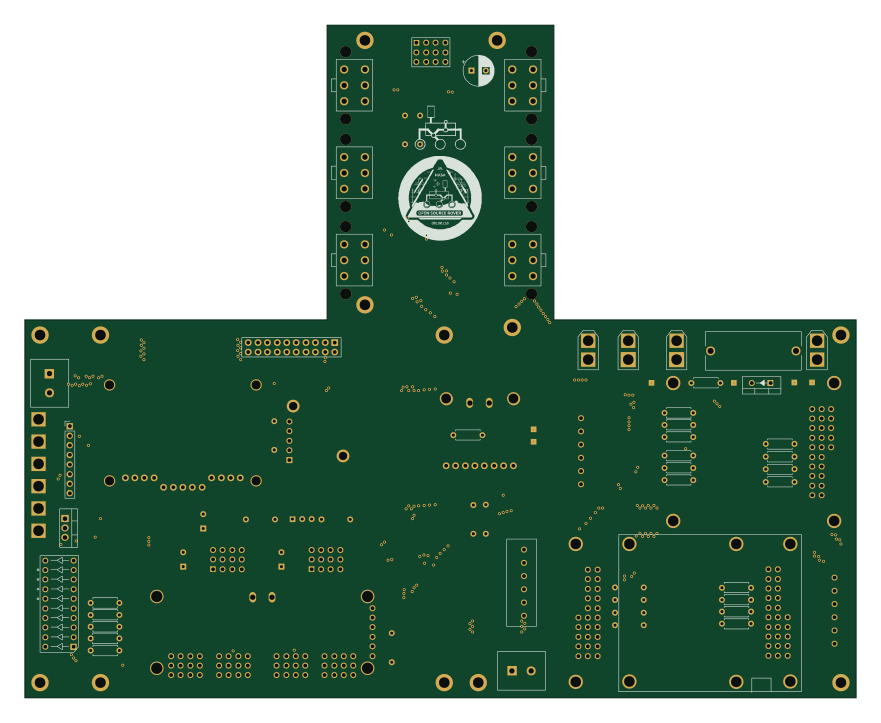
Open source rover
nasa-jpl
220 × 178 mm144 parts2LApache-2.09.7k Raspberry Pi
Iot
dotnet
56 × 65 mm24 parts2LMIT2.4k Raspberry Pi
SPIRIT
SPIRIT-org
82 × 155 mm130 parts6LCERN-OHL-S-2.01.3k Raspberry Pi
CM5RevEng
schlae
55 × 40 mm417 parts10LNo license1.0k Raspberry Pi
Haxo hw
cardonabits
102.4 × 211.3 mm38 parts2LCustom license672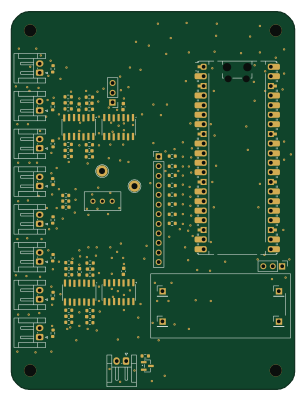 Raspberry Pi
Phased
Neumi
75 × 100 mm71 parts2LNo license507