
RetroARDUInput

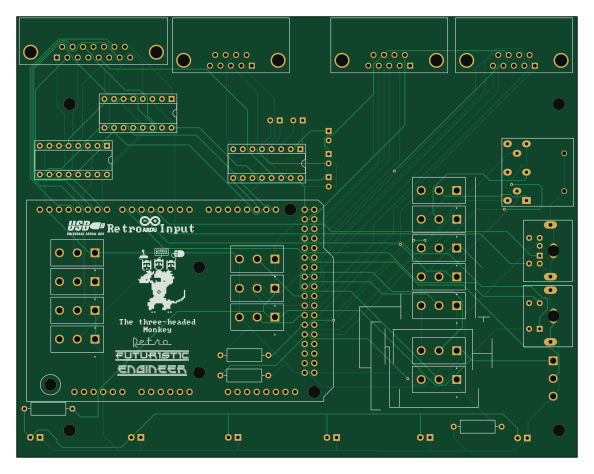
About the RetroARDUInput PCB
RetroARDUInput is an open source AVR/Arduino PCB design by RetroFuturisticEngineer, published on GitHub under the LGPL-2.1 license. It is a 2-layer board measuring 148.3 × 116.6 mm, with 37 components from 11 distinct parts.
Its main chip is the Arduino Mega2560+USB Host Shield, from the AVR/Arduino family. Other key parts include the MAX232 and DS18030-100+. By type, the board carries 15 switches, 6 LEDs, 5 capacitors, 4 connectors, 4 resistors and 3 ICs.
It belongs with the retro computing and keyboards designs in this gallery.
From the project
Use USB Keyboards, Mice and Joysticks on PC/XT, PC/AT, Tandy 1000, Atari, Amiga, C64 and Apple
All KiCAD files if you want to modify the project for yourself, e.g., sparing out ports you do not need and so making the PCB smaller (but then, you also need to make a new case)
Gerber package for direct submission to PCB manufacturer in the Gerber folder
Main components on the RetroARDUInput
RetroARDUInput bill of materials (BOM)
37 components, 11 distinct parts.
| Qty | Part | Footprint | Refs |
|---|---|---|---|
| 1 | MAX232 | DIP-16_W7.62mm_Socket | IC1 |
| 2 | DS18030-100+ | DIP-16_W7.62mm_Socket | IC2, IC3 |
| 1 | Arduino Mega2560+USB Host Shield | Arduino_Mega2560_Shield_Reduced | CN0 |
| 1 | 8-Pin DIN | DIN8-270Print | CN5 |
| 1 | Conn_01x07_Female | Connector_Mini-DIN_Female_6Pin_2rows | CN6 |
| 1 | Conn_01x05_Female | Connector_Mini-DIN_Female_4Pin_2rows | CN7 |
| 15 | Switch 1xOn-On | CS12ANW03 | SW1, SW2, SW3, SW4, SW5, SW6, SW7, SW8 +7 |
| 6 | LED | LED_D5.0mm | LED1, LED2, LED3, LED4, LED5, LED6 |
| 5 | 10μF 50V | CP_Radial_D5.0mm_P2.50mm | C1, C2, C3, C4, C5 |
| 3 | 10kOHM | R_Axial_DIN0309_L9.0mm_D3.2mm_P12.70mm_Horizontal | R1, R2, R3 |
| 1 | >=10 OHM | R_Axial_DIN0309_L9.0mm_D3.2mm_P12.70mm_Horizontal | R4 |
RetroARDUInput design files
The KiCad project lives in the RetroFuturisticEngineer/RetroARDUInput repository on GitHub; these links point at the commit this page was built from.
RetroARDUInput: common questions
What microcontroller does the RetroARDUInput use?
The RetroARDUInput is built around the Arduino Mega2560+USB Host Shield, from the AVR/Arduino family.
How big is the RetroARDUInput PCB?
The RetroARDUInput measures 148.3 × 116.6 mm, has 2 copper layers and is 1.6 mm thick.
How many components are on the RetroARDUInput?
37 components, from 11 distinct parts. The full bill of materials is listed on this page.
Where can I download the RetroARDUInput design files?
From the RetroFuturisticEngineer/RetroARDUInput repository on GitHub, which has the KiCad layout; the links under Design files point to each one.
Can I use the RetroARDUInput design in my own project?
Yes, under the terms of its LGPL-2.1 license, which RetroFuturisticEngineer chose for the repository.
Can I test firmware for the RetroARDUInput without the hardware?
Yes. HardLabs builds a simulation of the board from its netlist and BOM, so you can run and debug AVR/Arduino firmware against it before you order a PCB.
Similar boards
 AVR/Arduino
Magspoof
samyk
35 × 29 mm11 parts2LNo license4.2k AVR/Arduino
Redox keyboard
mattdibi
162.2 × 126.5 mm77 parts2LMIT2.0k AVR/Arduino
Labrador
espotek-org
36.8 × 34.7 mm75 parts2LNo license1.2k AVR/Arduino
V4
stuartpittaway
30 × 50 mm38 parts2LCC-BY-NC-4.01.1k AVR/Arduino
ModuleV450
30 × 61.4 mm39 parts2LCC-BY-NC-4.01.1k AVR/Arduino
Discipline
coseyfannitutti
304.9 × 122.8 mm170 parts2LCC-BY-NC-4.01.0k