
Help

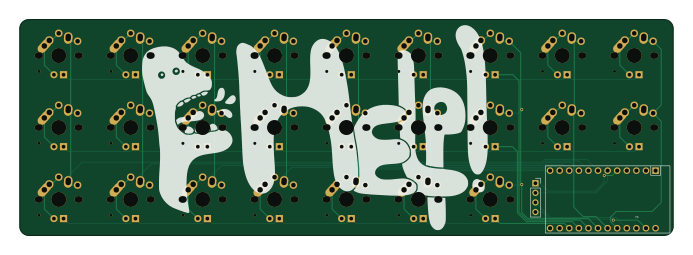
About the Help PCB
Help is an open source AVR/Arduino PCB design by rqcoon, published on GitHub under the MIT license. It is a 2-layer board measuring 173 × 57.2 mm, with 27 components from 3 distinct parts.
Its main chip is the ProMicro, from the AVR/Arduino family. By type, the board carries 25 switches, 1 IC and 1 connector.
It belongs with the keyboards and displays & leds designs in this gallery.
From the project
Help! 25 Key Keyboard
The Help! is a 9x3 ortholinear pro micro based keyboard. It has support for an SSD1306 OLED display that sits above the pro micro à la corne.

Main components on the Help
Help bill of materials (BOM)
27 components, 3 distinct parts.
| Qty | Part | Footprint | Refs |
|---|---|---|---|
| 1 | ProMicro | ArduinoProMicro | U1 |
| 1 | OLED | PinSocket_1x04_P2.54mm_Vertical | J1 |
| 25 | MX | MX-Alps-Choc-1U | SW1, SW2, SW3, SW4, SW5, SW6, SW7, SW8 +17 |
Help design files
The KiCad project lives in the rqcoon/Help repository on GitHub; these links point at the commit this page was built from.
- Layouthelp.kicad_pcb
- Schematichelp.kicad_sch
Help: common questions
What microcontroller does the Help use?
The Help is built around the ProMicro, from the AVR/Arduino family.
How big is the Help PCB?
The Help measures 173 × 57.2 mm, has 2 copper layers and is 1.6 mm thick.
How many components are on the Help?
27 components, from 3 distinct parts. The full bill of materials is listed on this page.
Where can I download the Help design files?
From the rqcoon/Help repository on GitHub, which has the KiCad layout and the schematic; the links under Design files point to each one.
Can I use the Help design in my own project?
Yes, under the terms of its MIT license, which rqcoon chose for the repository.
Can I test firmware for the Help without the hardware?
Yes. HardLabs builds a simulation of the board from its netlist and BOM, so you can run and debug AVR/Arduino firmware against it before you order a PCB.
Similar boards
 AVR/Arduino
Redox keyboard
mattdibi
162.2 × 126.5 mm77 parts2LMIT2.0k AVR/Arduino
ModuleV450
stuartpittaway
30 × 61.4 mm39 parts2LCC-BY-NC-4.01.1k AVR/Arduino
V4
30 × 50 mm38 parts2LCC-BY-NC-4.01.1k AVR/Arduino
Discipline
coseyfannitutti
304.9 × 122.8 mm170 parts2LCC-BY-NC-4.01.0k AVR/Arduino
Megadesk
gcormier
41.7 × 32.2 mm23 parts2LGPL-3.0818 AVR/Arduino
Easyduino Atmega Nano
Hanqaqa
43.4 × 18 mm30 parts4LCERN-OHL-P-2.0746