
Coco keeb

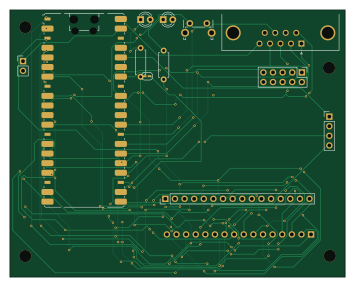
About the Coco keeb PCB
Coco keeb is an open source RP2040/RP2350 PCB design by wdathing, published on GitHub under the CERN-OHL-P-2.0 license. It is a 2-layer board measuring 88.5 × 70.5 mm, with 11 components from 8 distinct parts.
Its main chip is the Pico, from the RP2040/RP2350 family. By type, the board carries 5 connectors, 2 diodes, 2 resistors, 1 IC and 1 switch.
It belongs with the keyboards and iot & wireless designs in this gallery.
From the project
A Raspberry Pi Pico board that connects to the keyboard matrix of a TRS-80 Color Computer 3. Its 16-pin keyboard header (J1) is wired pin-for-pin to the CoCo 3 keyboard connector, so the same board can sit on either side of that connector. Which firmware you flash decides which w
A Raspberry Pi Pico board that connects to the keyboard matrix of a TRS-80 Color Computer 3. Its 16-pin keyboard header (J1) is wired pin-for-pin to the CoCo 3 keyboard connector, so the same board can sit on either side of that connector. Which firmware you flash decides which way the keystrokes go.
Both loads use the same pin assignment for the matrix (rows on GP0–GP6, columns on GP8–GP15) and share the same key layout. They are mirror images of each other: QMK reads the CoCo keyboard and sends modern keycodes, while usb-to-coco takes modern keycodes and reproduces CoCo key presses.
Main components on the Coco keeb
Coco keeb bill of materials (BOM)
11 components, 8 distinct parts — part numbers from the project's BOM.
| Qty | Part | Footprint | Refs |
|---|---|---|---|
| 1 | Pico | RaspberryPi_Pico_Common_SMD | U1 |
| 2 | CONN_01X16_PIN Conn_01x16_Pin | PinHeader_1x16_P2.54mm_Vertical | J1, J3 |
| 1 | SSD1306 I2C Display (optional) | PinHeader_1x04_P2.54mm_Vertical | J4 |
| 1 | Power In | PinHeader_1x02_P2.54mm_Vertical | J5 |
| 1 | Remote DE9 | PinHeader_2x05_P2.54mm_Vertical | J6 |
| 1 | Pairing Button | SW_Tactile_SPST_Angled_PTS645Vx39-2LFS | SW1 |
| 2 | LED | LED_D3.0mm | D1, D2 |
| 2 | 1K | R_Axial_DIN0207_L6.3mm_D2.5mm_P7.62mm_Horizontal | R1, R2 |
Coco keeb design files
The KiCad project lives in the wdathing/coco_keeb repository on GitHub; these links point at the commit this page was built from.
- LayoutCoco_pico_keyb.kicad_pcb
- SchematicCoco_pico_keyb.kicad_sch
- BOMproduction/bom.csv
Coco keeb: common questions
What microcontroller does the Coco keeb use?
The Coco keeb is built around the Pico, from the RP2040/RP2350 family.
How big is the Coco keeb PCB?
The Coco keeb measures 88.5 × 70.5 mm, has 2 copper layers and is 1.6 mm thick.
How many components are on the Coco keeb?
11 components, from 8 distinct parts, with part numbers taken from the project's own BOM. The full bill of materials is listed on this page.
Where can I download the Coco keeb design files?
From the wdathing/coco_keeb repository on GitHub, which has the KiCad layout, the schematic and the BOM; the links under Design files point to each one.
Can I use the Coco keeb design in my own project?
Yes, under the terms of its CERN-OHL-P-2.0 license, which wdathing chose for the repository.
Can I test firmware for the Coco keeb without the hardware?
Yes. HardLabs builds a simulation of the board from its netlist and BOM, so you can run and debug RP2040/RP2350 firmware against it before you order a PCB.
Similar boards
 RP2040/RP2350
OSO-BOOK-C1
joeycastillo
85 × 115 mm29 parts2LCC-BY-SA-4.08.1k RP2040/RP2350
Corne chocolate
foostan
277.2 × 107.5 mm164 parts2LCC-BY-4.07.7k RP2040/RP2350
Corne cherry
277.2 × 107.5 mm164 parts2LCC-BY-4.07.7k RP2040/RP2350
Jitx design
gusmanb
55.5 × 65 mm26 parts4LGPL-3.05.0k RP2040/RP2350
LogicAnalyzer
57 × 55.2 mm6 parts2LGPL-3.05.0k RP2040/RP2350
Main
google
98 × 71 mm102 parts2LApache-2.02.9k