
Keyboard81X

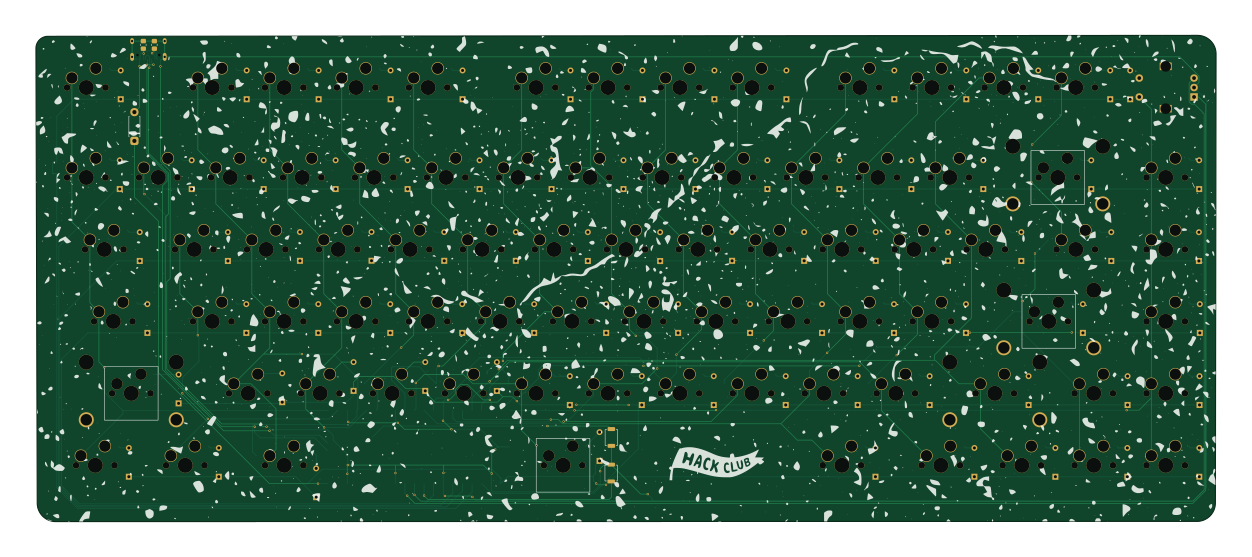
About the Keyboard81X PCB
Keyboard81X is an open source RP2040/RP2350 PCB design by XinyiC222, published on GitHub under the MIT license. It is a 2-layer board measuring 312.4 × 128.7 mm, with 173 components from 18 distinct parts.
Its main chip is the RaspberryPi_Pico, from the RP2040/RP2350 family. By type, the board carries 87 switches, 82 diodes, 2 resistors, 1 module and 1 connector.
It belongs with the keyboards designs in this gallery.
From the project
A custom 75% pcb keyboard with 81 keys, and a rotary encoder.
A custom 75% PCB keyboard with a rotary encoder and 81 keys.
- PCB was designed in KiCad using a keyswitch plugin. - If you are trying to find it here are the ones I used: - KLE Placer /Organize the keys and diodes automatically based on .json file - JLCPCB tools / used for BOM and Placement for JLC pcbs (EDIT: New version does not use JLCPCB assembly so this tool was no longer used in the final version. But this tool really do come in handy!) - Case was modeled in Fusion. ## Tools I used - Plate was generated with: - Keyboard Layout Editor: - Keycaps used in the model: - Footprint Library I…
Main components on the Keyboard81X
Keyboard81X bill of materials (BOM)
173 components, 18 distinct parts — part numbers from the project's BOM.
| Qty | Part | Footprint | Refs |
|---|---|---|---|
| 1 | RaspberryPi_Pico | RaspberryPi_Pico_SMD | A1 |
| 1 | USB_C_Receptacle_USB2.0_16P | USB_C_Receptacle_HCTL_HC-TYPE-C-16P-01A | J1 |
| 2 | MX_stab | STAB_MX_P_2u | S28, S70 |
| 2 | MX_stab | STAB_MX_P_2.25u | S57, S59 |
| 67 | MX_SW_HS | SW_MX_HS_CPG151101S11_1u | SW1, SW2, SW3, SW4, SW5, SW6, SW7, SW8 +59 |
| 1 | RotaryEncoder_Switch | Encoder_EC11_MX | SW14 |
| 2 | MX_SW_HS | SW_Hotswap_Kailh_MX_2.00u | SW28, SW57 |
| 4 | MX_SW_HS | SW_MX_HS_CPG151101S11_1.5u | SW30, SW43, SW75, SW77 |
| 2 | MX_SW_HS | SW_MX_HS_CPG151101S11_1.75u | SW45, SW70 |
| 1 | MX_SW_HS | SW_Hotswap_Kailh_MX_2.25u | SW59 |
| 3 | MX_SW_HS | SW_MX_HS_CPG151101S11_1.25u | SW73, SW74, SW78 |
| 1 | MX_SW_HS | SW_Hotswap_Kailh_MX_6.25u | SW76 |
| 1 | RST | SW_SPST_TS-1088-xR025 | SW82 |
| 1 | BOOTSEL | SW_SPST_TS-1088-xR025 | SW83 |
| 81 | D_Small | Diode_DO-35 | D1, D2, D3, D4, D5, D6, D7, D8 +73 |
| 1 | Diode | D_DO-41_SOD81_P7.62mm_Horizontal | D91 |
| 1 | R1 | R_0805_2012Metric_Pad1.20x1.40mm_HandSolder | R1 |
| 1 | R2 | R_0805_2012Metric_Pad1.20x1.40mm_HandSolder | R2 |
Keyboard81X design files
The KiCad project lives in the XinyiC222/Keyboard81X repository on GitHub; these links point at the commit this page was built from.
Keyboard81X: common questions
What microcontroller does the Keyboard81X use?
The Keyboard81X is built around the RaspberryPi_Pico, from the RP2040/RP2350 family.
How big is the Keyboard81X PCB?
The Keyboard81X measures 312.4 × 128.7 mm, has 2 copper layers and is 1.6 mm thick.
How many components are on the Keyboard81X?
173 components, from 18 distinct parts, with part numbers taken from the project's own BOM. The full bill of materials is listed on this page.
Where can I download the Keyboard81X design files?
From the XinyiC222/Keyboard81X repository on GitHub, which has the KiCad layout, the schematic and the BOM; the links under Design files point to each one.
Can I use the Keyboard81X design in my own project?
Yes, under the terms of its MIT license, which XinyiC222 chose for the repository.
Can I test firmware for the Keyboard81X without the hardware?
Yes. HardLabs builds a simulation of the board from its netlist and BOM, so you can run and debug RP2040/RP2350 firmware against it before you order a PCB.
Similar boards
 RP2040/RP2350
OSO-BOOK-C1
joeycastillo
85 × 115 mm29 parts2LCC-BY-SA-4.08.1k RP2040/RP2350
Corne chocolate
foostan
277.2 × 107.5 mm164 parts2LCC-BY-4.07.7k RP2040/RP2350
Corne cherry
277.2 × 107.5 mm164 parts2LCC-BY-4.07.7k RP2040/RP2350
Jitx design
gusmanb
55.5 × 65 mm26 parts4LGPL-3.05.0k RP2040/RP2350
LogicAnalyzer
57 × 55.2 mm6 parts2LGPL-3.05.0k RP2040/RP2350
Main
google
98 × 71 mm102 parts2LApache-2.02.9k