
Gigaboard

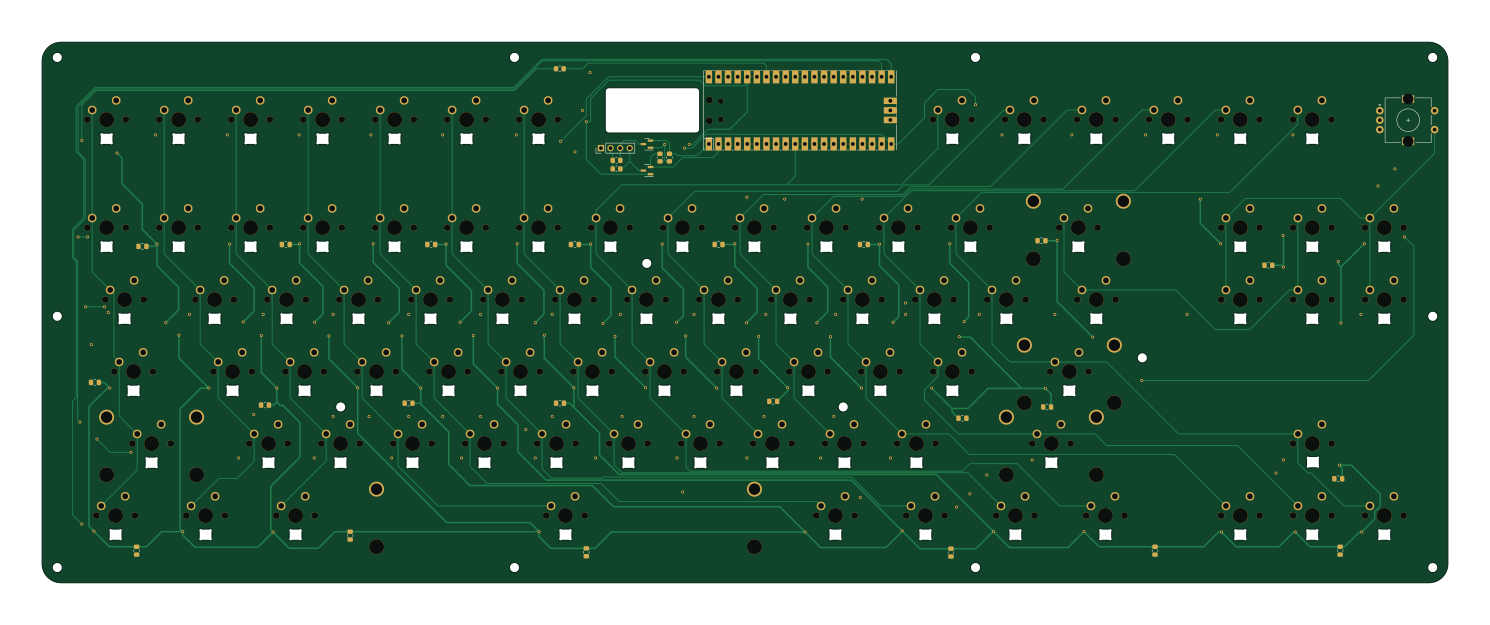
About the Gigaboard PCB
Gigaboard is an open source RP2040/RP2350 PCB design by adarshdg4567, published on GitHub under the MIT license. It is a 2-layer board measuring 372 × 143 mm, with 308 components from 98 distinct parts.
Its main chip is the Pico, from the RP2040/RP2350 family. By type, the board carries 85 diodes, 84 LEDs, 40 capacitors, 6 switches, 5 resistors and 2 transistors.
It belongs with the displays & leds and keyboards designs in this gallery.
From the project
Welcome to Gigaboard v1 a fully chaotic, DIY, tenkeyless mechanical keyboard that I built basically for vibes. Two PCBs, a bunch of parts, and me learning PCB design on the fly.
Welcome to Gigaboard v1 a fully chaotic, DIY, tenkeyless mechanical keyboard that I built basically for vibes. Two PCBs, a bunch of parts, and me learning PCB design on the fly.
Is it practical? Nah. Is it fun? Absolutely.
- Tenkeyless Layout, Standard layout, compatible with Cherry MX-style switches (I used Kailh Box Crystal Jades clicky bois) - Per-Key RGB, Reverse mounted SK6812 (Neopixel) LEDs for maximum gamer energy - 16x2 Character Display, Retro LCD, mainly for flex (TBD on actual use) - Knob (Rotary Encoder), Twist it to feel something - Powered by Raspberry Pi Pico, Because it’s…
Main components on the Gigaboard
Gigaboard bill of materials (BOM)
308 components, 98 distinct parts — part numbers from the project's BOM.
| Qty | Part | Footprint | Refs |
|---|---|---|---|
| 1 | Pico | RPi_Pico_SMD_TH | U1 |
| 2 | BSS138 | SOT-23 | Q1, Q2 |
| 1 | I2C Display | PinHeader_1x04_P2.54mm_Vertical | J1 |
| 1 | Esc | SW_MX_1u | MX1 |
| 1 | F1 | SW_MX_1u | MX2 |
| 1 | F2 | SW_MX_1u | MX3 |
| 1 | F3 | SW_MX_1u | MX4 |
| 1 | F4 | SW_MX_1u | MX5 |
| 1 | F5 | SW_MX_1u | MX6 |
| 1 | F6 | SW_MX_1u | MX7 |
| 1 | F7 | SW_MX_1u | MX9 |
| 1 | F8 | SW_MX_1u | MX10 |
| 1 | F9 | SW_MX_1u | MX11 |
| 1 | F10 | SW_MX_1u | MX12 |
| 1 | F11 | SW_MX_1u | MX13 |
| 1 | F12 | SW_MX_1u | MX14 |
| 1 | Tilde | SW_MX_1u | MX16 |
| 1 | 1 | SW_MX_1u | MX17 |
| 1 | 2 | SW_MX_1u | MX18 |
| 1 | 3 | SW_MX_1u | MX19 |
Show 78 more
| Qty | Part | Footprint | Refs |
|---|---|---|---|
| 1 | 4 | SW_MX_1u | MX20 |
| 1 | 5 | SW_MX_1u | MX21 |
| 1 | 6 | SW_MX_1u | MX22 |
| 1 | 7 | SW_MX_1u | MX23 |
| 1 | 8 | SW_MX_1u | MX24 |
| 1 | 9 | SW_MX_1u | MX25 |
| 1 | 0 | SW_MX_1u | MX26 |
| 1 | - | SW_MX_1u | MX27 |
| 1 | + | SW_MX_1u | MX28 |
| 1 | Backspace | SW_MX_1u | MX29 |
| 1 | Insert | SW_MX_1u | MX30 |
| 1 | Home | SW_MX_1u | MX31 |
| 1 | PgUp | SW_MX_1u | MX32 |
| 1 | Tab | SW_MX_1.5u | MX33 |
| 1 | Q | SW_MX_1u | MX34 |
| 1 | W | SW_MX_1u | MX35 |
| 1 | E | SW_MX_1u | MX36 |
| 1 | R | SW_MX_1u | MX37 |
| 1 | T | SW_MX_1u | MX38 |
| 1 | Y | SW_MX_1u | MX39 |
| 1 | U | SW_MX_1u | MX40 |
| 1 | I | SW_MX_1u | MX41 |
| 1 | O | SW_MX_1u | MX42 |
| 1 | P | SW_MX_1u | MX43 |
| 1 | [ | SW_MX_1u | MX44 |
| 1 | ] | SW_MX_1u | MX45 |
| 1 | \ | SW_MX_1.5u | MX46 |
| 1 | Del | SW_MX_1u | MX47 |
| 1 | End | SW_MX_1u | MX48 |
| 1 | PgDn | SW_MX_1u | MX49 |
| 1 | CapsLck | SW_MX_1.75u | MX50 |
| 1 | A | SW_MX_1u | MX51 |
| 1 | S | SW_MX_1u | MX52 |
| 1 | D | SW_MX_1u | MX53 |
| 1 | F | SW_MX_1u | MX54 |
| 1 | G | SW_MX_1u | MX55 |
| 1 | H | SW_MX_1u | MX56 |
| 1 | J | SW_MX_1u | MX57 |
| 1 | K | SW_MX_1u | MX58 |
| 1 | L | SW_MX_1u | MX59 |
| 1 | ; | SW_MX_1u | MX60 |
| 1 | ' | SW_MX_1u | MX61 |
| 1 | Enter | SW_MX_1u | MX62 |
| 1 | LShift | SW_MX_1u | MX63 |
| 1 | Z | SW_MX_1u | MX64 |
| 1 | X | SW_MX_1u | MX65 |
| 1 | C | SW_MX_1u | MX66 |
| 1 | V | SW_MX_1u | MX67 |
| 1 | B | SW_MX_1u | MX68 |
| 1 | N | SW_MX_1u | MX69 |
| 1 | M | SW_MX_1u | MX70 |
| 1 | < | SW_MX_1u | MX71 |
| 1 | > | SW_MX_1u | MX72 |
| 1 | / | SW_MX_1u | MX73 |
| 1 | RShift | SW_MX_1u | MX74 |
| 1 | ArrowUp | SW_MX_1u | MX75 |
| 1 | LCtrl | SW_MX_1.25u | MX76 |
| 1 | LWin | SW_MX_1.25u | MX77 |
| 1 | LAlt | SW_MX_1.25u | MX78 |
| 1 | Space | SW_MX_1u | MX79 |
| 1 | Alt | SW_MX_1.25u | MX80 |
| 1 | RWin | SW_MX_1.25u | MX81 |
| 1 | Menu | SW_MX_1.25u | MX82 |
| 1 | RCtrl | SW_MX_1.25u | MX83 |
| 1 | ArrowLeft | SW_MX_1u | MX84 |
| 1 | ArrowDown | SW_MX_1u | MX85 |
| 1 | ArrowRight | SW_MX_1u | MX86 |
| 1 | MX_stab_enter | STAB_MX_P_2.25u | S2 |
| 1 | MX_stab_RShift | STAB_MX_P_2.75u | S3 |
| 1 | MX_stab_LShift | STAB_MX_P_2.25u | S4 |
| 1 | MX_stab_spacebar | STAB_MX_P_6.25u | S5 |
| 1 | MX_stab_backspace | STAB_MX_P_2u | S6 |
| 1 | RotaryEncoder_Switch | RotaryEncoder_Alps_EC11E-Switch_Vertical_H20mm | SW1 |
| 84 | MX_SK6812MINI-E | LED_MX_6028R | LED1, LED2, LED3, LED4, LED5, LED6, LED7, LED8 +76 |
| 85 | — | D_SOD-123 | D1, D2, D3, D4, D5, D6, D7, D9 +77 |
| 40 | C | C_0805_2012Metric_Pad1.18x1.45mm_HandSolder | C1, C2, C3, C4, C5, C6, C7, C8 +32 |
| 1 | 300 | R_0805_2012Metric_Pad1.20x1.40mm_HandSolder | R1 |
| 4 | 10K | R_0805_2012Metric_Pad1.20x1.40mm_HandSolder | R2, R3, R4, R5 |
Gigaboard design files
The KiCad project lives in the adarshdg4567/gigaboard-v1 repository on GitHub; these links point at the commit this page was built from.
- Layoutgigaboard.kicad_pcb
- Schematicgigaboard.kicad_sch
- BOMbom.csv
Gigaboard: common questions
What microcontroller does the Gigaboard use?
The Gigaboard is built around the Pico, from the RP2040/RP2350 family.
How big is the Gigaboard PCB?
The Gigaboard measures 372 × 143 mm, has 2 copper layers and is 1.6 mm thick.
How many components are on the Gigaboard?
308 components, from 98 distinct parts, with part numbers taken from the project's own BOM. The full bill of materials is listed on this page.
Where can I download the Gigaboard design files?
From the adarshdg4567/gigaboard-v1 repository on GitHub, which has the KiCad layout, the schematic and the BOM; the links under Design files point to each one.
Can I use the Gigaboard design in my own project?
Yes, under the terms of its MIT license, which adarshdg4567 chose for the repository.
Can I test firmware for the Gigaboard without the hardware?
Yes. HardLabs builds a simulation of the board from its netlist and BOM, so you can run and debug RP2040/RP2350 firmware against it before you order a PCB.
Similar boards
 RP2040/RP2350
Open Book Abridged Edition
joeycastillo
85 × 115 mm29 parts2LCC-BY-SA-4.08.1k RP2040/RP2350
Corne
foostan
277.2 × 107.5 mm164 parts2LCC-BY-4.07.7k RP2040/RP2350
Corne
277.2 × 107.5 mm164 parts2LCC-BY-4.07.7k RP2040/RP2350
Jitx design
gusmanb
55.5 × 65 mm26 parts4LGPL-3.05.0k RP2040/RP2350
LogicAnalyzer
57 × 55.2 mm6 parts2LGPL-3.05.0k RP2040/RP2350
Main
google
98 × 71 mm102 parts2LApache-2.02.9k