
Micromouse

About the Micromouse PCB
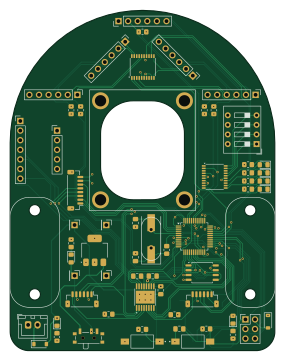
Micromouse is an open source STM32 PCB design by Andy46, published on GitHub. It is a 4-layer board measuring 70 × 90 mm, with 61 components from 39 distinct parts.
Its main chip is the STM32F103CBTx, from the STM32 family. Other key parts include the DRV8833PWP, AMS1117-3.3, PCF8574TS and W25Q32JVSS. By type, the board carries 17 connectors, 17 resistors, 9 diodes, 6 ICs, 6 capacitors and 4 switches.
It belongs with the robotics & motion designs in this gallery.
From the project
Repository to host the PCB design of the micromouse robot
Main components on the Micromouse
Micromouse bill of materials (BOM)
61 components, 39 distinct parts.
| Qty | Part | Footprint | Refs |
|---|---|---|---|
| 1 | STM32F103CBTx | LQFP-48_7x7mm_P0.5mm | U1 |
| 1 | DRV8833PWP | HTSSOP-16-1EP_4.4x5mm_P0.65mm_EP3.4x5mm_Mask2.46x2.31mm_ThermalVias | U2 |
| 1 | AMS1117-3.3 | SOT-223-3_TabPin2 | U3 |
| 2 | PCF8574TS | SSOP-20_4.4x6.5mm_P0.65mm | U4, U5 |
| 1 | W25Q32JVSS | SOIC-8_5.23x5.23mm_P1.27mm | U6 |
| 1 | Crystal (8MHz) | Crystal_SMD_HC49-SD | Y1 |
| 1 | Crystal (8MHz) | Crystal_HC49-4H_Vertical | Y2 |
| 1 | TOF_LEFT | PinHeader_1x06_P2.54mm_Vertical | J1 |
| 1 | TOF_FRONTLEFT | PinHeader_1x06_P2.54mm_Vertical | J2 |
| 1 | TOF_FRONTRIGHT | PinHeader_1x06_P2.54mm_Vertical | J3 |
| 1 | TOF_RIGHT | PinHeader_1x06_P2.54mm_Vertical | J4 |
| 1 | BatteryConnector | JST_XH_B2B-XH-A_1x02_P2.50mm_Vertical | J5 |
| 1 | PMW3360_Conn | JST_SH_BM08B-SRSS-TB_1x08-1MP_P1.00mm_Vertical | J6 |
| 1 | Bluetooth_Conn | PinHeader_1x06_P2.54mm_Vertical | J7 |
| 1 | Programming_Conn | PinHeader_2x03_P2.54mm_Vertical | J8 |
| 1 | MotorA_Conn | JST_SH_BM06B-SRSS-TB_1x06-1MP_P1.00mm_Vertical | J9 |
| 1 | MotorB_Conn | JST_SH_BM06B-SRSS-TB_1x06-1MP_P1.00mm_Vertical | J10 |
| 1 | BMI_ConnB | PinHeader_1x07_P2.54mm_Vertical | J11 |
| 1 | BMI_ConnA | PinHeader_1x05_P2.54mm_Vertical | J12 |
| 1 | StepDown_{In+} | PinHeader_1x01_P2.54mm_Vertical | J13 |
Show 19 more
| Qty | Part | Footprint | Refs |
|---|---|---|---|
| 1 | StepDown_{In-} | PinHeader_1x01_P2.54mm_Vertical | J14 |
| 1 | StepDown_{Out+} | PinHeader_1x01_P2.54mm_Vertical | J15 |
| 1 | StepDown_{Out-} | PinHeader_1x01_P2.54mm_Vertical | J16 |
| 1 | Micro_SD_Card_Det1 | microSD_HC_Hirose_DM3D-SF | J18 |
| 1 | SW_SPDT | SW_SPDT_PCM12 | SW1 |
| 1 | PB_RESET | TE_FSMSM | SW2 |
| 1 | PB_BOOT | TE_FSMSM | SW3 |
| 1 | SW_DIP_x04 | SW_DIP_SPSTx04_Slide_9.78x12.34mm_W7.62mm_P2.54mm | SW4 |
| 7 | LED | LED_0805_2012Metric_Pad1.15x1.40mm_HandSolder | D1, D2, D3, D4, D5, D6, D7 |
| 2 | D_Schottky | D_SOD-123 | D8, D9 |
| 2 | 22pF | C_0805_2012Metric_Pad1.18x1.45mm_HandSolder | C1, C2 |
| 1 | 0.01uF | C_0805_2012Metric_Pad1.18x1.45mm_HandSolder | C3 |
| 1 | 10uF | C_0805_2012Metric_Pad1.18x1.45mm_HandSolder | C4 |
| 1 | 2.2uF | C_0805_2012Metric_Pad1.18x1.45mm_HandSolder | C5 |
| 1 | 100nF | C_0805_2012Metric_Pad1.18x1.45mm_HandSolder | C6 |
| 7 | 4.7k | R_0805_2012Metric_Pad1.20x1.40mm_HandSolder | R1, R11, R12, R13, R14, R15, R16 |
| 3 | 200m | R_0805_2012Metric_Pad1.20x1.40mm_HandSolder | R2, R3, R17 |
| 4 | 2.2k | R_0805_2012Metric_Pad1.20x1.40mm_HandSolder | R4, R5, R6, R7 |
| 3 | 10k | R_0805_2012Metric_Pad1.20x1.40mm_HandSolder | R8, R9, R10 |
Micromouse design files
The KiCad project lives in the Andy46/micromouse-pcb repository on GitHub; these links point at the commit this page was built from.
Micromouse: common questions
What microcontroller does the Micromouse use?
The Micromouse is built around the STM32F103CBTx, from the STM32 family.
How big is the Micromouse PCB?
The Micromouse measures 70 × 90 mm, has 4 copper layers and is 1.6 mm thick.
How many components are on the Micromouse?
61 components, from 39 distinct parts. The full bill of materials is listed on this page.
Where can I download the Micromouse design files?
From the Andy46/micromouse-pcb repository on GitHub, which has the KiCad layout and the schematic; the links under Design files point to each one.
Can I use the Micromouse design in my own project?
The repository has no license, so all rights stay with Andy46. Use it as a reference, and ask the author before reusing the design.
Can I test firmware for the Micromouse without the hardware?
Yes. HardLabs builds a simulation of the board from its netlist and BOM, so you can run and debug STM32 firmware against it before you order a PCB.
More boards in micromouse-pcb
Similar boards
 STM32
LumenPnP Motherboard
opulo-inc
149 × 95 mm296 parts4LCC-BY-SA-4.03.7k STM32
Type g
google
169 × 30 mm24 parts2LApache-2.02.9k STM32
Main panel
234 × 84 mm26 parts4LApache-2.02.9k STM32
Base
52.3 × 52.3 mm36 parts2LApache-2.02.9k STM32
Type a
150 × 30 mm14 parts2LApache-2.02.9k STM32
Type c
188 × 30 mm17 parts2LApache-2.02.9k