
GCode Buttons MCU

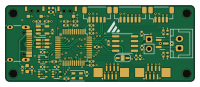
About the GCode Buttons MCU PCB
GCode Buttons MCU is an open source STM32 PCB design by meteyou, published on GitHub under the GPL-3.0 license. It is a 4-layer board measuring 50 × 20 mm, with 50 components from 31 distinct parts.
Its main chip is the STM32F072C8T6, from the STM32 family. Other key parts include the MCP2551-I-SN, USBLC6-2SC6, 74LVC1G17GW and TLV74333PDBVR. By type, the board carries 20 capacitors, 7 ICs, 7 connectors, 7 resistors, 5 diodes and 2 switches.
From the project
The Klipper Gcode-Buttons offer a unique control and status display solution in 3D printers and automated systems. Executing gcodes directly via hardware buttons and displaying the status visually significantly increases user-friendliness. The CANBUS support as a USB-to-CAN adapt
The Klipper Gcode-Buttons offer a unique control and status display solution in 3D printers and automated systems. Executing gcodes directly via hardware buttons and displaying the status visually significantly increases user-friendliness. The CANBUS support as a USB-to-CAN adapter and the additional interfaces, such as SPI and I2C, offer extra benefits and significantly expand the application possibilities.
Main components on the GCode Buttons MCU
GCode Buttons MCU bill of materials (BOM)
50 components, 31 distinct parts — part numbers from the project's BOM.
| Qty | Part | Footprint | Refs |
|---|---|---|---|
| 1 | STM32F072C8T6 | LQFP-48_7x7mm_P0.5mm | U1 |
| 1 | MCP2551-I-SN | SOIC-8_3.9x4.9mm_P1.27mm | U2 |
| 1 | USBLC6-2SC6 | SOT-23-6 | U3 |
| 3 | 74LVC1G17GW | SOT-353_SC-70-5 | U4, U6, U7 |
| 1 | TLV74333PDBVR | SOT-23-5 | U5 |
| 1 | USB_C_RECEPTACLE_USB2.0 USB_C_Receptacle_USB2.0 | USB_C_Receptacle_HRO_TYPE-C-31-M-12 | J1 |
| 1 | C262301 GCode_Buttons_A | JUSHUO AFC11-S08ICC-00 | J2 |
| 1 | C262301 GCode_Buttons_B | JUSHUO AFC11-S08ICC-00 | J3 |
| 1 | B2B-XH-A-GU CAN | JST_XH_B2B-XH-A_1x02_P2.50mm_Vertical | J4 |
| 1 | I2C | JST_SH_BM04B-SRSS-TB_1x04-1MP_P1.00mm_Vertical | J5 |
| 1 | C145963 SPI | JST_SH_BM06B-SRSS-TB_1x06-1MP_P1.00mm_Vertical | J6 |
| 1 | C145962 SWD | JST_SH_BM05B-SRSS-TB_1x05-1MP_P1.00mm_Vertical | J7 |
| 1 | C492401 CAN | PinHeader_1x02_P2.54mm_Vertical | JP2 |
| 2 | SW_Push | SW_SPST_1TS003B-1400-3500A-CT | SW1, SW2 |
| 1 | NUP2105LT1G NUP2105L | SOT-23 | D1 |
| 1 | MHT136CGCT green | LED_0402_1005Metric | D2 |
| 1 | MHT136UBCT blue | LED_0402_1005Metric | D3 |
| 1 | C71911 red | LED_0402_1005Metric | D4 |
| 1 | SK6805 | LED_SK6805_PLCC4_2.4x2.7mm_P1.3mm | D5 |
| 1 | 600Z | L_0603_1608Metric | FB1 |
Show 11 more
| Qty | Part | Footprint | Refs |
|---|---|---|---|
| 7 | 100NF 100nF | C_0402_1005Metric | C1, C4, C5, C7, C10, C12, C17 |
| 4 | 1UF/10V 1uF/10V | C_0402_1005Metric | C2, C3, C9, C14 |
| 2 | 4U7 4u7 | C_0402_1005Metric | C6, C11 |
| 1 | 10NF 10nF | C_0402_1005Metric | C8 |
| 4 | 100NF 100n | C_0402_1005Metric | C13, C18, C19, C20 |
| 1 | 2U2 2u2 | C_0402_1005Metric | C15 |
| 1 | 22N 22n | C_0402_1005Metric | C16 |
| 2 | 10K 10k | R_0402_1005Metric | R1, R4 |
| 1 | 120R | R_0402_1005Metric | R5 |
| 3 | 1k | R_0402_1005Metric | R6, R7, R8 |
| 1 | 100R | R_0402_1005Metric | R9 |
GCode Buttons MCU design files
The KiCad project lives in the meteyou/klipper-gcode-buttons repository on GitHub; these links point at the commit this page was built from.
GCode Buttons MCU: common questions
What microcontroller does the GCode Buttons MCU use?
The GCode Buttons MCU is built around the STM32F072C8T6, from the STM32 family.
How big is the GCode Buttons MCU PCB?
The GCode Buttons MCU measures 50 × 20 mm, has 4 copper layers and is 1.59 mm thick.
How many components are on the GCode Buttons MCU?
50 components, from 31 distinct parts, with part numbers taken from the project's own BOM. The full bill of materials is listed on this page.
Where can I download the GCode Buttons MCU design files?
From the meteyou/klipper-gcode-buttons repository on GitHub, which has the KiCad layout, the schematic and the BOM; the links under Design files point to each one.
Can I use the GCode Buttons MCU design in my own project?
Yes, under the terms of its GPL-3.0 license, which meteyou chose for the repository.
Can I test firmware for the GCode Buttons MCU without the hardware?
Yes. HardLabs builds a simulation of the board from its netlist and BOM, so you can run and debug STM32 firmware against it before you order a PCB.
More boards in klipper-gcode-buttons


Similar boards
 STM32
STM32AxxSolder
AxxAxx
39 × 82.5 mm122 parts2LGPL-3.01.7k STM32
STM32AIOC
skuep
21 × 31.5 mm47 parts2LMIT1.4k STM32
STM32Ferris
pierrechevalier83
208.8 × 86.8 mm102 parts2LSHL-2.11.3k STM32
STM32Module 16S
stuartpittaway
71.1 × 89.6 mm113 parts4LCC-BY-NC-4.01.1k STM32
STM32Djinn
tzarc
192.3 × 150.5 mm216 parts2LCERN-OHL-S-2.0988 STM32
STM32Ghoul
228.6 × 79.4 mm163 parts2LCERN-OHL-S-2.0988