
WakeUpDudeItsSchoolTime

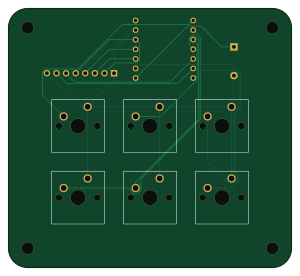
About the WakeUpDudeItsSchoolTime PCB
WakeUpDudeItsSchoolTime is an open source ESP32 PCB design by Pixeleyesd, published on GitHub under the GPL-3.0 license. It is a 2-layer board measuring 74.9 × 68.6 mm, with 9 components from 4 distinct parts.
Its main chip is the XIAO-ESP32-C3-SMD, from the ESP32 family. By type, the board carries 6 switches, 1 IC, 1 connector and 1 buzzer.
It belongs with the iot & wireless and keyboards designs in this gallery.
From the project
An alarm clock designed for easy use in the mornings, designed specifically for students
This simple design comprises of 2 seperate parts. The main shell used for holding the PCB and all of the keys, and the cover. Onshape Link
WakeUpDudeItsSchoolTime uses firmware written in C++.
- SW1 is select / menu - SW2 is back / cancel - SW3 is up - SW4 is down - SW5 is alarm menu - SW6 is sleep
When you first boot up, it first asks you for your time zone (you enter the value to add to gmt), then it asks whether daylight savings applies. These customisations are saved to the internal memory. The alarm clock will show time on the main screen. You can add alarms by going into the menu, or…
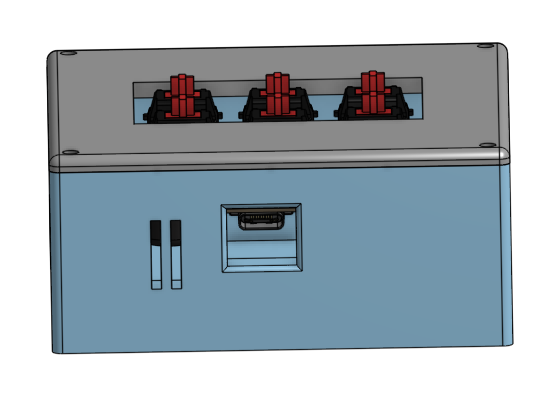
Main components on the WakeUpDudeItsSchoolTime
WakeUpDudeItsSchoolTime bill of materials (BOM)
9 components, 4 distinct parts.
| Qty | Part | Footprint | Refs |
|---|---|---|---|
| 1 | XIAO-ESP32-C3-SMD | XIAO-ESP32-C3-DIP | U1 |
| 1 | Conn_01x08_Pin | PinSocket_1x08_P2.54mm_Vertical | J1 |
| 1 | Buzzer | Buzzer_12x9.5RM7.6 | BZ1 |
| 6 | SW_Push | SW_Cherry_MX_1.00u_PCB | SW1, SW2, SW3, SW4, SW5, SW6 |
WakeUpDudeItsSchoolTime design files
The KiCad project lives in the Pixeleyesd/WakeUpDudeItsSchoolTime repository on GitHub; these links point at the commit this page was built from.
- LayoutPCB/alarm.kicad_pcb
- SchematicPCB/alarm.kicad_sch
WakeUpDudeItsSchoolTime: common questions
What microcontroller does the WakeUpDudeItsSchoolTime use?
The WakeUpDudeItsSchoolTime is built around the XIAO-ESP32-C3-SMD, from the ESP32 family.
How big is the WakeUpDudeItsSchoolTime PCB?
The WakeUpDudeItsSchoolTime measures 74.9 × 68.6 mm, has 2 copper layers and is 1.6 mm thick.
How many components are on the WakeUpDudeItsSchoolTime?
9 components, from 4 distinct parts. The full bill of materials is listed on this page.
Where can I download the WakeUpDudeItsSchoolTime design files?
From the Pixeleyesd/WakeUpDudeItsSchoolTime repository on GitHub, which has the KiCad layout and the schematic; the links under Design files point to each one.
Can I use the WakeUpDudeItsSchoolTime design in my own project?
Yes, under the terms of its GPL-3.0 license, which Pixeleyesd chose for the repository.
Can I test firmware for the WakeUpDudeItsSchoolTime without the hardware?
Yes. HardLabs builds a simulation of the board from its netlist and BOM, so you can run and debug ESP32 firmware against it before you order a PCB.
Similar boards
 ESP32
OSO-BOOK-B1
joeycastillo
85 × 115 mm65 parts2LCC-BY-SA-4.08.1k ESP32
Powertrain
byrantech
64 × 45.4 mm171 parts4LMIT4.3k ESP32
Esp32 minimal
atopile
36.2 × 26.8 mm20 parts2LMIT4.0k ESP32
Badge
56.3 × 39 mm239 parts4LMIT4.0k ESP32
Racer
StuckAtPrototype
36 × 50.2 mm70 parts4LApache-2.03.8k ESP32
Controller
29 × 74 mm58 parts4LApache-2.03.8k