
Sprite

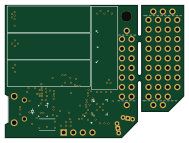
About the Sprite PCB
Sprite is an open source Microchip SAM PCB design by RoboticExplorationLab, published on GitHub. It is a board measuring 47.2 × 35 mm, with 77 components from 30 distinct parts.
Its main chip is the ATSAMD51G_TQFN48, from the Microchip SAM family. Other key parts include the BAT-HLD-001, CC1101RGPR, LSM9DS1TR, TPS82740ASIP and OVM9724. By type, the board carries 27 connectors, 24 capacitors, 8 ICs, 6 resistors, 5 switches and 2 antennas.
It belongs with the sensors and rf & radio designs in this gallery.
From the project
KickSat Sprite (2019) running Circuitpython
hardware: KiCad PCB files and bill of materials. Assembling a sprite? Check out https://roboticexplorationlab.github.io/sprite/ for an interactive BOM!
firmware: pre-built circuitpython bootloader.bin and firmware.uf2 (and the files to build it yourself)
software: circuitpython scripts and libraries working on the sprite
Put all the files located in /software/ on to the sprite and start the serial console (as described above). After pressing Ctrl+C to halt the sprite, press any key to enter the REPL, then type
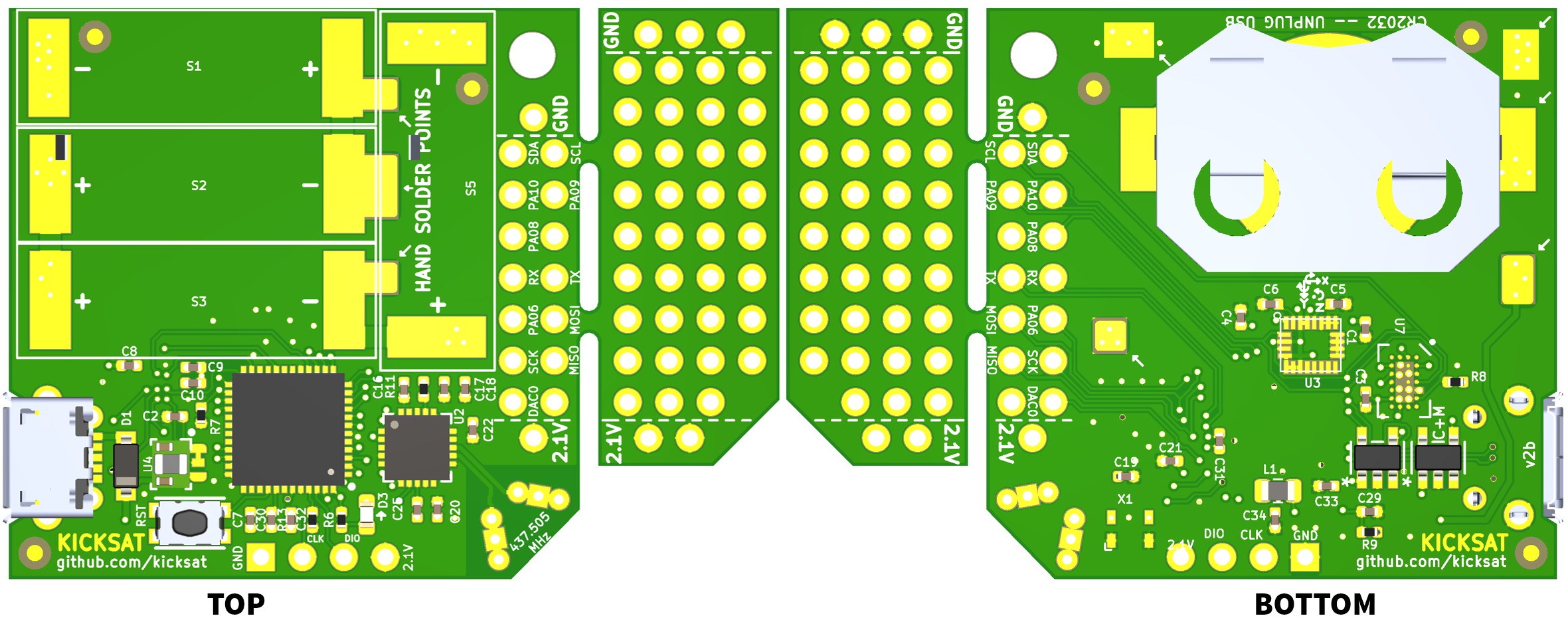
Main components on the Sprite
Sprite bill of materials (BOM)
77 components, 30 distinct parts — part numbers from the project's BOM.
| Qty | Part | Footprint | Refs |
|---|---|---|---|
| 1 | BAT-HLD-001 | BAT-HLD-001 | U1 |
| 1 | CC1101RGPR | CC1101_RGP_20 | U2 |
| 1 | LSM9DS1TR LSM9DS1 | LGA24-8X4 | U3 |
| 1 | TPS82740ASIP | TPS82740ASIPR | U4 |
| 1 | ATSAMD51G_TQFN48 | QFN50P700X700X90-49N-D | U6 |
| 1 | OVM9724 | OVM9724b | U7 |
| 2 | DS90LV012ATMFX/NOPB DS90LV012ATMFX_NOPB | DS90 | U8, U9 |
| 1 | 7L2609LCSC-CGG4S 26.000 | TXCO_2.5x2 | X1 |
| 1 | 10118194-0001LF | 10118194-0001LF | J1 |
| 10 | Conn_01x01 | PinHeader_CUSTOM2 | J2, J4, J5, J6, J7, J8, J9, J10 +2 |
| 1 | Conn_01x04 | PinHeader_1x04_P2.54mm_Vertical | J3 |
| 8 | Conn_01x04 | PinHeader_CUSTOM | J13, J14, J15, J16, J17, J18, J19, J20 |
| 7 | Conn_01x02 | PinHeader_CUSTOM3 | J21, J22, J23, J24, J25, J26, J27 |
| 1 | — | @HOLE0 | |
| 2 | ANTENNA | ANTENNA | ANT-N1, ANT-P1 |
| 4 | KXOB22-04X3F | KXOB22-12X1F | S1, S2, S3, S5 |
| 1 | KMR631NGULCLFS KMR231NG LFS | BTN_KMR2_4.6X2.8 | SW2 |
| 1 | SOD4004-SH MBR120 | D_SOD-123 | D1 |
| 1 | TJ-S1608SW6TGLC2G-A5 GREEN LED | LED_0603_1608Metric | D3 |
| 1 | CMI201209X100KT 10uH | L_0805_2012Metric | L1 |
Show 10 more
| Qty | Part | Footprint | Refs |
|---|---|---|---|
| 3 | 0402X106M6R3NT 10uF | C_0402_1005Metric | C1, C30, C34 |
| 8 | CL05B104KO5NNNC 0.1uF | C_0402_1005Metric | C2, C3, C4, C6, C8, C9, C10, C32 |
| 3 | CC0402JRX7R9BB103 10nF | C_0402_1005Metric | C5, C18, C20 |
| 4 | CL05B105KQ5NQNC 1uF | C_0402_1005Metric | C7, C29, C31, C33 |
| 3 | 0402B221K500NT 220pF | C_0402_1005Metric | C16, C17, C19 |
| 2 | CL05B104KO5NNNC 100nF | C_0402_1005Metric | C21, C22 |
| 1 | CC0402JRX7R9BB103 27pF | C_0402_1005Metric | C25 |
| 1 | RC0402FR-07330RL 330 | R_0402_1005Metric | R6 |
| 4 | RTT021002FTH 10K | R_0402_1005Metric | R7, R8, R9, R13 |
| 1 | RC0402FR-0756KL 56K | R_0402_1005Metric | R11 |
Sprite design files
The KiCad project lives in the RoboticExplorationLab/sprite repository on GitHub; these links point at the commit this page was built from.
Sprite: common questions
What microcontroller does the Sprite use?
The Sprite is built around the ATSAMD51G_TQFN48, from the Microchip SAM family.
How big is the Sprite PCB?
The Sprite measures 47.2 × 35 mm and is 0.8 mm thick.
How many components are on the Sprite?
77 components, from 30 distinct parts, with part numbers taken from the project's own BOM. The full bill of materials is listed on this page.
Where can I download the Sprite design files?
From the RoboticExplorationLab/sprite repository on GitHub, which has the KiCad layout and the BOM; the links under Design files point to each one.
Can I use the Sprite design in my own project?
The repository has no license, so all rights stay with RoboticExplorationLab. Use it as a reference, and ask the author before reusing the design.
Can I test firmware for the Sprite without the hardware?
Yes. HardLabs builds a simulation of the board from its netlist and BOM, so you can run and debug Microchip SAM firmware against it before you order a PCB.
Similar boards
 Microchip SAM
Fpgaboy
Wren6991
50 × 50 mm89 parts4LNo license508 Microchip SAM
Kira
kiibohd
366.9 × 114.3 mm400 partsCERN-OHL-1.2415 Microchip SAM
DSKY driver
benkrasnow
43 × 92.3 mm44 partsMIT258 Microchip SAM
Duet 2 Maestro
Duet3D
100 × 123 mm336 partsCERN-OHL-1.2257 Microchip SAM
Mainboard
pycubed
90.2 × 95.9 mm196 parts2LNo license96 Microchip SAM
Tiny4FSK
New-England-Weather-Balloon-Society
35.1 × 76.3 mm80 parts4LCERN-OHL-W-2.095