
KiCAD Test

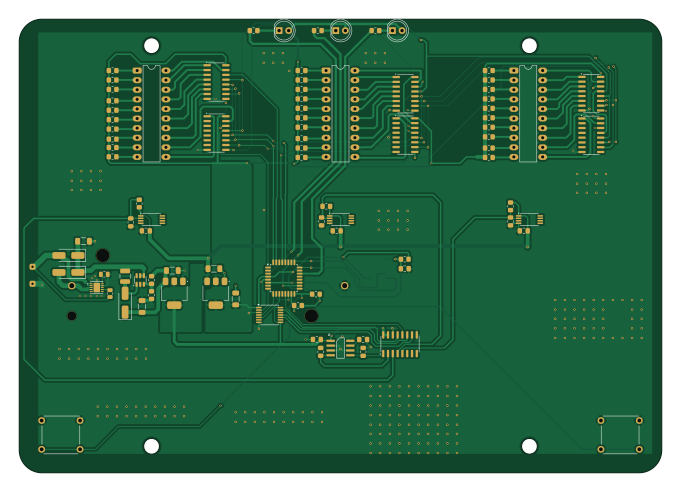
About the KiCAD Test PCB
KiCAD Test is an open source STM32 PCB design by shayesMEL, published on GitHub. It is a 2-layer board measuring 170 × 120 mm, with 92 components from 27 distinct parts.
Its main chip is the STM32G030K6T6, from the STM32 family. Other key parts include the TLV61048DBVR, MCP73123, NCP1117-5.0_SOT223, MLX90333 and A1330. By type, the board carries 43 resistors, 17 ICs, 16 capacitors, 6 diodes, 3 connectors and 2 switches.
From the project
Test Library for Github integration for MEL Libraries
KiCad Local History Directory =============================
This directory contains automatic snapshots of your project files. KiCad periodically saves copies of your work here, allowing you to recover from accidental changes or data loss.
You can browse and restore previous versions through KiCad's File > Local History menu.
To disable this feature: Preferences > Common > Project Backup > Enable automatic backups
Main components on the KiCAD Test
KiCAD Test bill of materials (BOM)
92 components, 27 distinct parts.
| Qty | Part | Footprint | Refs |
|---|---|---|---|
| 1 | TLV61048DBVR | SOT-23-6 | U1 |
| 1 | MCP73123 | DFN-10-1EP_3x3mm_P0.5mm_EP1.7x2.5mm | U2 |
| 1 | NCP1117-5.0_SOT223 | SOT-223-3_TabPin2 | U3 |
| 1 | MLX90333 | SOIC-8 | U4 |
| 3 | A1330 | TSSOP-8_4.4x3mm_P0.65mm | U5, U6, U8 |
| 1 | NCP1117-3.3_SOT223 | SOT-223-3_TabPin2 | U7 |
| 1 | TXU0104 | TSSOP-14_4.4x5mm_P0.65mm | U9 |
| 1 | STM32G030K6T6 | LQFP-32_7x7mm_P0.8mm | U10 |
| 1 | MCP3208-CI/SL | SOIC-16_3.9x9.9mm_P1.27mm | U11 |
| 6 | 74HC595 | SOIC-16_3.9x9.9mm_P1.27mm | U12, U13, U14, U15, U16, U17 |
| 2 | Conn_01x01_Pin | SolderWire-0.1sqmm_1x01_D0.4mm_OD1mm | J1, J2 |
| 1 | FTSH-107-01-X-DV-K-TR | SAMTEC_FTSH-107-01-X-DV-K-TR | J3 |
| 1 | 1043P | BAT_1043P | BT1 |
| 3 | ~ | DIP-20_W7.62mm_LongPads | LEDB1, LEDB2, LEDB3 |
| 2 | 5GTH935 | 5GTH9 | SW1, SW2 |
| 3 | D_Schottky | D_SMA_Handsoldering | D1, D2, D3 |
| 3 | LED | LED_D5.0mm | D4, D5, D6 |
| 1 | 10uH | L_1210_3225Metric | L1 |
| 5 | 10uF | C_1206_3216Metric_Pad1.33x1.80mm_HandSolder | C1, C2, C8, C10, C16 |
| 11 | 100nF | C_0805_2012Metric_Pad1.18x1.45mm_HandSolder | C3, C4, C5, C6, C7, C9, C11, C12 +3 |
Show 7 more
| Qty | Part | Footprint | Refs |
|---|---|---|---|
| 1 | 10k | R_0805_2012Metric | R1 |
| 1 | 4k | R_0805_2012Metric | R2 |
| 4 | 100k | R_0805_2012Metric_Pad1.20x1.40mm_HandSolder | R3, R38, R39, R40 |
| 1 | 675k | R_0805_2012Metric_Pad1.20x1.40mm_HandSolder | R4 |
| 3 | 10k | R_0805_2012Metric_Pad1.20x1.40mm_HandSolder | R5, R6, R7 |
| 30 | 1.2k | R_0805_2012Metric_Pad1.20x1.40mm_HandSolder | R8, R9, R10, R11, R12, R13, R14, R15 +22 |
| 3 | 650 | R_0805_2012Metric_Pad1.20x1.40mm_HandSolder | R41, R42, R43 |
KiCAD Test design files
The KiCad project lives in the shayesMEL/KiCAD_Test repository on GitHub; these links point at the commit this page was built from.
KiCAD Test: common questions
What microcontroller does the KiCAD Test use?
The KiCAD Test is built around the STM32G030K6T6, from the STM32 family.
How big is the KiCAD Test PCB?
The KiCAD Test measures 170 × 120 mm, has 2 copper layers and is 1.6 mm thick.
How many components are on the KiCAD Test?
92 components, from 27 distinct parts. The full bill of materials is listed on this page.
Where can I download the KiCAD Test design files?
From the shayesMEL/KiCAD_Test repository on GitHub, which has the KiCad layout and the schematic; the links under Design files point to each one.
Can I use the KiCAD Test design in my own project?
The repository has no license, so all rights stay with shayesMEL. Use it as a reference, and ask the author before reusing the design.
Can I test firmware for the KiCAD Test without the hardware?
Yes. HardLabs builds a simulation of the board from its netlist and BOM, so you can run and debug STM32 firmware against it before you order a PCB.
Similar boards
 STM32
LumenPnP Motherboard
opulo-inc
149 × 95 mm296 parts4LCC-BY-SA-4.03.7k STM32
Type g
google
169 × 30 mm24 parts2LApache-2.02.9k STM32
Main panel
234 × 84 mm26 parts4LApache-2.02.9k STM32
Base
52.3 × 52.3 mm36 parts2LApache-2.02.9k STM32
Type a
150 × 30 mm14 parts2LApache-2.02.9k STM32
Type c
188 × 30 mm17 parts2LApache-2.02.9k