
80--Keyboard

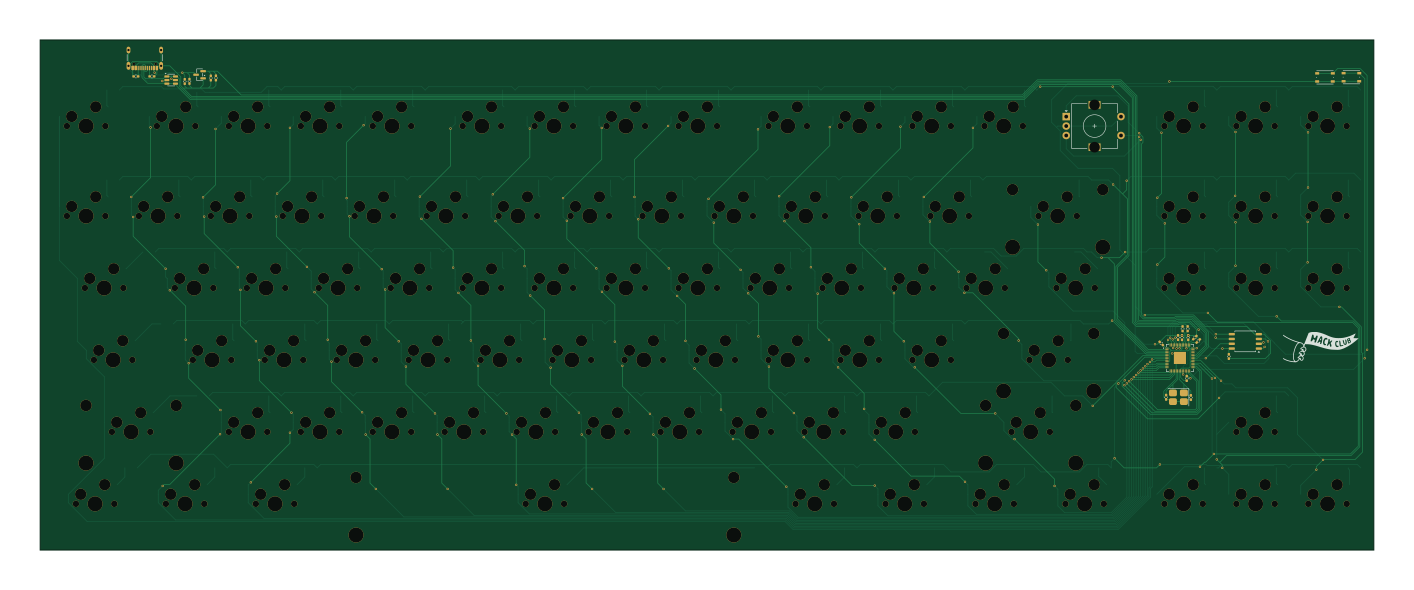
About the 80--Keyboard PCB
80--Keyboard is an open source RP2040/RP2350 PCB design by XavierdSeth, published on GitHub. It is a 2-layer board measuring 353 × 135 mm, with 201 components from 104 distinct parts.
Its main chip is the RP2040, from the RP2040/RP2350 family. Other key parts include the W25Q16JVSS, MCP1700x-330xxTT and USBLC6-2SC6. By type, the board carries 90 switches, 87 diodes, 13 capacitors, 5 resistors, 4 ICs and 1 crystal.
It belongs with the keyboards designs in this gallery.
From the project
I made this Keyboard for myself, And to learn. This was my first time using Chip on Board tech, so it was quite a challenge for me, but it helped me learn alot.
I made this Keyboard for myself, And to learn. This was my first time using Chip on Board tech, so it was quite a challenge for me, but it helped me learn alot.
Here is the Schematic, I spend alot of time figuring out how to get the whole CoB system working, but I think I did well.
Here is the PCB, I think I was able to make it pretty Compact with the components, however I am still unsure about the USB-C port.
Main components on the 80--Keyboard
80--Keyboard bill of materials (BOM)
201 components, 104 distinct parts — part numbers from the project's BOM.
| Qty | Part | Footprint | Refs |
|---|---|---|---|
| 1 | W25Q16JVSS | SOIC-8_5.3x5.3mm_P1.27mm | U1 |
| 1 | RP2040 | QFN-56-1EP_7x7mm_P0.4mm_EP3.2x3.2mm | U2 |
| 1 | MCP1700x-330xxTT | SOT-23 | U3 |
| 1 | USBLC6-2SC6 | SOT-23-6 | U4 |
| 1 | Crystal | Crystal_SMD_3225-4Pin_3.2x2.5mm_HandSoldering | Y1 |
| 1 | USB_C_Receptacle_USB2.0_16P | USB_C_Receptacle_GCT_USB4105-xx-A_16P_TopMnt_Horizontal | J1 |
| 1 | Esc | MX-Hotswap-1U | SW1 |
| 1 | Tilde ~ | MX-Hotswap-1U | SW2 |
| 1 | Tab | MX-Hotswap-1.5U | SW3 |
| 1 | CapsLock | MX-Hotswap-1.75U | SW4 |
| 1 | Shift | MX-Hotswap-2.25U | SW5 |
| 1 | Ctrl | MX-Hotswap-1.25U | SW6 |
| 1 | F1 | MX-Hotswap-1U | SW7 |
| 1 | 1 | MX-Hotswap-1U | SW8 |
| 1 | Q | MX-Hotswap-1U | SW9 |
| 1 | A | MX-Hotswap-1U | SW10 |
| 1 | Z | MX-Hotswap-1U | SW11 |
| 1 | Win | MX-Hotswap-1.25U | SW12 |
| 1 | F2 | MX-Hotswap-1U | SW13 |
| 1 | 2 | MX-Hotswap-1U | SW14 |
Show 84 more
| Qty | Part | Footprint | Refs |
|---|---|---|---|
| 1 | W | MX-Hotswap-1U | SW15 |
| 1 | S | MX-Hotswap-1U | SW16 |
| 1 | X | MX-Hotswap-1U | SW17 |
| 1 | Alt | MX-Hotswap-1.25U | SW18 |
| 1 | F3 | MX-Hotswap-1U | SW19 |
| 1 | 3 | MX-Hotswap-1U | SW20 |
| 1 | E | MX-Hotswap-1U | SW21 |
| 1 | D | MX-Hotswap-1U | SW22 |
| 1 | C | MX-Hotswap-1U | SW23 |
| 1 | RotaryEncoder | RotaryEncoder_Alps_EC11E-Switch_Vertical_H20mm | SW24 |
| 1 | F4 | MX-Hotswap-1U | SW25 |
| 1 | 4 | MX-Hotswap-1U | SW26 |
| 1 | R | MX-Hotswap-1U | SW27 |
| 1 | F | MX-Hotswap-1U | SW28 |
| 1 | V | MX-Hotswap-1U | SW29 |
| 1 | SW_BOOT | SW_Push_1P1T_NO_Vertical_Wuerth_434133025816 | SW30 |
| 1 | F5 | MX-Hotswap-1U | SW31 |
| 1 | 5 | MX-Hotswap-1U | SW32 |
| 1 | T | MX-Hotswap-1U | SW33 |
| 1 | G | MX-Hotswap-1U | SW34 |
| 1 | B | MX-Hotswap-1U | SW35 |
| 1 | Space | MX-Hotswap-6.25U | SW36 |
| 1 | F6 | MX-Hotswap-1U | SW37 |
| 1 | 6 | MX-Hotswap-1U | SW38 |
| 1 | Y | MX-Hotswap-1U | SW39 |
| 1 | H | MX-Hotswap-1U | SW40 |
| 1 | N | MX-Hotswap-1U | SW41 |
| 1 | SW_RESET | SW_Push_1P1T_NO_Vertical_Wuerth_434133025816 | SW42 |
| 1 | F7 | MX-Hotswap-1U | SW43 |
| 1 | 7 | MX-Hotswap-1U | SW44 |
| 1 | U | MX-Hotswap-1U | SW45 |
| 1 | J | MX-Hotswap-1U | SW46 |
| 1 | M | MX-Hotswap-1U | SW47 |
| 1 | F8 | MX-Hotswap-1U | SW49 |
| 1 | 8 | MX-Hotswap-1U | SW50 |
| 1 | I | MX-Hotswap-1U | SW51 |
| 1 | K | MX-Hotswap-1U | SW52 |
| 1 | Comma | MX-Hotswap-1U | SW53 |
| 1 | R_Alt | MX-Hotswap-1.25U | SW54 |
| 1 | F9 | MX-Hotswap-1U | SW55 |
| 1 | 9 | MX-Hotswap-1U | SW56 |
| 1 | O | MX-Hotswap-1U | SW57 |
| 1 | L | MX-Hotswap-1U | SW58 |
| 1 | Full Stop | MX-Hotswap-1U | SW59 |
| 1 | R_Win | MX-Hotswap-1.25U | SW60 |
| 1 | F10 | MX-Hotswap-1U | SW61 |
| 1 | 0 | MX-Hotswap-1U | SW62 |
| 1 | P | MX-Hotswap-1U | SW63 |
| 1 | Semicolon | MX-Hotswap-1U | SW64 |
| 1 | F Slash | MX-Hotswap-1U | SW65 |
| 1 | Fn | MX-Hotswap-1.25U | SW66 |
| 1 | F11 | MX-Hotswap-1U | SW67 |
| 1 | Minus - | MX-Hotswap-1U | SW68 |
| 1 | [ | MX-Hotswap-1U | SW69 |
| 1 | Apostrophe | MX-Hotswap-1U | SW70 |
| 1 | R_Shift | MX-Hotswap-2.75U | SW71 |
| 1 | R_Ctrl | MX-Hotswap-1.25U | SW72 |
| 1 | F12 | MX-Hotswap-1U | SW73 |
| 1 | Plus + | MX-Hotswap-1U | SW74 |
| 1 | ] | MX-Hotswap-1U | SW75 |
| 1 | Enter | MX-Hotswap-2.25U | SW76 |
| 1 | Backspace | MX-Hotswap-2U | SW80 |
| 1 | B Slash | MX-Hotswap-1.5U | SW81 |
| 1 | PrtSc | MX-Hotswap-1U | SW85 |
| 1 | Insert | MX-Hotswap-1U | SW86 |
| 1 | Delete | MX-Hotswap-1U | SW87 |
| 1 | Left | MX-Hotswap-1U | SW90 |
| 1 | Scroll Lock | MX-Hotswap-1U | SW91 |
| 1 | Home | MX-Hotswap-1U | SW92 |
| 1 | End | MX-Hotswap-1U | SW93 |
| 1 | Up | MX-Hotswap-1U | SW95 |
| 1 | Down | MX-Hotswap-1U | SW96 |
| 1 | Pause | MX-Hotswap-1U | SW97 |
| 1 | PgUp | MX-Hotswap-1U | SW98 |
| 1 | PgDn | MX-Hotswap-1U | SW99 |
| 1 | Right | MX-Hotswap-1U | SW102 |
| 87 | D | D_SOD-123 | D1, D2, D3, D4, D5, D6, D7, D8 +79 |
| 7 | 100nF | C_0402_1005Metric_Pad0.74x0.62mm_HandSolder | C1, C2, C5, C6, C7, C8, C11 |
| 3 | 10µF | C_0402_1005Metric_Pad0.74x0.62mm_HandSolder | C3, C4, C9 |
| 1 | 1µF | C_0402_1005Metric_Pad0.74x0.62mm_HandSolder | C10 |
| 2 | 15pF | C_0402_1005Metric_Pad0.74x0.62mm_HandSolder | C12, C13 |
| 2 | 5.1kΩ | R_0402_1005Metric_Pad0.72x0.64mm_HandSolder | R1, R2 |
| 1 | 10kΩ | R_0402_1005Metric_Pad0.72x0.64mm_HandSolder | R3 |
| 2 | 27Ω | R_0402_1005Metric_Pad0.72x0.64mm_HandSolder | R4, R5 |
80--Keyboard design files
The KiCad project lives in the XavierdSeth/80--Keyboard repository on GitHub; these links point at the commit this page was built from.
- LayoutPCB/80% Keyboard.kicad_pcb
- SchematicPCB/80% Keyboard.kicad_sch
- BOMBOM.csv
80--Keyboard: common questions
What microcontroller does the 80--Keyboard use?
The 80--Keyboard is built around the RP2040, from the RP2040/RP2350 family.
How big is the 80--Keyboard PCB?
The 80--Keyboard measures 353 × 135 mm, has 2 copper layers and is 1.6 mm thick.
How many components are on the 80--Keyboard?
201 components, from 104 distinct parts, with part numbers taken from the project's own BOM. The full bill of materials is listed on this page.
Where can I download the 80--Keyboard design files?
From the XavierdSeth/80--Keyboard repository on GitHub, which has the KiCad layout, the schematic and the BOM; the links under Design files point to each one.
Can I use the 80--Keyboard design in my own project?
The repository has no license, so all rights stay with XavierdSeth. Use it as a reference, and ask the author before reusing the design.
Can I test firmware for the 80--Keyboard without the hardware?
Yes. HardLabs builds a simulation of the board from its netlist and BOM, so you can run and debug RP2040/RP2350 firmware against it before you order a PCB.
Similar boards
 RP2040/RP2350
OSO-BOOK-C1
joeycastillo
85 × 115 mm29 parts2LCC-BY-SA-4.08.1k RP2040/RP2350
Corne chocolate
foostan
277.2 × 107.5 mm164 parts2LCC-BY-4.07.7k RP2040/RP2350
Corne cherry
277.2 × 107.5 mm164 parts2LCC-BY-4.07.7k RP2040/RP2350
Jitx design
gusmanb
55.5 × 65 mm26 parts4LGPL-3.05.0k RP2040/RP2350
LogicAnalyzer
57 × 55.2 mm6 parts2LGPL-3.05.0k RP2040/RP2350
Main
google
98 × 71 mm102 parts2LApache-2.02.9k