
PicoCAN

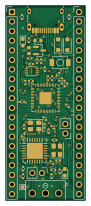
About the PicoCAN PCB
PicoCAN is an open source RP2040/RP2350 PCB design by AdrianR3, published on GitHub. It is a 2-layer board measuring 21 × 51.5 mm, with 51 components from 26 distinct parts.
Its main chip is the C2040, from the RP2040/RP2350 family. Other key parts include the C39051, C2843335 and MCP25625X-X-ML. By type, the board carries 22 capacitors, 12 resistors, 6 connectors, 4 ICs, 4 diodes and 2 crystals.
It belongs with the rf & radio and dev boards & breakouts designs in this gallery.
From the project
RP2040 based dev board w/built-in CAN controller and transceiver
To interface with the CAN bus, you can use any library that supports the MCP25625. There are a few examples that use the MCPCAN library in the ./firmwareexamples folder; they are adapted from https://github.com/coryjfowler/MCPCANlib.
This is what JLC PCBA gets you! These don't have the headers soldered on yet. SEE BUILD.md FOR STEPS TAKEN
Exhaustive PCB component BOM available at ./KiCAD/prod/PicoCAN.csv.
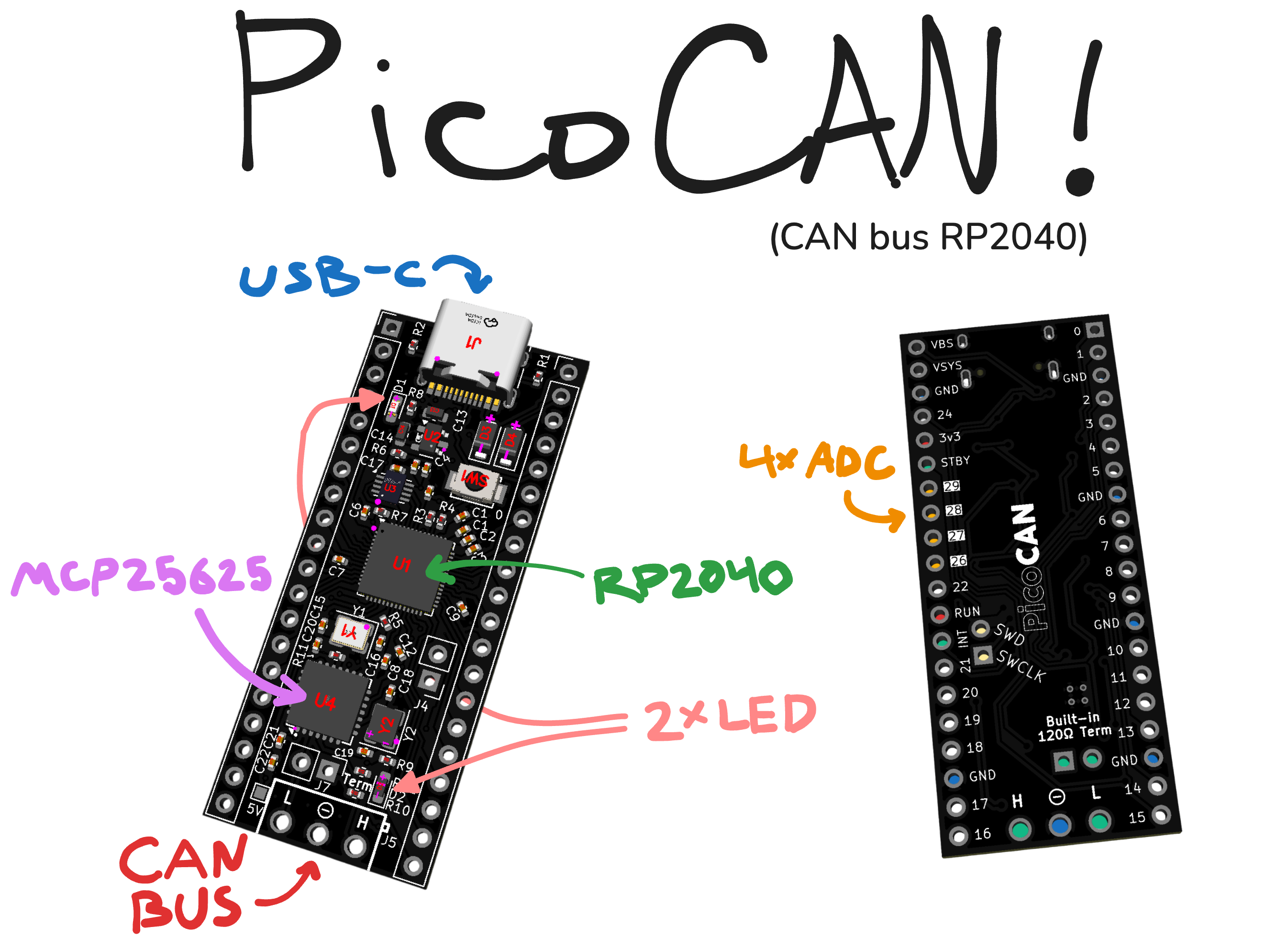
Main components on the PicoCAN
PicoCAN bill of materials (BOM)
51 components, 26 distinct parts — part numbers from the project's BOM.
| Qty | Part | Footprint | Refs |
|---|---|---|---|
| 1 | C2040 RP2040 | QFN-56-1EP_7x7mm_P0.4mm_EP3.2x3.2mm | U1 |
| 1 | C39051 MCP1700x-330xxTT | SOT-23 | U2 |
| 1 | C2843335 W25Q16JVUXIQ | Winbond_USON-8-1EP_3x2mm_P0.5mm_EP0.2x1.6mm | U3 |
| 1 | MCP25625X-X-ML MCP25625x-x-ML | QFN-28-1EP_6x6mm_P0.65mm_EP4.25x4.25mm | U4 |
| 1 | C9002 12 MHz Crystal_GND24 (C9002) | Crystal_SMD_3225-4Pin_3.2x2.5mm | Y1 |
| 1 | C13738 16 MHz Crystal_GND24 (C13738) | Crystal_SMD_3225-4Pin_3.2x2.5mm | Y2 |
| 1 | C165948 USB_C_Receptacle_USB2.0_14P | USB_C_Receptacle_HRO_TYPE-C-31-M-12 | J1 |
| 2 | CONN_01X20 Conn_01x20 | PinHeader_1x20_P2.54mm_Vertical | J2, J3 |
| 2 | CONN_01X02 Conn_01x02 | PinHeader_1x02_P2.54mm_Vertical | J4, J7 |
| 1 | C3817776 Screw_Terminal_01x03 (C3817776) | CONN-TH_3P-P3.50_OSTTE030161 | J5 |
| 1 | C720477 SW_Push | SW-SMD_L3.9-W3.0-P4.45 | SW1 |
| 1 | C2286 | LED_0603_1608Metric_Pad1.05x0.95mm_HandSolder | D1 |
| 1 | C2994781 | LED_0603_1608Metric_Pad1.05x0.95mm_HandSolder | D2 |
| 2 | C223608 MBR120VLSFT1G | D_SOD-123F | D3, D4 |
| 2 | C52923 1 µF | C_0402_1005Metric | C1, C10 |
| 14 | C1525 100 nF | C_0402_1005Metric | C2, C3, C4, C5, C6, C7, C8, C9 +6 |
| 2 | C96446 10 µF | C_0603_1608Metric | C13, C14 |
| 2 | C1562 33 pF | C_0402_1005Metric | C15, C16 |
| 2 | C1578 8 pF | C_0402_1005Metric | C18, C19 |
| 2 | C25905 5.1K | R_0402_1005Metric | R1, R2 |
Show 6 more
| Qty | Part | Footprint | Refs |
|---|---|---|---|
| 2 | C25100 27R | R_0402_1005Metric | R3, R4 |
| 2 | C11702 1K | R_0402_1005Metric | R5, R7 |
| 3 | C25744 10K | R_0402_1005Metric | R6, R11, R12 |
| 1 | C25117 470R | R_0402_1005Metric | R8 |
| 1 | C25076 100R | R_0402_1005Metric | R9 |
| 1 | C25079 120R | R_0402_1005Metric | R10 |
PicoCAN design files
The KiCad project lives in the AdrianR3/PicoCAN repository on GitHub; these links point at the commit this page was built from.
PicoCAN: common questions
What microcontroller does the PicoCAN use?
The PicoCAN is built around the C2040, from the RP2040/RP2350 family.
How big is the PicoCAN PCB?
The PicoCAN measures 21 × 51.5 mm, has 2 copper layers and is 1.6 mm thick.
How many components are on the PicoCAN?
51 components, from 26 distinct parts, with part numbers taken from the project's own BOM. The full bill of materials is listed on this page.
Where can I download the PicoCAN design files?
From the AdrianR3/PicoCAN repository on GitHub, which has the KiCad layout, the schematic and the BOM; the links under Design files point to each one.
Can I use the PicoCAN design in my own project?
The repository has no license, so all rights stay with AdrianR3. Use it as a reference, and ask the author before reusing the design.
Can I test firmware for the PicoCAN without the hardware?
Yes. HardLabs builds a simulation of the board from its netlist and BOM, so you can run and debug RP2040/RP2350 firmware against it before you order a PCB.
Similar boards
 RP2040/RP2350
Open Book Abridged Edition
joeycastillo
85 × 115 mm29 parts2LCC-BY-SA-4.08.1k RP2040/RP2350
Corne
foostan
277.2 × 107.5 mm164 parts2LCC-BY-4.07.7k RP2040/RP2350
Corne
277.2 × 107.5 mm164 parts2LCC-BY-4.07.7k RP2040/RP2350
Msa
Mentra-Community
47.8 × 9.4 mm53 parts2LMIT1.2k RP2040/RP2350
Open Source Smart Glasses
93 × 10.5 mm80 parts4LMIT1.2k RP2040/RP2350
MSA
30.5 × 138 mm61 parts2LMIT1.2k