
DIY-Gaming-Mouse

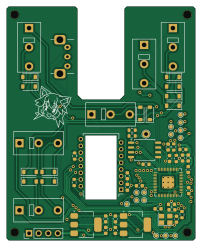
About the DIY-Gaming-Mouse PCB
DIY-Gaming-Mouse is an open source RP2040/RP2350 PCB design by wareya, published on GitHub. It is a 2-layer board measuring 49.8 × 61.7 mm, with 53 components from 22 distinct parts.
Its main chip is the RP2040, from the RP2040/RP2350 family. Other key parts include the LM1117-1.8V, PMW3360DM-T2QU, W25Q32JVSS and NCP1117-3.3_SOT223. By type, the board carries 19 capacitors, 12 diodes, 7 resistors, 6 switches, 5 ICs and 1 crystal.
It belongs with the sensors designs in this gallery.
From the project
Completely open source DIY gaming mouse, including hardware (PCB, shell) design files
Video about why and how I made this, and what the various iterations were like: https://www.youtube.com/watch?v=h-Cdl4Vq9H4
This repository contains the code, schematic, PCB layout, and 3d model for a completely DIY gaming mouse, all designed around a Pixart PMW3360 sensor.
The firmware for this mouse uses a special debouncing algorithm that completely eliminates chatter without adding ANY latency, and eliminates bounce better than commercial mice do. Random double-clicks be gone!
Main components on the DIY-Gaming-Mouse
DIY-Gaming-Mouse bill of materials (BOM)
53 components, 22 distinct parts.
| Qty | Part | Footprint | Refs |
|---|---|---|---|
| 1 | LM1117-1.8V | SOT-223-3_TabPin2 | U1 |
| 1 | PMW3360DM-T2QU | PixArt_PDIP-16_10.9x16.2mm_P1.78mm | U2 |
| 1 | RP2040 | RP2040-QFN-56 | U3 |
| 1 | W25Q32JVSS | SOIC-8_5.275x5.275mm_P1.27mm | U4 |
| 1 | NCP1117-3.3_SOT223 | SOT-223-3_TabPin2 | U10 |
| 1 | ABM8-272-T3 | Crystal_SMD_3225-4Pin_3.2x2.5mm | Y1 |
| 1 | RotaryEncoder | Alps-EC10E1220501 | Encoder1 |
| 6 | SW_SPDT | SW_Tactile_SPDT_Omron_D2F | SW1, SW2, SW3, SW4, SW5, SW6 |
| 1 | USB | PinHeader_1x04_P2.54mm_Vertical | USB1 |
| 1 | Conn_01x01_Socket | TestPoint_THTPad_D2.0mm_Drill1.0mm_Edit | USB_BOOT1 |
| 12 | D | D_SOD-123 | D1, D2, D3, D4, D5, D6, D7, D8 +4 |
| 2 | 10uF | C_0603_1608Metric | C1, C2 |
| 1 | 100nF | C_0603_1608Metric | C3 |
| 1 | 4.7uF | C_0603_1608Metric | C4 |
| 9 | 100n | C_0603_1608Metric | C6, C7, C9, C11, C12, C13, C14, C15 +1 |
| 2 | 1u | C_0603_1608Metric | C8, C10 |
| 2 | 10u | C_0603_1608Metric | C100, C400 |
| 2 | 15p | C_0603_1608Metric | C200, C300 |
| 2 | 10K | R_0603_1608Metric | R1, R200 |
| 2 | 27 | R_0603_1608Metric | R3, R4 |
Show 2 more
| Qty | Part | Footprint | Refs |
|---|---|---|---|
| 1 | R39 | R_0603_1608Metric | R40 |
| 2 | 1k | R_0603_1608Metric | R100, R500 |
DIY-Gaming-Mouse design files
The KiCad project lives in the wareya/DIY-Gaming-Mouse repository on GitHub; these links point at the commit this page was built from.
DIY-Gaming-Mouse: common questions
What microcontroller does the DIY-Gaming-Mouse use?
The DIY-Gaming-Mouse is built around the RP2040, from the RP2040/RP2350 family.
How big is the DIY-Gaming-Mouse PCB?
The DIY-Gaming-Mouse measures 49.8 × 61.7 mm, has 2 copper layers and is 1.6 mm thick.
How many components are on the DIY-Gaming-Mouse?
53 components, from 22 distinct parts. The full bill of materials is listed on this page.
Where can I download the DIY-Gaming-Mouse design files?
From the wareya/DIY-Gaming-Mouse repository on GitHub, which has the KiCad layout and the schematic; the links under Design files point to each one.
Can I use the DIY-Gaming-Mouse design in my own project?
The repository has no license, so all rights stay with wareya. Use it as a reference, and ask the author before reusing the design.
Can I test firmware for the DIY-Gaming-Mouse without the hardware?
Yes. HardLabs builds a simulation of the board from its netlist and BOM, so you can run and debug RP2040/RP2350 firmware against it before you order a PCB.
Similar boards
 RP2040/RP2350
Open Book Abridged Edition
joeycastillo
85 × 115 mm29 parts2LCC-BY-SA-4.08.1k RP2040/RP2350
Corne
foostan
277.2 × 107.5 mm164 parts2LCC-BY-4.07.7k RP2040/RP2350
Corne
277.2 × 107.5 mm164 parts2LCC-BY-4.07.7k RP2040/RP2350
LogicAnalyzer
gusmanb
57 × 55.2 mm6 parts2LGPL-3.05.0k RP2040/RP2350
Jitx design
55.5 × 65 mm26 parts4LGPL-3.05.0k RP2040/RP2350
Pro V2
kata0510
290.1 × 130 mm270 parts2LMIT2.3k