
MZ80K SD

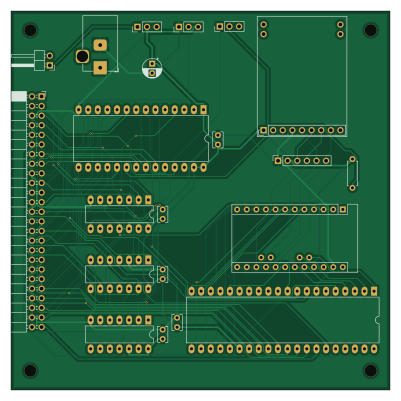
About the MZ80K SD PCB
MZ80K SD is an open source AVR/Arduino PCB design by yanataka60, published on GitHub under the MIT license. It is a 2-layer board measuring 100 × 100 mm, with 21 components from 16 distinct parts.
Its main chip is the Arduino_Pro_Mini_5V, from the AVR/Arduino family. Other key parts include the 74LS04, 2764, 8255 and 74LS30. By type, the board carries 6 ICs, 6 capacitors, 5 connectors, 3 switches and 1 resistor.
From the project
MZ-80KシリーズでSD-CARDからのアプリケーション起動、BASICなどのアプリケーションからSD-CARDへのロード、セーブを実現するものです
ROMをF000Hに置くことでMZ-80シリーズにフロッピーディスク装置を外付けした際に起動するためのFDコマンドを利用できますが、フロッピーディスク装置の代わりにSD-CARDを繋いでしまおうというものです。
アダプタを繋ぐだけでもBASIC SP-5030が約4秒で起動できるようになるなどアプリケーションランチャーとして便利に使えますが、MONITOR SP-1002にパッチをあてることでBASIC SP-5030はもちろん、ほとんどのMZ-80KアプリケーションがSD-CARD対応となります。
MZ-700もMZ-80K用アプリケーションについては同様にSD-CARD対応となりますが、標準添付のS-BASIC、Hu-BASICともMONITOR 1Z-009A、1Z-009BのCMTルーチンを利用していないためMONITOR 1Z-009A、1Z-009BにパッチをあてただけではSD-CARD対応となりません。
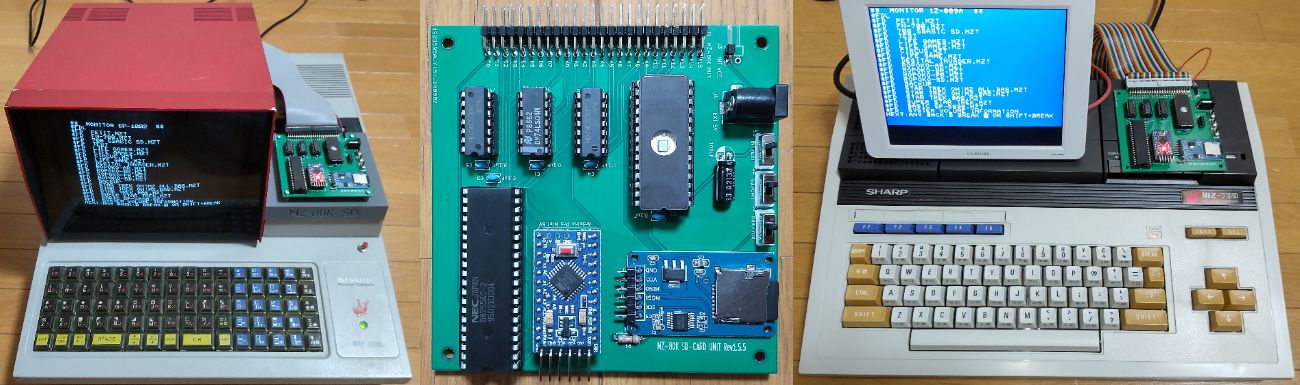
Main components on the MZ80K SD
MZ80K SD bill of materials (BOM)
21 components, 16 distinct parts.
| Qty | Part | Footprint | Refs |
|---|---|---|---|
| 1 | 74LS04 | DIP-14_W7.62mm_LongPads | U1 |
| 1 | 2764 | DIP-28_W15.24mm_LongPads | U2 |
| 1 | 8255 | DIP-40_W15.24mm_LongPads | U3 |
| 1 | Arduino_Pro_Mini_5V | Arduino_Pro_Mini | U4 |
| 2 | 74LS30 | DIP-14_W7.62mm_LongPads | U5, U6 |
| 1 | MZ-80K BUS | PinSocket_2x25_P2.54mm_Horizontal | J1 |
| 1 | Micro_SD_Card_Kit | AE-microSD-LLCNV | J2 |
| 1 | INT VCC | PinHeader_1x02_P2.54mm_Horizontal | J3 |
| 1 | EXT 5V | BarrelJack_Horizontal | J4 |
| 1 | MicroSD Card Adapter | PinSocket_1x06_P2.54mm_Vertical | J5 |
| 1 | INT/EXT | PinHeader_1x03_P2.54mm_Vertical | S1 |
| 1 | SD/CMT | PinHeader_1x03_P2.54mm_Vertical | S2 |
| 1 | 80K/700 | PinHeader_1x03_P2.54mm_Vertical | S3 |
| 5 | 0.1uF | C_Rect_L4.0mm_W2.5mm_P2.50mm | C1, C2, C3, C4, C5 |
| 1 | 100uF | CP_Radial_D5.0mm_P2.50mm | C6 |
| 1 | 10k | R_Axial_DIN0207_L6.3mm_D2.5mm_P7.62mm_Horizontal | R1 |
MZ80K SD design files
The KiCad project lives in the yanataka60/MZ80K_SD repository on GitHub; these links point at the commit this page was built from.
MZ80K SD: common questions
What microcontroller does the MZ80K SD use?
The MZ80K SD is built around the Arduino_Pro_Mini_5V, from the AVR/Arduino family.
How big is the MZ80K SD PCB?
The MZ80K SD measures 100 × 100 mm, has 2 copper layers and is 1.6 mm thick.
How many components are on the MZ80K SD?
21 components, from 16 distinct parts. The full bill of materials is listed on this page.
Where can I download the MZ80K SD design files?
From the yanataka60/MZ80K_SD repository on GitHub, which has the KiCad layout; the links under Design files point to each one.
Can I use the MZ80K SD design in my own project?
Yes, under the terms of its MIT license, which yanataka60 chose for the repository.
Can I test firmware for the MZ80K SD without the hardware?
Yes. HardLabs builds a simulation of the board from its netlist and BOM, so you can run and debug AVR/Arduino firmware against it before you order a PCB.
Similar boards
 AVR/Arduino
Magspoof
samyk
35 × 29 mm11 parts2LNo license4.2k AVR/Arduino
Redox keyboard
mattdibi
162.2 × 126.5 mm77 parts2LMIT2.0k AVR/Arduino
Labrador
espotek-org
36.8 × 34.7 mm75 parts2LNo license1.2k AVR/Arduino
V4
stuartpittaway
30 × 50 mm38 parts2LCC-BY-NC-4.01.1k AVR/Arduino
ModuleV450
30 × 61.4 mm39 parts2LCC-BY-NC-4.01.1k AVR/Arduino
Discipline
coseyfannitutti
304.9 × 122.8 mm170 parts2LCC-BY-NC-4.01.0k