
A Computer

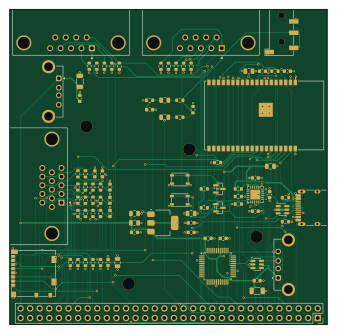
About the A Computer PCB
A Computer is an open source ESP32 PCB design by alexlutsenko7, published on GitHub under the MIT license. It is a 4-layer board measuring 84.1 × 83.4 mm, with 87 components from 33 distinct parts.
Its main chip is the ESP32-WROVER-E-N16R8, from the ESP32 family. Other key parts include the LDL1117S33R, CP2102N-A02-GQFN24R, CH9350L and USBLC6-2SC6. By type, the board carries 42 resistors, 29 capacitors, 6 ICs, 6 connectors, 2 transistors and 2 switches.
From the project
To implement my childhoods PCs on FPGA
KiCad 10 project for the second revision of the L I/O board (revision 1 = ../ExtraPCBCycloneIV/, as built). The board sits beside the QMTECH Cyclone IV core board and is wired to its U8 through J1, exactly as revision 1 (same J1 pinout, same pair-swapped wiring), so the FPGA images do not change. The ESP32 firmware needs one change (the control UART's pins, chosen at start by the PSRAM check).
Main components on the A Computer
A Computer bill of materials (BOM)
87 components, 33 distinct parts — part numbers from the project's BOM.
| Qty | Part | Footprint | Refs |
|---|---|---|---|
| 1 | LDL1117S33R | SOT-223-3_TabPin2 | U1 |
| 1 | ESP32-WROVER-E-N16R8 | ESP32-WROVER-E | U2 |
| 1 | CP2102N-A02-GQFN24R CP2102N-A02-GQFN24 | QFN-24-1EP_4x4mm_P0.5mm_EP2.6x2.6mm | U3 |
| 1 | CH9350L | LQFP-48_7x7mm_P0.5mm | U4 |
| 2 | USBLC6-2SC6 | SOT-23-6 | U5, U6 |
| 2 | MMBT3904 | SOT-23 | Q1, Q2 |
| 1 | DS1038-15FBNSiA74-0CC VGA | DSUB-15-HD_Socket_Horizontal_P2.29x2.54mm_CONNFLY_DS1038 | J2 |
| 1 | PJ-320D-4A Audio out | Jack_3.5mm_KoreanHropartsElec_PJ-320D-4A_Horizontal | J3 |
| 1 | TYPE-C-31-M-12 USB-C 5V / console | USB_C_Receptacle_HRO_TYPE-C-31-M-12 | J5 |
| 1 | 104031-0811 microSD | microSD_HC_Molex_104031-0811 | J7 |
| 1 | USB-302-T USB keyboard | USB_A_Connfly_DS1095 | J8 |
| 1 | USB-302-T USB 5V (HDMI dongle) | USB_A_Connfly_DS1095 | J9 |
| 1 | PTS810SJM250SMTRLFS EN | SW_SPST_PTS810 | SW1 |
| 1 | PTS810SJM250SMTRLFS BOOT | SW_SPST_PTS810 | SW2 |
| 5 | 10P 10p | C_0603_1608Metric | C1, C2, C3, C4, C5 |
| 11 | 0.1U 0.1u | C_0603_1608Metric | C6, C8, C13, C15, C16, C17, C21, C22 +3 |
| 7 | 10U 10u | C_0805_2012Metric | C7, C9, C10, C23, C24, C25, C27 |
| 2 | 1u | C_0603_1608Metric | C11, C14 |
| 1 | 22U 22u | C_0805_2012Metric | C12 |
| 1 | 4.7U 4.7u | C_0603_1608Metric | C18 |
Show 13 more
| Qty | Part | Footprint | Refs |
|---|---|---|---|
| 2 | 100U 100u | C_1206_3216Metric | C19, C20 |
| 3 | 510 | R_0603_1608Metric | R1, R5, R9 |
| 5 | 1k | R_0603_1608Metric | R2, R6, R10, R33, R42 |
| 3 | 2k | R_0603_1608Metric | R3, R7, R11 |
| 3 | 4.7K 4.7k | R_0603_1608Metric | R4, R8, R12 |
| 2 | 22 | R_0603_1608Metric | R13, R14 |
| 10 | 3K3 3k3 | R_0603_1608Metric | R15, R16, R17, R18, R19, R20, R21, R22 +2 |
| 9 | 10K 10k | R_0603_1608Metric | R25, R26, R27, R28, R29, R34, R35, R36 +1 |
| 1 | 100 | R_0603_1608Metric | R30 |
| 2 | 2.2K 2.2k | R_0603_1608Metric | R31, R32 |
| 2 | 5.1K 5.1k | R_0603_1608Metric | R38, R39 |
| 1 | 22K 22k | R_0603_1608Metric | R40 |
| 1 | 47K 47k | R_0603_1608Metric | R41 |
A Computer design files
The KiCad project lives in the alexlutsenko7/A_Computer repository on GitHub; these links point at the commit this page was built from.
A Computer: common questions
What microcontroller does the A Computer use?
The A Computer is built around the ESP32-WROVER-E-N16R8, from the ESP32 family.
How big is the A Computer PCB?
The A Computer measures 84.1 × 83.4 mm, has 4 copper layers and is 1.6 mm thick.
How many components are on the A Computer?
87 components, from 33 distinct parts, with part numbers taken from the project's own BOM. The full bill of materials is listed on this page.
Where can I download the A Computer design files?
From the alexlutsenko7/A_Computer repository on GitHub, which has the KiCad layout, the schematic and the BOM; the links under Design files point to each one.
Can I use the A Computer design in my own project?
Yes, under the terms of its MIT license, which alexlutsenko7 chose for the repository.
Can I test firmware for the A Computer without the hardware?
Yes. HardLabs builds a simulation of the board from its netlist and BOM, so you can run and debug ESP32 firmware against it before you order a PCB.
Earlier revisions in the repo: Extra_PCB_CycloneIV
Similar boards
 ESP32
OSO-BOOK-B1
joeycastillo
85 × 115 mm65 parts2LCC-BY-SA-4.08.1k ESP32
Powertrain
byrantech
64 × 45.4 mm171 parts4LMIT4.3k ESP32
Esp32 minimal
atopile
36.2 × 26.8 mm20 parts2LMIT4.0k ESP32
Badge
56.3 × 39 mm239 parts4LMIT4.0k ESP32
Racer
StuckAtPrototype
36 × 50.2 mm70 parts4LApache-2.03.8k ESP32
Controller
29 × 74 mm58 parts4LApache-2.03.8k