
PicoPD Pro

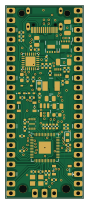
About the PicoPD Pro PCB
PicoPD Pro is an open source RP2040/RP2350 PCB design by CentyLab, published on GitHub. It is a 4-layer board measuring 20.5 × 50.8 mm, with 61 components from 26 distinct parts.
Its main chip is the RP2040, from the RP2040/RP2350 family. Other key parts include the AP33772S, W25Q16JVUXIQ_TR, AON7262E, AP2204K-3.3 and C221896. By type, the board carries 23 capacitors, 21 resistors, 9 ICs, 2 transistors, 2 diodes and 1 crystal.
It belongs with the power & battery designs in this gallery.
From the project
Repo for PicoPD Pro hardware/software and documentation
AP33772S CircuitPython Library -> Big thanks to @hansendc
Calling usbpd.displayProfiles() without Serial.begin() can soft-brick your PicoPD. Causing the IC to be non-recognizable by your computer. You will have to use PicoProbe to reflash the chip. Check out @Patronics PicoProbePCB if you would like to make a stable fixture for firmware debugging.
If you want to use PicoPD Pro as an AP33772S evalulation board with your own micro-controller, flash the board with AP33772SEval.uf2** using the drag and drop method. This firmware will config GP0 and GP1 as INPUT to prevent I2C interferance with…
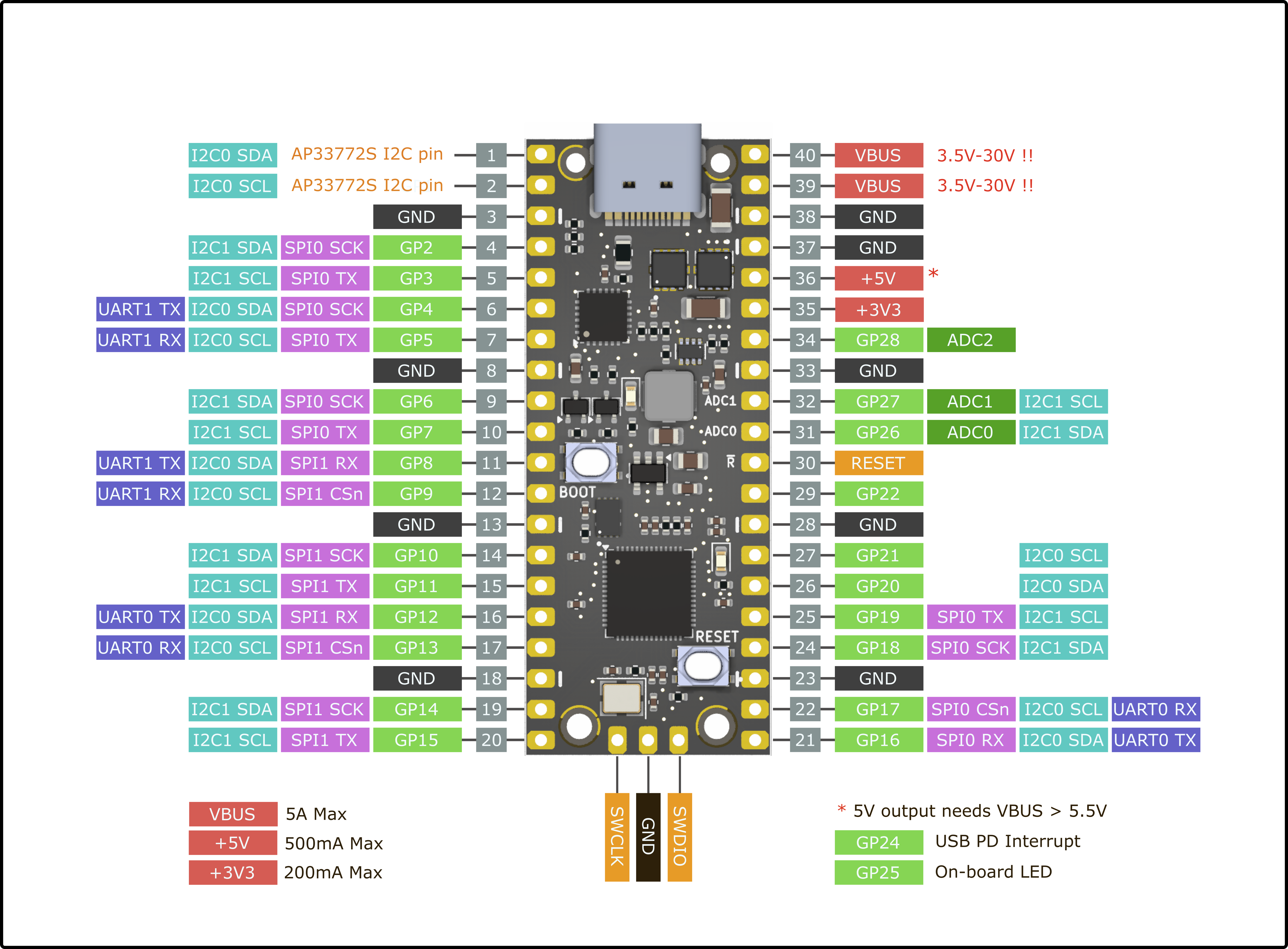
Main components on the PicoPD Pro
PicoPD Pro bill of materials (BOM)
61 components, 26 distinct parts — part numbers from the project's BOM.
| Qty | Part | Footprint | Refs |
|---|---|---|---|
| 1 | AP33772S | QFN-24-1EP_4x4mm_P0.5mm_EP2.6x2.6mm | U1 |
| 1 | W25Q16JVUXIQ_TR | 8-USON | U3 |
| 1 | RP2040 | QFN-56-1EP_7x7mm_P0.4mm_EP3.2x3.2mm | U4 |
| 2 | AON7262E | DFN-8(3.3x3.3) | U5, U6 |
| 1 | AP2204K-3.3 | SOT-23-5 | U7 |
| 2 | C221896 ~ | Button_3.2x2.5 | U8, U9 |
| 1 | TPS62933DRLR | SOT583 | U10 |
| 2 | BSS138 | SOT-323_SC-70 | Q1, Q2 |
| 1 | 12MHZ 12MHz | Crystal_SMD_3225-4Pin_3.2x2.5mm | Y1 |
| 1 | USB_C_RECEPTACLE_USB2.0_16P USB_C_Receptacle_USB2.0_16P | USB_C_GSwitch | J1 |
| 1 | C77131 Thermistor_NTC | R_0402_1005Metric | TH1 |
| 2 | C12624 GREEN | LED_0603_1608Metric | D1, D2 |
| 1 | 3.3U 3.3u | L_Wuerth_MAPI-4020 | L1 |
| 2 | 1u | C_0603_1608Metric | C1, C24 |
| 12 | 100NF 100nF | C_0402_1005Metric | C2, C3, C6, C9, C10, C11, C12, C14 +4 |
| 2 | 10U 10u | C_1206_3216Metric | C4, C5 |
| 2 | 30PF 30pF | C_0402_1005Metric | C7, C8 |
| 2 | 2.2UF 2.2uF | C_0402_1005Metric | C13, C18 |
| 2 | 22U 22u | C_0805_2012Metric | C20, C25 |
| 1 | 33N 33n | C_0603_1608Metric | C23 |
Show 6 more
| Qty | Part | Footprint | Refs |
|---|---|---|---|
| 8 | 5.1K 5.1k | R_0402_1005Metric | R1, R2, R3, R4, R5, R6, R19, R21 |
| 1 | 5m | R_0805_2012Metric | R7 |
| 3 | 1k | R_0402_1005Metric | R8, R13, R15 |
| 5 | 10K 10k | R_0402_1005Metric | R9, R10, R14, R18, R20 |
| 3 | 27R | R_0402_1005Metric | R11, R12, R16 |
| 1 | 52.3K 52.3k | R_0402_1005Metric | R17 |
PicoPD Pro design files
The KiCad project lives in the CentyLab/PicoPD_Pro repository on GitHub; these links point at the commit this page was built from.
- LayoutHardware/Hardware.kicad_pcb
- SchematicHardware/Hardware.kicad_sch
- BOMHardware/bom.csv
PicoPD Pro: common questions
What microcontroller does the PicoPD Pro use?
The PicoPD Pro is built around the RP2040, from the RP2040/RP2350 family.
How big is the PicoPD Pro PCB?
The PicoPD Pro measures 20.5 × 50.8 mm, has 4 copper layers and is 1.6 mm thick.
How many components are on the PicoPD Pro?
61 components, from 26 distinct parts, with part numbers taken from the project's own BOM. The full bill of materials is listed on this page.
Where can I download the PicoPD Pro design files?
From the CentyLab/PicoPD_Pro repository on GitHub, which has the KiCad layout, the schematic and the BOM; the links under Design files point to each one.
Can I use the PicoPD Pro design in my own project?
The repository has no license, so all rights stay with CentyLab. Use it as a reference, and ask the author before reusing the design.
Can I test firmware for the PicoPD Pro without the hardware?
Yes. HardLabs builds a simulation of the board from its netlist and BOM, so you can run and debug RP2040/RP2350 firmware against it before you order a PCB.
Similar boards
 RP2040/RP2350
Open Book Abridged Edition
joeycastillo
85 × 115 mm29 parts2LCC-BY-SA-4.08.1k RP2040/RP2350
Corne
foostan
277.2 × 107.5 mm164 parts2LCC-BY-4.07.7k RP2040/RP2350
Corne
277.2 × 107.5 mm164 parts2LCC-BY-4.07.7k RP2040/RP2350
Hid remapper
jfedor2
100 × 100 mm124 parts2LMIT1.7k RP2040/RP2350
MSA
Mentra-Community
30.5 × 138 mm61 parts2LMIT1.2k RP2040/RP2350
Open Source Smart Glasses
93 × 10.5 mm80 parts4LMIT1.2k