
Rp2040-devboard

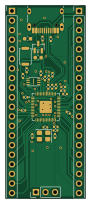
About the Rp2040-devboard PCB
Rp2040-devboard is an open source RP2040/RP2350 PCB design by Cosmin-Mare, published on GitHub. It is a 2-layer board measuring 21 × 51 mm, with 33 components from 16 distinct parts.
Its main chip is the RP2040, from the RP2040/RP2350 family. Other key parts include the MCP1700T-3302E/TT and W25Q16JVUXIQ. By type, the board carries 17 capacitors, 7 resistors, 4 connectors, 3 ICs, 1 crystal and 1 switch.
It belongs with the dev boards & breakouts designs in this gallery.
From the project
A small, Pico-style development board built around the RP2040, designed in KiCad 10. USB-C, 3.3 V LDO, 2 MB QSPI flash, a BOOTSEL button, SWD header, and every GPIO broken out to two 20-pin 2.54 mm headers.
A small, Pico-style development board built around the RP2040, designed in KiCad 10. USB-C, 3.3 V LDO, 2 MB QSPI flash, a BOOTSEL button, SWD header, and every GPIO broken out to two 20-pin 2.54 mm headers.
1. Order – follow docs/ORDERING.md. Upload fabrication/jlcpcb/devboard-gerbers.zip, then bom.csv and cpl.csv. 2. Solder the two 20-pin headers (and optionally the SWD header) – see docs/ASSEMBLY.md. 3. Bring up – hold BOOTSEL, plug in USB-C, copy a .uf2 onto the RPI-RP2 drive. See docs/BRINGUP.md.
Main components on the Rp2040-devboard
Rp2040-devboard bill of materials (BOM)
33 components, 16 distinct parts — part numbers from the project's BOM.
| Qty | Part | Footprint | Refs |
|---|---|---|---|
| 1 | RP2040 Raspberry Pi | QFN-56-1EP_7x7mm_P0.4mm_EP3.2x3.2mm | U1 |
| 1 | MCP1700T-3302E/TT MCP1700x-330xxTT Microchip Tech | SOT-23 | U2 |
| 1 | W25Q16JVUXIQ W25Q16JVZPIQ TR Winbond Elec | Winbond_USON-8-1EP_3x2mm_P0.5mm_EP0.2x1.6mm | U3 |
| 1 | X322512MSB4SI 12MHz YXC Crystal Oscillators | Crystal_SMD_3225-4Pin_3.2x2.5mm | Y1 |
| 1 | TYPE-C-31-M-12 USB_C_Receptacle_USB2.0_14P Korean Hroparts Elec | USB_C_Receptacle_HRO_TYPE-C-31-M-12 | J1 |
| 2 | CONN_01X20 Conn_01x20 BOOMELE(Boom Precision Elec) | PinHeader_1x20_P2.54mm_Vertical | J2, J3 |
| 1 | CONN_01X03 Conn_01x03 BOOMELE(Boom Precision Elec) | PinHeader_1x03_P2.54mm_Vertical | J4 |
| 1 | TS-1088-AR02016 SW_Push XUNPU | SW_Push_SPST_NO_Alps_SKRK | SW1 |
| 2 | CL05A105KA5NQNC 1uF Samsung Electro-Mechanics | C_0402_1005Metric | C1, C10 |
| 11 | CL05B104KO5NNNC 0.1uF Samsung Electro-Mechanics | C_0402_1005Metric | C2, C3, C4, C5, C6, C7, C8, C9 +3 |
| 2 | CL10A106KP8NNNC 10uF Samsung Electro-Mechanics | C_0603_1608Metric | C13, C14 |
| 2 | 0402CG330J500NT 33pF FH (Guangdong Fenghua Advanced Tech) | C_0402_1005Metric | C15, C16 |
| 2 | 0402WGF5101TCE 5.1k UNI-ROYAL(Uniroyal Elec) | R_0402_1005Metric | R1, R2 |
| 2 | 0402WGF270JTCE 27 UNI-ROYAL(Uniroyal Elec) | R_0402_1005Metric | R3, R4 |
| 2 | 0402WGF1001TCE 1k UNI-ROYAL(Uniroyal Elec) | R_0402_1005Metric | R5, R7 |
| 1 | 0402WGF1002TCE 10k UNI-ROYAL(Uniroyal Elec) | R_0402_1005Metric | R6 |
Rp2040-devboard design files
The KiCad project lives in the Cosmin-Mare/rp2040-devboard repository on GitHub; these links point at the commit this page was built from.
Rp2040-devboard: common questions
What microcontroller does the Rp2040-devboard use?
The Rp2040-devboard is built around the RP2040, from the RP2040/RP2350 family.
How big is the Rp2040-devboard PCB?
The Rp2040-devboard measures 21 × 51 mm, has 2 copper layers and is 1.6 mm thick.
How many components are on the Rp2040-devboard?
33 components, from 16 distinct parts, with part numbers taken from the project's own BOM. The full bill of materials is listed on this page.
Where can I download the Rp2040-devboard design files?
From the Cosmin-Mare/rp2040-devboard repository on GitHub, which has the KiCad layout, the schematic and the BOM; the links under Design files point to each one.
Can I use the Rp2040-devboard design in my own project?
The repository has no license, so all rights stay with Cosmin-Mare. Use it as a reference, and ask the author before reusing the design.
Can I test firmware for the Rp2040-devboard without the hardware?
Yes. HardLabs builds a simulation of the board from its netlist and BOM, so you can run and debug RP2040/RP2350 firmware against it before you order a PCB.
Similar boards
 RP2040/RP2350
Open Book Abridged Edition
joeycastillo
85 × 115 mm29 parts2LCC-BY-SA-4.08.1k RP2040/RP2350
Corne
foostan
277.2 × 107.5 mm164 parts2LCC-BY-4.07.7k RP2040/RP2350
Corne
277.2 × 107.5 mm164 parts2LCC-BY-4.07.7k RP2040/RP2350
LogicAnalyzer
gusmanb
57 × 55.2 mm6 parts2LGPL-3.05.0k RP2040/RP2350
Jitx design
55.5 × 65 mm26 parts4LGPL-3.05.0k RP2040/RP2350
Main
google
98 × 71 mm102 parts2LApache-2.02.9k