
Kicad automation

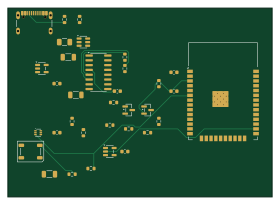
About the Kicad automation PCB
Kicad automation is an open source ESP32 PCB design by Polymath-AS, published on GitHub under the MIT license. It is a 2-layer board measuring 70 × 50 mm, with 34 components from 34 distinct parts.
Its main chip is the ESP32-WROOM-32, from the ESP32 family. Other key parts include the CH340C USB-UART, AP2112K-3.3, TMP102, USBLC6-2SC6 and 74AHCT1G125. By type, the board carries 14 resistors, 9 capacitors, 6 ICs, 2 transistors, 1 connector and 1 fuse.
It belongs with the sensors designs in this gallery.
From the project
Dockerized kicad and mcp tools with autorouter capability and skillset for using the tools.
This repository provides a reproducible Docker runtime for agent-driven KiCad work:
After cloning, start the KiCad container and Codex together:
The first run builds the Docker image, waits for the MCP endpoint, and then opens Codex. No token setup is required. Docker Desktop must be installed and running.
Running plain codex is also safe: the KiCad MCP server is optional during Codex startup, so an unavailable container no longer prevents the session from opening. Start the container and open a new Codex session when you need KiCad tools.
Main components on the Kicad automation
Kicad automation bill of materials (BOM)
34 components, 34 distinct parts.
| Qty | Part | Footprint | Refs |
|---|---|---|---|
| 1 | ESP32-WROOM-32 | ESP32-WROOM-32 | U1 |
| 1 | CH340C USB-UART | SOIC-16_3.9x9.9mm_P1.27mm | U2 |
| 1 | AP2112K-3.3 | SOT-23-5 | U3 |
| 1 | TMP102 | SOT-563 | U4 |
| 1 | USBLC6-2SC6 | SOT-23-6 | U5 |
| 1 | 74AHCT1G125 | SOT-23-5 | U6 |
| 1 | MMBT3904 (BOOT) | SOT-23 | Q1 |
| 1 | MMBT3904 (RESET) | SOT-23 | Q2 |
| 1 | USB-C USB2.0 | USB_C_Receptacle_GCT_USB4105-xx-A_16P_TopMnt_Horizontal | J1 |
| 1 | 500mA resettable fuse | Fuse_1206_3216Metric | F1 |
| 1 | WS2812B addressable RGB | LED_WS2812B_PLCC4_5.0x5.0mm_P3.2mm | D1 |
| 1 | 10uF USB bulk | C_1206_3216Metric | C1 |
| 1 | 1uF LDO input | C_0603_1608Metric | C2 |
| 1 | 10uF 3V3 bulk | C_1206_3216Metric | C3 |
| 1 | 100nF ESP32 | C_0603_1608Metric | C4 |
| 1 | 100nF CH340 V3 | C_0603_1608Metric | C5 |
| 1 | 100nF TMP102 | C_0603_1608Metric | C6 |
| 1 | 100nF AHCT | C_0603_1608Metric | C7 |
| 1 | 100nF EN delay | C_0603_1608Metric | C8 |
| 1 | 10uF LED bulk | C_1206_3216Metric | C9 |
Show 14 more
| Qty | Part | Footprint | Refs |
|---|---|---|---|
| 1 | 5.1k CC1 | R_0603_1608Metric | R1 |
| 1 | 5.1k CC2 | R_0603_1608Metric | R2 |
| 1 | 22R USB D+ | R_0603_1608Metric | R3 |
| 1 | 22R USB D- | R_0603_1608Metric | R4 |
| 1 | 10k EN pull-up | R_0603_1608Metric | R5 |
| 1 | 10k IO0 pull-up | R_0603_1608Metric | R6 |
| 1 | 10k DTR base | R_0603_1608Metric | R7 |
| 1 | 10k RTS base | R_0603_1608Metric | R8 |
| 1 | 100k BOOT base pulldown | R_0603_1608Metric | R9 |
| 1 | 100k RESET base pulldown | R_0603_1608Metric | R10 |
| 1 | 4.7k SDA pull-up | R_0603_1608Metric | R11 |
| 1 | 4.7k SCL pull-up | R_0603_1608Metric | R12 |
| 1 | 330R LED data | R_0603_1608Metric | R13 |
| 1 | 10k ALERT pull-up | R_0603_1608Metric | R14 |
Kicad automation design files
The KiCad project lives in the Polymath-AS/kicad_automation repository on GitHub; these links point at the commit this page was built from.
Kicad automation: common questions
What microcontroller does the Kicad automation use?
The Kicad automation is built around the ESP32-WROOM-32, from the ESP32 family.
How big is the Kicad automation PCB?
The Kicad automation measures 70 × 50 mm, has 2 copper layers and is 1.6 mm thick.
How many components are on the Kicad automation?
34 components, from 34 distinct parts. The full bill of materials is listed on this page.
Where can I download the Kicad automation design files?
From the Polymath-AS/kicad_automation repository on GitHub, which has the KiCad layout and the schematic; the links under Design files point to each one.
Can I use the Kicad automation design in my own project?
Yes, under the terms of its MIT license, which Polymath-AS chose for the repository.
Can I test firmware for the Kicad automation without the hardware?
Yes. HardLabs builds a simulation of the board from its netlist and BOM, so you can run and debug ESP32 firmware against it before you order a PCB.
Similar boards
 ESP32
ESP32Open Book Abridged Edition
joeycastillo
85 × 115 mm65 parts2LCC-BY-SA-4.08.1k ESP32
ESP32Powertrain
byrantech
64 × 45.4 mm171 parts4LMIT4.3k ESP32
ESP32Esp32 minimal
atopile
36.2 × 26.8 mm20 parts2LMIT4.0k ESP32
ESP32Badge
56.3 × 39 mm239 parts4LMIT4.0k ESP32
ESP32Controller
StuckAtPrototype
29 × 74 mm58 parts4LApache-2.03.8k ESP32
ESP32Racer
36 × 50.2 mm70 parts4LApache-2.03.8k