
Pico keyboard ime terminal

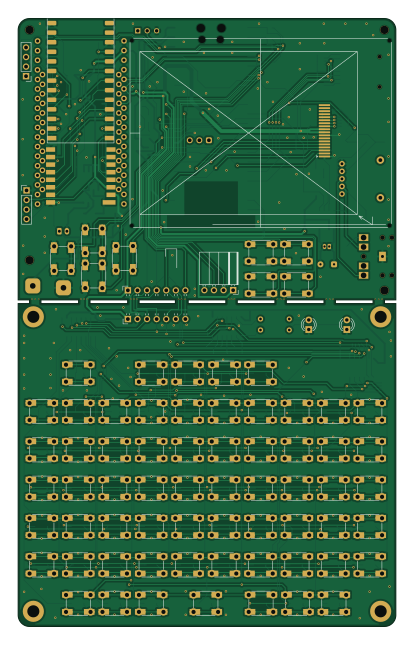
About the Pico keyboard ime terminal PCB
Pico keyboard ime terminal is an open source RP2040/RP2350 PCB design by pondahai, published on GitHub under the MIT license. It is a 2-layer board measuring 100 × 161 mm, with 202 components from 127 distinct parts.
Its main chip is the Pico, from the RP2040/RP2350 family. Other key parts include the 74HC595, 74HC165, MCP73831-2-OT, HT6872 and XB8089D0. By type, the board carries 74 switches, 65 diodes, 24 resistors, 12 capacitors, 10 connectors and 7 ICs.
It belongs with the keyboards designs in this gallery.
Main components on the Pico keyboard ime terminal
Pico keyboard ime terminal bill of materials (BOM)
202 components, 127 distinct parts — part numbers from the project's BOM.
| Qty | Part | Footprint | Refs |
|---|---|---|---|
| 2 | 74HC595 | SOIC-16_3.9x9.9mm_P1.27mm | U1, U4 |
| 1 | 74HC165 | SOIC-16_3.9x9.9mm_P1.27mm | U2 |
| 1 | Pico | RaspberryPi_Pico_W_SMD_HandSolder | U3 |
| 1 | MCP73831-2-OT | SOT-23-5 | U5 |
| 1 | HT6872 | SOIC-8_3.9x4.9mm_P1.27mm | U6 |
| 1 | XB8089D0 | SOIC-8-1EP_3.9x4.9mm_P1.27mm_EP2.41x3.3mm | U7 |
| 1 | HT-RA62_/_RA-01SH_LORA_RADIO HT-RA62_/_RA-01SH_LoRa_radio | HT-RA62 RA-01SH LoRa radio | M1 |
| 1 | PROMICRO_NRF52840 ProMicro_NRF52840 | ProMicro nrf52840 | M2 |
| 1 | ESP32_LORA_V3 | LoRa-ESP32-V3 | M3 |
| 1 | T114_V2 | T114 | M4 |
| 1 | 2N7002 | SOT-23_Handsoldering | Q1 |
| 1 | DMG2305UX | SOT-23_Handsoldering | Q2 |
| 1 | CONN_01X07 Conn_01x07 | PinHeader_1x07_P2.54mm_Horizontal | J1 |
| 1 | STP0280A1-240320-18P | STP0280A1-240320 | J2 |
| 1 | KEYBOARD | PinSocket_1x07_P2.54mm_Horizontal | J3 |
| 1 | UART | PinSocket_1x04_P2.54mm_Horizontal | J4 |
| 1 | I2C Oled screen | PinHeader_1x04_P2.54mm_Vertical | J5 |
| 1 | AUDIOJACK3_SWITCHTR AudioJack3_SwitchTR | audiojack-3.5mm-5p | J6 |
| 1 | speaker | SolderWire-0.1sqmm_1x02_P3.6mm_D0.4mm_OD1mm | J7 |
| 1 | speaker | Hirose_DF13-02P-1.25DSA_1x02_P1.25mm_Vertical | J8 |
Show 107 more
| Qty | Part | Footprint | Refs |
|---|---|---|---|
| 1 | GPS Pins | PinHeader_1x04_P2.54mm_Vertical | J9 |
| 1 | Micro_SD_Card | sd-card | J10 |
| 1 | Li-Poly PH2.0 | JST_PH_B2B-PH-K_1x02_P2.00mm_Vertical | BT1 |
| 1 | 10K 10k | potentiometre disk 5pin | RV1 |
| 1 | 1 ! ㄅ | SW_Push_1P1T_NO_CK_KSC7xxJ | SW1 |
| 1 | Q ㄆ | SW_Push_1P1T_NO_CK_KSC7xxJ | SW2 |
| 1 | A ㄇ | SW_Push_1P1T_NO_CK_KSC7xxJ | SW3 |
| 1 | Z ㄈ | SW_Push_1P1T_NO_CK_KSC7xxJ | SW4 |
| 1 | 2 @ ㄉ | SW_Push_1P1T_NO_CK_KSC7xxJ | SW5 |
| 1 | W ㄊ | SW_Push_1P1T_NO_CK_KSC7xxJ | SW6 |
| 1 | S ㄋ | SW_Push_1P1T_NO_CK_KSC7xxJ | SW7 |
| 1 | X ㄌ | SW_Push_1P1T_NO_CK_KSC7xxJ | SW8 |
| 1 | 3 # ˇ | SW_Push_1P1T_NO_CK_KSC7xxJ | SW9 |
| 1 | E ㄍ | SW_Push_1P1T_NO_CK_KSC7xxJ | SW10 |
| 1 | D ㄎ | SW_Push_1P1T_NO_CK_KSC7xxJ | SW11 |
| 1 | C ㄏ | SW_Push_1P1T_NO_CK_KSC7xxJ | SW12 |
| 1 | 4 $ ˋ | SW_Push_1P1T_NO_CK_KSC7xxJ | SW13 |
| 1 | R ㄐ | SW_Push_1P1T_NO_CK_KSC7xxJ | SW14 |
| 1 | F ㄑ | SW_Push_1P1T_NO_CK_KSC7xxJ | SW15 |
| 1 | V ㄒ | SW_Push_1P1T_NO_CK_KSC7xxJ | SW16 |
| 1 | 5 % ㄓ | SW_Push_1P1T_NO_CK_KSC7xxJ | SW17 |
| 1 | T ㄔ | SW_Push_1P1T_NO_CK_KSC7xxJ | SW18 |
| 1 | G ㄕ | SW_Push_1P1T_NO_CK_KSC7xxJ | SW19 |
| 1 | B ㄖ | SW_Push_1P1T_NO_CK_KSC7xxJ | SW20 |
| 1 | 6 ^ ˊ | SW_Push_1P1T_NO_CK_KSC7xxJ | SW21 |
| 1 | Y ㄗ | SW_Push_1P1T_NO_CK_KSC7xxJ | SW22 |
| 1 | H ㄘ | SW_Push_1P1T_NO_CK_KSC7xxJ | SW23 |
| 1 | N ㄙ | SW_Push_1P1T_NO_CK_KSC7xxJ | SW24 |
| 1 | 7 & ˙ | SW_Push_1P1T_NO_CK_KSC7xxJ | SW25 |
| 1 | U ㄧ | SW_Push_1P1T_NO_CK_KSC7xxJ | SW26 |
| 1 | J ㄨ | SW_Push_1P1T_NO_CK_KSC7xxJ | SW27 |
| 1 | M ㄩ | SW_Push_1P1T_NO_CK_KSC7xxJ | SW28 |
| 1 | 8 * ㄚ | SW_Push_1P1T_NO_CK_KSC7xxJ | SW29 |
| 1 | I ㄛ | SW_Push_1P1T_NO_CK_KSC7xxJ | SW30 |
| 1 | K ㄜ | SW_Push_1P1T_NO_CK_KSC7xxJ | SW31 |
| 1 | , < ㄝ | SW_Push_1P1T_NO_CK_KSC7xxJ | SW32 |
| 1 | 9 ( ㄞ | SW_Push_1P1T_NO_CK_KSC7xxJ | SW33 |
| 1 | O ㄟ | SW_Push_1P1T_NO_CK_KSC7xxJ | SW34 |
| 1 | L ㄠ | SW_Push_1P1T_NO_CK_KSC7xxJ | SW35 |
| 1 | . > ㄡ | SW_Push_1P1T_NO_CK_KSC7xxJ | SW36 |
| 1 | 0 ) ㄢ | SW_Push_1P1T_NO_CK_KSC7xxJ | SW37 |
| 1 | P ㄣ | SW_Push_1P1T_NO_CK_KSC7xxJ | SW38 |
| 1 | ; : ㄤ | SW_Push_1P1T_NO_CK_KSC7xxJ | SW39 |
| 1 | / ? ㄥ | SW_Push_1P1T_NO_CK_KSC7xxJ | SW40 |
| 1 | - _ ㄦ | SW_Push_1P1T_NO_CK_KSC7xxJ | SW41 |
| 1 | [ { | SW_Push_1P1T_NO_CK_KSC7xxJ | SW42 |
| 1 | ' " | SW_Push_1P1T_NO_CK_KSC7xxJ | SW43 |
| 1 | SHIFT | SW_Push_1P1T_NO_CK_KSC7xxJ | SW44 |
| 1 | = + | SW_Push_1P1T_NO_CK_KSC7xxJ | SW45 |
| 1 | ] } | SW_Push_1P1T_NO_CK_KSC7xxJ | SW46 |
| 1 | ENTER | SW_Push_1P1T_NO_CK_KSC7xxJ | SW47 |
| 1 | SPACE | SW_Push_1P1T_NO_CK_KSC7xxJ | SW48 |
| 1 | ` ~ | SW_Push_1P1T_NO_CK_KSC7xxJ | SW49 |
| 1 | TAB | SW_Push_1P1T_NO_CK_KSC7xxJ | SW50 |
| 1 | CAPS | SW_Push_1P1T_NO_CK_KSC7xxJ | SW51 |
| 1 | CTRL | SW_Push_1P1T_NO_CK_KSC7xxJ | SW52 |
| 1 | ALT | SW_Push_1P1T_NO_CK_KSC7xxJ | SW53 |
| 1 | BACK | SW_Push_1P1T_NO_CK_KSC7xxJ | SW54 |
| 1 | \ | | SW_Push_1P1T_NO_CK_KSC7xxJ | SW55 |
| 1 | PGUP | SW_Push_1P1T_NO_CK_KSC7xxJ | SW56 |
| 1 | PGDN | SW_Push_1P1T_NO_CK_KSC7xxJ | SW57 |
| 1 | ⇧ | SW_Push_1P1T_NO_CK_KSC7xxJ | SW58 |
| 1 | ⇩ | SW_Push_1P1T_NO_CK_KSC7xxJ | SW59 |
| 1 | ⇦ | SW_Push_1P1T_NO_CK_KSC7xxJ | SW60 |
| 1 | ⇨ | SW_Push_1P1T_NO_CK_KSC7xxJ | SW61 |
| 1 | ESC | SW_Push_1P1T_NO_CK_KSC7xxJ | SW62 |
| 1 | bb up | SW_Push_1P1T_NO_CK_KSC7xxJ | SW63 |
| 1 | POWER | SW_CuK_JS202011AQN_DPDT_Angled | SW64 |
| 1 | bb down | SW_Push_1P1T_NO_CK_KSC7xxJ | SW65 |
| 1 | bb left | SW_Push_1P1T_NO_CK_KSC7xxJ | SW66 |
| 1 | bb right | SW_Push_1P1T_NO_CK_KSC7xxJ | SW67 |
| 1 | bb a | SW_Push_1P1T_NO_CK_KSC7xxJ | SW68 |
| 1 | bb b | SW_Push_1P1T_NO_CK_KSC7xxJ | SW69 |
| 1 | bb c | SW_Push_1P1T_NO_CK_KSC7xxJ | SW70 |
| 1 | bb d | SW_Push_1P1T_NO_CK_KSC7xxJ | SW71 |
| 1 | RUN | skrp | SW72 |
| 1 | RST | skrp | SW75 |
| 1 | BTN | skrp | SW76 |
| 1 | VBAT | TestPoint_THTPad_5.0x5.0mm_Drill2.0mm | TP6 |
| 1 | GND | TestPoint_THTPad_5.0x5.0mm_Drill2.0mm | TP7 |
| 62 | 1N4148 | D_0805_JUMPER | D1, D2, D3, D4, D5, D6, D7, D8 +54 |
| 1 | ㄅ | LED_D3.0mm_Clear | D63 |
| 1 | ENG | LED_D3.0mm_Clear | D64 |
| 1 | charge | LED_0805_2012Metric_Pad1.15x1.40mm_HandSolder | D65 |
| 3 | 100N 100n | C_0805_2012Metric_Pad1.18x1.45mm_HandSolder | C1, C2, C3 |
| 1 | 33N 33n | C_0805_2012Metric_Pad1.18x1.45mm_HandSolder | C4 |
| 2 | 100N/10U 100n/10u | C_0805_2012Metric_Pad1.18x1.45mm_HandSolder | C5, C6 |
| 1 | 1u | C_0805_2012Metric_Pad1.18x1.45mm_HandSolder | C7 |
| 1 | 1U/NC 1u/NC | C_0805_2012Metric_Pad1.18x1.45mm_HandSolder | C8 |
| 3 | 100NF 100nF | C_0805_2012Metric_Pad1.18x1.45mm_HandSolder | C9, C10, C11 |
| 1 | 100NF 100nF | C_1206_3216Metric_Pad1.33x1.80mm_HandSolder | C12 |
| 2 | R_US | R_Axial_DIN0204_L3.6mm_D1.6mm_P7.62mm_Horizontal_0805 | R1, R2 |
| 1 | 330 | R_0805_2012Metric_Pad1.20x1.40mm_HandSolder | R3 |
| 4 | 10K 10k | R_0805_2012Metric_Pad1.20x1.40mm_HandSolder | R4, R7, R15, R18 |
| 1 | 5K1 5k1 | R_0805_2012Metric_Pad1.20x1.40mm_HandSolder | R5 |
| 1 | 1k | R_0805_2012Metric_Pad1.20x1.40mm_HandSolder | R6 |
| 1 | 270 | R_0805_2012Metric_Pad1.20x1.40mm_HandSolder | R8 |
| 1 | NC/150 | R_0805_2012Metric_Pad1.20x1.40mm_HandSolder | R9 |
| 1 | 0/15K 0/15k | R_0805_2012Metric_Pad1.20x1.40mm_HandSolder | R10 |
| 1 | 0/NC | R_0805_2012Metric_Pad1.20x1.40mm_HandSolder | R11 |
| 2 | 12K/100 12k/100 | R_0805_2012Metric_Pad1.20x1.40mm_HandSolder | R12, R13 |
| 1 | NC/10K NC/10k | R_0805_2012Metric_Pad1.20x1.40mm_HandSolder | R14 |
| 2 | 10M | R_0805_2012Metric_Pad1.20x1.40mm_HandSolder | R16, R17 |
| 1 | 1k | R_1206_3216Metric_Pad1.30x1.75mm_HandSolder | R19 |
| 2 | 10K | R_Array_Convex_4x0603 | RN1, RN2 |
| 1 | 10 | R_Array_Convex_4x0603 | RN3 |
| 2 | 47K 47k | R_Array_Convex_4x0603 | RN4, RN5 |
Pico keyboard ime terminal design files
The KiCad project lives in the pondahai/pico_keyboard_ime_terminal repository on GitHub; these links point at the commit this page was built from.
Pico keyboard ime terminal: common questions
What microcontroller does the Pico keyboard ime terminal use?
The Pico keyboard ime terminal is built around the Pico, from the RP2040/RP2350 family.
How big is the Pico keyboard ime terminal PCB?
The Pico keyboard ime terminal measures 100 × 161 mm, has 2 copper layers and is 1.6 mm thick.
How many components are on the Pico keyboard ime terminal?
202 components, from 127 distinct parts, with part numbers taken from the project's own BOM. The full bill of materials is listed on this page.
Where can I download the Pico keyboard ime terminal design files?
From the pondahai/pico_keyboard_ime_terminal repository on GitHub, which has the KiCad layout, the schematic and the BOM; the links under Design files point to each one.
Can I use the Pico keyboard ime terminal design in my own project?
Yes, under the terms of its MIT license, which pondahai chose for the repository.
Can I test firmware for the Pico keyboard ime terminal without the hardware?
Yes. HardLabs builds a simulation of the board from its netlist and BOM, so you can run and debug RP2040/RP2350 firmware against it before you order a PCB.
Similar boards
 RP2040/RP2350
Open Book Abridged Edition
joeycastillo
85 × 115 mm29 parts2LCC-BY-SA-4.08.1k RP2040/RP2350
Corne
foostan
277.2 × 107.5 mm164 parts2LCC-BY-4.07.7k RP2040/RP2350
Corne
277.2 × 107.5 mm164 parts2LCC-BY-4.07.7k RP2040/RP2350
LogicAnalyzer
gusmanb
57 × 55.2 mm6 parts2LGPL-3.05.0k RP2040/RP2350
Jitx design
55.5 × 65 mm26 parts4LGPL-3.05.0k RP2040/RP2350
Pro V2
kata0510
290.1 × 130 mm270 parts2LMIT2.3k