
PendingHome

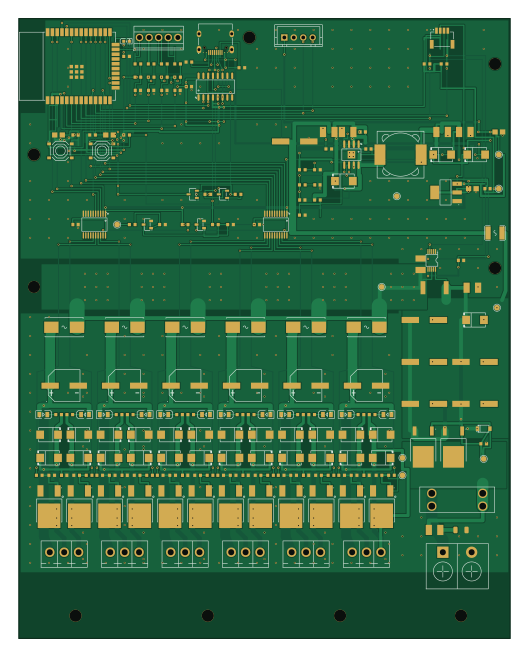
About the PendingHome PCB
PendingHome is an open source ESP32 PCB design by syncmeta, published on GitHub under the MIT license. It is a 2-layer board measuring 130 × 164 mm, with 199 components from 49 distinct parts.
Its main chip is the ESP32-WROOM-32E-N4, from the ESP32 family. Other key parts include the C2864837, C524806, C6186, C84681 and C52140501. By type, the board carries 66 resistors, 43 capacitors, 28 diodes, 18 transistors, 13 LEDs and 11 connectors.
It belongs with the iot & wireless designs in this gallery.
From the project
全屋双色温灯光控制方案 基于 HA 和 ESPHome
6 通道 CCT(色温可调)LED 灯带驱动板 —— 24V 输入、单板 12A 连续设计,ESP32 + ESPHome, 接入 Home Assistant。用户零焊接:贴片与插件件全部由嘉立创代焊,收到即成品。
git config core.hooksPath .githooks 这一句不能漏**(在仓库根执行,不是在本目录)。 Git 的钩子不随仓库克隆自动生效,不执行这句,下面那个防护就是摆设。
改板脚本要用 KiCad 自带的 Python(系统 python3 里没有 pcbnew):
这个坑踩过一次,而且是静默的 —— 不会报错,不会提示,只有 diff 里看得见。
用 KiCad 图形界面打开本工程后,hardware/cct-main.kicadpro` 里的这些东西可能被重置成出厂默认:
- 5 个网络类(Default / TRUNK / PWR2 / PWR1 / GND)被砍成只剩 Default - 14 条 netclasspatterns(把 V24、CHVOUT、GND 等网络分配到各类的规则)被清空 - Default 的 trackwidth 从 0.25 掉到 0.2、mintextheight` 从 0.5 变成 0.8
Main components on the PendingHome
PendingHome bill of materials (BOM)
199 components, 49 distinct parts — part numbers from the project's BOM.
| Qty | Part | Footprint | Refs |
|---|---|---|---|
| 1 | C2864837 | VSSOP-10_L3.0-W3.0-P0.50-LS4.9-BL | U1 |
| 1 | C524806 | SOIC-8_L5.0-W4.0-P1.27-LS6.0-BL-EP2.0 | U2 |
| 1 | C6186 | SOT-223-3_L6.5-W3.4-P2.30-LS7.0-BR | U3 |
| 1 | ESP32-WROOM-32E-N4 C701341 | WIFI-SMD_ESP32-WROOM-32E | U4 |
| 1 | C84681 | SOP-16_L10.0-W3.9-P1.27-LS6.0-BL | U5 |
| 2 | C52140501 | TSSOP-20_L6.5-W4.4-P0.65-LS6.4-BL | U6, U7 |
| 2 | C3281500 | TO-252-2_L6.6-W6.1-P4.58-LS9.9-BR | Q1, Q2 |
| 2 | C20526 | SOT-23-3_L2.9-W1.3-P1.90-LS2.4-BR | Q3, Q6 |
| 2 | C2146 | SOT-23-3_L3.0-W1.7-P0.95-LS2.9-BR | Q4, Q5 |
| 12 | C2890395 | TO-252-2_L6.6-W6.1-P4.57-LS10.1-BL-1 | Q7, Q8, Q9, Q10, Q11, Q12, Q13, Q14 +4 |
| 1 | C707824 | CONN-TH_KF7.62-2P | J1 |
| 1 | C165948 | USB-C_SMD-TYPE-C-31-M-12_1 | J2 |
| 6 | C441333 | CONN-TH_3P-P3.81_KF2EDGV-3.81-3P | J3, J4, J5, J6, J7, J8 |
| 1 | C2906270 | CONN-SMD_4P-P1.00_SHOU-HAN_1.0-4P-WT | J9 |
| 1 | C37815 | CONN-TH_4P-P2.50_XH-4A | J10 |
| 1 | C474923 | CONN-TH_5P-P2.54_KF128-2.54-5P | J11 |
| 1 | C19077410 | SOD-123_L2.7-W1.6-LS3.7-RD | DZ1 |
| 1 | C352820 | FUSE-TH_4P-L19.8-W6.7_3557-2 | F1 |
| 6 | C108518 | FUSE-SMD_L9.8-W5.0_01550900M | F2, F3, F4, F5, F6, F7 |
| 1 | C70119 | F1812 | PTC1 |
Show 29 more
| Qty | Part | Footprint | Refs |
|---|---|---|---|
| 1 | C459679 | R2512 | RS1 |
| 2 | C318884 | SW-SMD_4P-L5.1-W5.1-P3.70-LS6.5-TL_H1.5 | SW1, SW2 |
| 1 | C2286 | LED-SMD_L1.6-W0.8-R-RD | LED1 |
| 12 | C2297 | LED0805-R-RD | LED2, LED3, LED4, LED5, LED6, LED7, LED8, LED9 +4 |
| 13 | C19077580 | SMB_L4.6-W3.6-LS5.3-RD | D1, D7, D8, D11, D12, D15, D16, D19 +5 |
| 15 | C35490 | SMB_L4.6-W3.6-LS5.3-RD | D2, D3, D4, D5, D6, D9, D10, D13 +7 |
| 1 | C9400 | IND-SMD_L12.3-W12.3 | L1 |
| 12 | C2836439 | CAP-SMD_BD8.0-L8.3-W8.3-LS9.3-FD | C1, C2, C3, C4, C5, C16, C18, C20 +4 |
| 18 | C14663 | C0603 | C6, C11, C13, C14, C15, C17, C19, C21 +10 |
| 2 | C15850 | C0805 | C10, C42 |
| 1 | C28323 | C0805 | C12 |
| 5 | C381466 | C1210 | C32, C33, C44, C45, C46 |
| 2 | C309062 | C1210 | C36, C37 |
| 1 | C21117 | C0603 | C39 |
| 1 | C107035 | C0603 | C40 |
| 1 | C45783 | C0805 | C41 |
| 2 | C25803 | R0603 | R1, R3 |
| 23 | C25804 | R0603 | R2, R4, R5, R11, R12, R13, R14, R18 +15 |
| 5 | C21190 | R0603 | R8, R54, R55, R56, R57 |
| 2 | C23186 | R0603 | R9, R10 |
| 3 | C23162 | R0603 | R15, R52, R53 |
| 12 | C22775 | R0603 | R16, R17, R22, R23, R28, R29, R34, R35 +4 |
| 13 | C12447 | R0603 | R20, R21, R26, R27, R32, R33, R38, R39 +5 |
| 1 | C25811 | R0603 | R62 |
| 1 | C22858 | R0603 | R63 |
| 1 | C22892 | R0603 | R64 |
| 1 | C25972 | R0603 | R65 |
| 1 | C23208 | R0603 | R66 |
| 1 | C17928 | R1206 | R68 |
PendingHome design files
The KiCad project lives in the syncmeta/PendingHome repository on GitHub; these links point at the commit this page was built from.
PendingHome: common questions
What microcontroller does the PendingHome use?
The PendingHome is built around the ESP32-WROOM-32E-N4, from the ESP32 family.
How big is the PendingHome PCB?
The PendingHome measures 130 × 164 mm, has 2 copper layers and is 1.6 mm thick.
How many components are on the PendingHome?
199 components, from 49 distinct parts, with part numbers taken from the project's own BOM. The full bill of materials is listed on this page.
Where can I download the PendingHome design files?
From the syncmeta/PendingHome repository on GitHub, which has the KiCad layout, the schematic and the BOM; the links under Design files point to each one.
Can I use the PendingHome design in my own project?
Yes, under the terms of its MIT license, which syncmeta chose for the repository.
Can I test firmware for the PendingHome without the hardware?
Yes. HardLabs builds a simulation of the board from its netlist and BOM, so you can run and debug ESP32 firmware against it before you order a PCB.
Similar boards
 ESP32
OSO-BOOK-B1
joeycastillo
85 × 115 mm65 parts2LCC-BY-SA-4.08.1k ESP32
Powertrain
byrantech
64 × 45.4 mm171 parts4LMIT4.3k ESP32
Esp32 minimal
atopile
36.2 × 26.8 mm20 parts2LMIT4.0k ESP32
Badge
56.3 × 39 mm239 parts4LMIT4.0k ESP32
Racer
StuckAtPrototype
36 × 50.2 mm70 parts4LApache-2.03.8k ESP32
Controller
29 × 74 mm58 parts4LApache-2.03.8k