
Printer cabinet

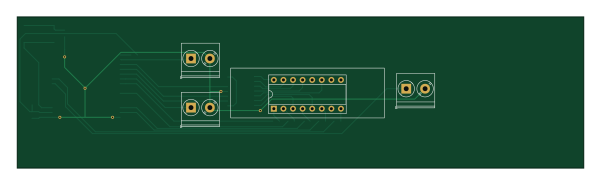
About the Printer cabinet PCB
Printer cabinet is an open source ESP32 PCB design by Cylindric3D, published on GitHub under the Apache-2.0 license. It is a 2-layer board measuring 150 × 40 mm, with 25 components from 19 distinct parts.
Its main chip is the ESP32-WROOM-32D, from the ESP32 family. Other key parts include the 74HC595, LTC-4627JR and NCP1117-3.3_TO252. By type, the board carries 7 resistors, 5 capacitors, 4 ICs, 4 switches, 2 connectors and 1 fuse.
From the project
3D printer cabinet controller
The electronic designs are all made using KiCad.
The actual KiCad project files are here.
Rendered output (schematic and board PDFs, gerbers and bom) are here. (Not always up-to-date with the schematics and boards, so use with caution)
All hardware designs are licensed under the CERN Open Hardware Licence v1.2.
Myriam Ayass, legal adviser of the Knowledge and Technology Transfer Group at CERN and author of the CERN OHL:

Main components on the Printer cabinet
Printer cabinet bill of materials (BOM)
25 components, 19 distinct parts.
| Qty | Part | Footprint | Refs |
|---|---|---|---|
| 1 | 74HC595 | SOIC-16W_5.3x10.2mm_P1.27mm | U1 |
| 1 | LTC-4627JR | DIP-16_W7.62mm_Socket | U2 |
| 1 | ESP32-WROOM-32D | Espressif_ESP32_WROOM_32D_SMT | U3 |
| 1 | NCP1117-3.3_TO252 | TO-252-2 | U4 |
| 1 | MAINS_IN | TerminalBlock_Phoenix_PT-1,5-2-5.0-H_1x02_P5.00mm_Horizontal | J1 |
| 1 | AIR_FILTER | TerminalBlock_Phoenix_PT-1,5-2-5.0-H_1x02_P5.00mm_Horizontal | J2 |
| 1 | 4A | Fuseholder_Glass_5mmx20mm | F1 |
| 1 | S14MOV | RV_Disc_D15.5mm_W6.1mm_P7.5mm | RV1 |
| 1 | Reset | SW_SPST_B3S-1000 | SW1 |
| 1 | UV_STARTSTOP | TerminalBlock_Phoenix_PT-1,5-2-5.0-H_1x02_P5.00mm_Horizontal | SW2 |
| 1 | UV_DOWN | TerminalBlock_Phoenix_PT-1,5-2-5.0-H_1x02_P5.00mm_Horizontal | SW3 |
| 1 | UV_UP | TerminalBlock_Phoenix_PT-1,5-2-5.0-H_1x02_P5.00mm_Horizontal | SW4 |
| 1 | 4W AC-DC Converter | Converter_ACDC_RECOM_RAC04-xxSGx_THT | V1 |
| 1 | 10uF | C_0603_1608Metric_Pad1.05x0.95mm_HandSolder | C1 |
| 2 | 0.1uF | C_0603_1608Metric_Pad1.05x0.95mm_HandSolder | C2, C3 |
| 1 | 10uF | CP_Elec_6.3x5.4_Nichicon | C4 |
| 1 | 4.7uF | CP_Elec_5x5.4 | C5 |
| 2 | 10k | R_0603_1608Metric_Pad1.05x0.95mm_HandSolder | R1, R2 |
| 5 | R | R_0603_1608Metric_Pad1.05x0.95mm_HandSolder | R3, R4, R5, R6, R7 |
Printer cabinet design files
The KiCad project lives in the Cylindric3D/printer_cabinet repository on GitHub; these links point at the commit this page was built from.
Printer cabinet: common questions
What microcontroller does the Printer cabinet use?
The Printer cabinet is built around the ESP32-WROOM-32D, from the ESP32 family.
How big is the Printer cabinet PCB?
The Printer cabinet measures 150 × 40 mm, has 2 copper layers and is 1.6 mm thick.
How many components are on the Printer cabinet?
25 components, from 19 distinct parts. The full bill of materials is listed on this page.
Where can I download the Printer cabinet design files?
From the Cylindric3D/printer_cabinet repository on GitHub, which has the KiCad layout; the links under Design files point to each one.
Can I use the Printer cabinet design in my own project?
Yes, under the terms of its Apache-2.0 license, which Cylindric3D chose for the repository.
Can I test firmware for the Printer cabinet without the hardware?
Yes. HardLabs builds a simulation of the board from its netlist and BOM, so you can run and debug ESP32 firmware against it before you order a PCB.
Similar boards
 ESP32
OSO-BOOK-B1
joeycastillo
85 × 115 mm65 parts2LCC-BY-SA-4.08.1k ESP32
Powertrain
byrantech
64 × 45.4 mm171 parts4LMIT4.3k ESP32
Esp32 minimal
atopile
36.2 × 26.8 mm20 parts2LMIT4.0k ESP32
Badge
56.3 × 39 mm239 parts4LMIT4.0k ESP32
Racer
StuckAtPrototype
36 × 50.2 mm70 parts4LApache-2.03.8k ESP32
Controller
29 × 74 mm58 parts4LApache-2.03.8k