
Pi super ups

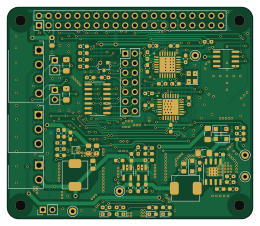
About the Pi super ups PCB
Pi super ups is an open source AVR/Arduino PCB design by mairas, published on GitHub under the BSD-3-Clause license. It is a 2-layer board measuring 65 × 56 mm, with 86 components from 50 distinct parts.
Its main chip is the ATtiny841-SSU, from the AVR/Arduino family. Other key parts include the MCP25625T-E_ML, TPS61022, DS3231MZ, MP1584EN and MT9700. By type, the board carries 31 resistors, 22 capacitors, 8 ICs, 8 diodes, 5 connectors and 5 test points.
It belongs with the power & battery designs in this gallery.
From the project
Power Monitor for Raspberry Pi and SignalK
The KiCad design files are in the hardware subdirectory. They are still untested and no suitability for any purpose is claimed.
The hardware needs some ATTiny13a code to correctly control the wakeup pin (GPIO3) state. This is still to be written!
pi-super-ups is a simple power monitor for Raspberry Pi. It monitors a defined GPIO pin on the Raspberry Pi. If the pin goes high for ten seconds, a shutdown is triggered. Using GPIO 3 is highly recommended because that allows for automatic restarting when power is restored (pulling GPIO 3 low powers on the device if it is powered off).
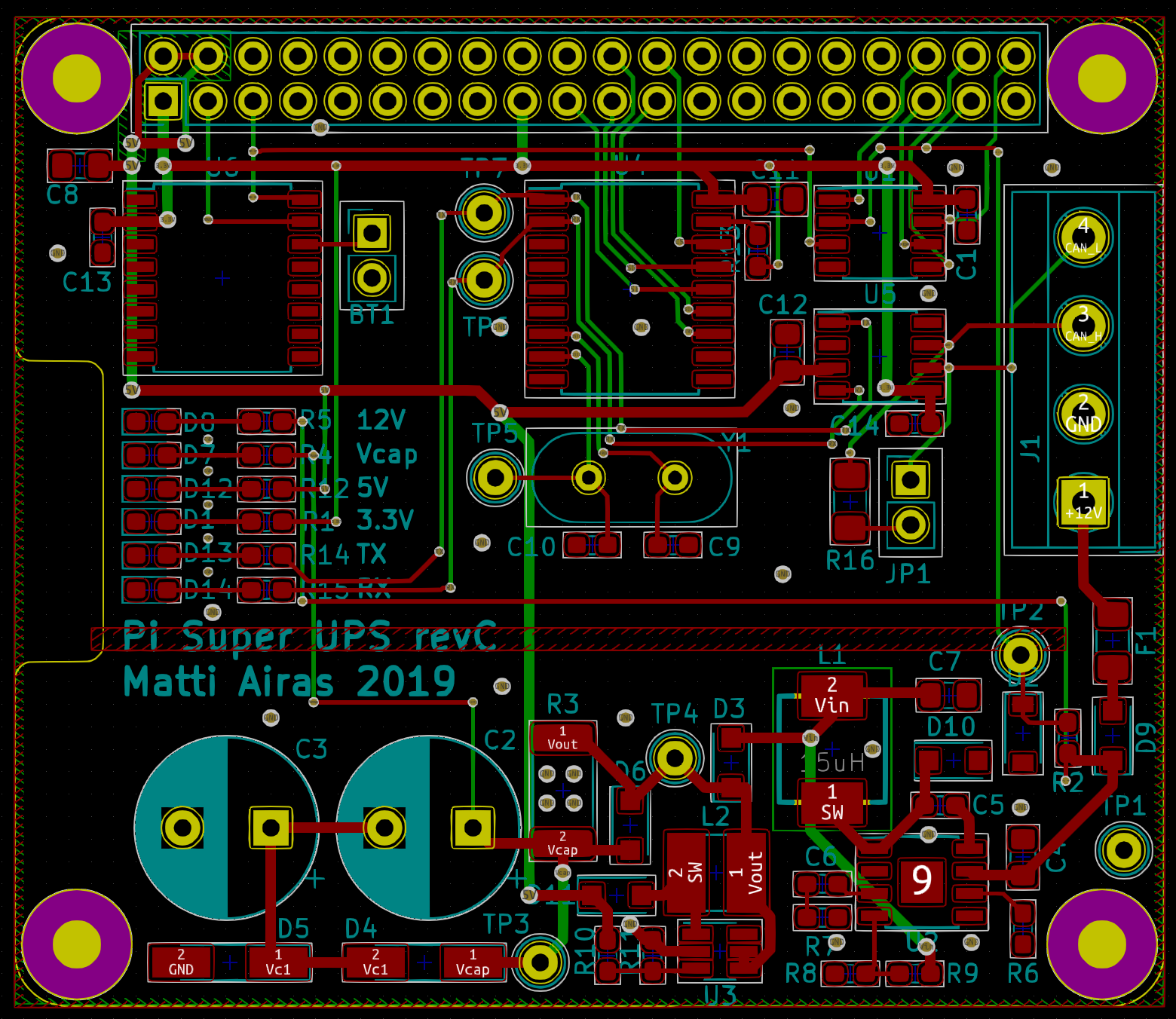
Main components on the Pi super ups
Pi super ups bill of materials (BOM)
86 components, 50 distinct parts.
| Qty | Part | Footprint | Refs |
|---|---|---|---|
| 2 | MCP25625T-E_ML | QFN65P600X600X100-29M-D | IC1, IC2 |
| 1 | ATtiny841-SSU | SOIC-14_3.9x8.7mm_P1.27mm | U1 |
| 1 | TPS61022 | TPS61022RWUR | U2 |
| 1 | DS3231MZ | SOIC-8_3.9x4.9mm_P1.27mm | U4 |
| 1 | MP1584EN | SOIC-8-1EP_3.9x4.9mm_P1.27mm_EP2.35x2.35mm | U5 |
| 2 | MT9700 | SOT-23-5_HandSoldering | U6, U7 |
| 1 | S3D8.000000B20F30T | Oscillator_SMD_Abracon_ASE-4Pin_3.2x2.5mm | X1 |
| 1 | Screw_Terminal_01x04 | TerminalBlock_WJ15EDGRC-3.81-4P | J1 |
| 1 | Raspberry_Pi_2_3 | PinHeader_2x20_P2.54mm_Vertical | J2 |
| 1 | Conn_02x07_Counter_Clockwise | PinHeader_2x07_P2.54mm_Vertical_CounterClockwise | J3 |
| 1 | Screw_Terminal_01x02 | TerminalBlock_WJ15EDGRC-3.81-2P | J4 |
| 1 | Screw_Terminal_01x03 | TerminalBlock_WJ15EDGRC-3.81-3P | J5 |
| 1 | CR1220 3V | BatteryHolder_Linx_BAT-HLD-012-SMT | BT1 |
| 1 | 1A | Fuse_1206_3216Metric_Pad1.42x1.75mm_HandSolder | F1 |
| 1 | Term | PinHeader_1x02_P2.54mm_Vertical | JP2 |
| 1 | SW_SPST | PinHeader_1x02_P2.54mm_Vertical | SW1 |
| 1 | +12V_prot | TestPoint_Keystone_5000-5004_Miniature | TP1 |
| 1 | GND | TestPoint_Keystone_5000-5004_Miniature | TP2 |
| 1 | Vcap | TestPoint_Keystone_5000-5004_Miniature | TP3 |
| 1 | OSC | TestPoint_Keystone_5000-5004_Miniature | TP5 |
Show 30 more
| Qty | Part | Footprint | Refs |
|---|---|---|---|
| 1 | Vbuck | TestPoint_Keystone_5000-5004_Miniature | TP8 |
| 1 | SMF16CA | D_SOD-123F | D1 |
| 2 | DS34W | D_SOD-123F | D2, D12 |
| 3 | RLED | LED_0603_1608Metric_Pad1.05x0.95mm_HandSolder | D3, D5, D11 |
| 1 | BAT54C | SOT-23 | D4 |
| 1 | GLED | LED_0603_1608Metric_Pad1.05x0.95mm_HandSolder | D7 |
| 1 | 4.7uH 3.5A | L_Abracon_ASPI-0630LR | L1 |
| 1 | 1uH | L_Abracon_ASPI-0630LR | L2 |
| 5 | 47uF 10V | C_0805_2012Metric_Pad1.15x1.40mm_HandSolder | C1, C6, C16, C17, C19 |
| 10 | 100nF | C_0603_1608Metric_Pad1.05x0.95mm_HandSolder | C2, C3, C4, C5, C9, C10, C11, C14 +2 |
| 1 | 100n | C_0603_1608Metric_Pad1.05x0.95mm_HandSolder | C8 |
| 1 | 10uF 50V | C_1206_3216Metric_Pad1.42x1.75mm_HandSolder | C13 |
| 1 | 150pF | C_0603_1608Metric_Pad1.05x0.95mm_HandSolder | C15 |
| 4 | 10uF 10V | C_0603_1608Metric_Pad1.05x0.95mm_HandSolder | C20, C21, C22, C23 |
| 1 | 4.7k | R_0603_1608Metric_Pad1.05x0.95mm_HandSolder | R1 |
| 8 | 10k | R_0603_1608Metric_Pad1.05x0.95mm_HandSolder | R2, R7, R19, R21, R24, R25, R29, R30 |
| 1 | 2.2k | R_0603_1608Metric_Pad1.05x0.95mm_HandSolder | R3 |
| 4 | 0 | R_0603_1608Metric_Pad1.05x0.95mm_HandSolder | R4, R5, R6, R8 |
| 2 | 1.5k | R_0603_1608Metric_Pad1.05x0.95mm_HandSolder | R9, R10 |
| 2 | 120R | R_1206_3216Metric_Pad1.42x1.75mm_HandSolder | R11, R31 |
| 1 | 200k | R_0603_1608Metric_Pad1.05x0.95mm_HandSolder | R12 |
| 1 | 54.9k | R_0603_1608Metric_Pad1.05x0.95mm_HandSolder | R13 |
| 1 | 93k | R_0603_1608Metric_Pad1.05x0.95mm_HandSolder | R14 |
| 1 | 40.2k | R_0603_1608Metric_Pad1.05x0.95mm_HandSolder | R15 |
| 1 | 330k | R_0603_1608Metric_Pad1.05x0.95mm_HandSolder | R16 |
| 1 | 43k | R_0603_1608Metric_Pad1.05x0.95mm_HandSolder | R17 |
| 2 | 4.53k | R_0603_1608Metric_Pad1.05x0.95mm_HandSolder | R18, R23 |
| 3 | 100k | R_0603_1608Metric_Pad1.05x0.95mm_HandSolder | R20, R22, R27 |
| 1 | 68k | R_0603_1608Metric_Pad1.05x0.95mm_HandSolder | R26 |
| 1 | 7.5k | R_0603_1608Metric_Pad1.05x0.95mm_HandSolder | R28 |
Pi super ups design files
The KiCad project lives in the mairas/pi-super-ups repository on GitHub; these links point at the commit this page was built from.
Pi super ups: common questions
What microcontroller does the Pi super ups use?
The Pi super ups is built around the ATtiny841-SSU, from the AVR/Arduino family.
How big is the Pi super ups PCB?
The Pi super ups measures 65 × 56 mm, has 2 copper layers and is 1.6 mm thick.
How many components are on the Pi super ups?
86 components, from 50 distinct parts. The full bill of materials is listed on this page.
Where can I download the Pi super ups design files?
From the mairas/pi-super-ups repository on GitHub, which has the KiCad layout; the links under Design files point to each one.
Can I use the Pi super ups design in my own project?
Yes, under the terms of its BSD-3-Clause license, which mairas chose for the repository.
Can I test firmware for the Pi super ups without the hardware?
Yes. HardLabs builds a simulation of the board from its netlist and BOM, so you can run and debug AVR/Arduino firmware against it before you order a PCB.
Similar boards
 AVR/Arduino
Magspoof
samyk
35 × 29 mm11 parts2LNo license4.2k AVR/Arduino
Redox keyboard
mattdibi
162.2 × 126.5 mm77 parts2LMIT2.0k AVR/Arduino
Labrador
espotek-org
36.8 × 34.7 mm75 parts2LNo license1.2k AVR/Arduino
V4
stuartpittaway
30 × 50 mm38 parts2LCC-BY-NC-4.01.1k AVR/Arduino
ModuleV450
30 × 61.4 mm39 parts2LCC-BY-NC-4.01.1k AVR/Arduino
Discipline
coseyfannitutti
304.9 × 122.8 mm170 parts2LCC-BY-NC-4.01.0k