
CTRL-AI-Macropad

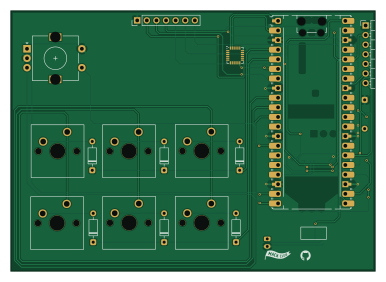
About the CTRL-AI-Macropad PCB
CTRL-AI-Macropad is an open source RP2040/RP2350 PCB design by RishabhMewada, published on GitHub under the MIT license. It is a 2-layer board measuring 96.3 × 68.8 mm, with 22 components from 11 distinct parts.
Its main chip is the RaspberryPi_Pico, from the RP2040/RP2350 family. Other key parts include the MDBT50Q-1MV2, MCP73831-2-OT, MPU-6050 and AP2112K-3.3. By type, the board carries 7 switches, 7 diodes, 4 ICs, 3 connectors and 1 module.
It belongs with the keyboards, iot & wireless and displays & leds designs in this gallery.
From the project
An open-source AI-integrated macropad built with a Raspberry Pi Pico, featuring a mechanical key matrix, rotary encoder, and IPS display. Designed as a programmable control surface with future support for software-based key remapping and AI workflows.
Originally developed as a programmable macropad, the project has evolved into a battery-powered, dual-transport embedded platform built around the Raspberry Pi Pico (RP2040), featuring modular firmware architecture and wireless expansion capabilities.CTRL is a custom-built Human-Computer Interaction (HCI) Development Board designed for productivity tooling, embedded experimentation, wireless HID systems, and future AI-assisted workflows.
Main components on the CTRL-AI-Macropad
CTRL-AI-Macropad bill of materials (BOM)
22 components, 11 distinct parts — part numbers from the project's BOM.
| Qty | Part | Footprint | Refs |
|---|---|---|---|
| 1 | MDBT50Q-1MV2 | Raytac_MDBT50Q | U1 |
| 1 | MCP73831-2-OT | SOT-23-5 | U2 |
| 1 | MPU-6050 | InvenSense_QFN-24_4x4mm_P0.5mm | U3 |
| 1 | AP2112K-3.3 | SOT-23-5 | U4 |
| 1 | RaspberryPi_Pico | RaspberryPi_Pico_Common_Unspecified | A1 |
| 1 | Conn_01x07 | PinHeader_1x07_P2.54mm_Vertical | J1 |
| 1 | Conn_01x02_Pin | JST_PH_S2B-PH-K_1x02_P2.00mm_Horizontal | J2 |
| 1 | Conn_01x08_Pin | PinHeader_1x07_P2.54mm_Horizontal | J3 |
| 6 | SW_Push | SW_Cherry_MX_1.00u_PCB | SW1, SW2, SW3, SW4, SW5, SW6 |
| 1 | RotaryEncoder_Switch | RotaryEncoder_Alps_EC11E-Switch_Vertical_H20mm | SW7 |
| 7 | DSB5712 | D_DO-35_SOD27_P7.62mm_Horizontal | D1, D2, D3, D4, D5, D6, D8 |
CTRL-AI-Macropad design files
The KiCad project lives in the RishabhMewada/CTRL-AI-Macropad repository on GitHub; these links point at the commit this page was built from.
CTRL-AI-Macropad: common questions
What microcontroller does the CTRL-AI-Macropad use?
The CTRL-AI-Macropad is built around the RaspberryPi_Pico, from the RP2040/RP2350 family.
How big is the CTRL-AI-Macropad PCB?
The CTRL-AI-Macropad measures 96.3 × 68.8 mm, has 2 copper layers and is 1.6 mm thick.
How many components are on the CTRL-AI-Macropad?
22 components, from 11 distinct parts, with part numbers taken from the project's own BOM. The full bill of materials is listed on this page.
Where can I download the CTRL-AI-Macropad design files?
From the RishabhMewada/CTRL-AI-Macropad repository on GitHub, which has the KiCad layout, the schematic and the BOM; the links under Design files point to each one.
Can I use the CTRL-AI-Macropad design in my own project?
Yes, under the terms of its MIT license, which RishabhMewada chose for the repository.
Can I test firmware for the CTRL-AI-Macropad without the hardware?
Yes. HardLabs builds a simulation of the board from its netlist and BOM, so you can run and debug RP2040/RP2350 firmware against it before you order a PCB.
Similar boards
 RP2040/RP2350
Open Book Abridged Edition
joeycastillo
85 × 115 mm29 parts2LCC-BY-SA-4.08.1k RP2040/RP2350
Corne
foostan
277.2 × 107.5 mm164 parts2LCC-BY-4.07.7k RP2040/RP2350
Corne
277.2 × 107.5 mm164 parts2LCC-BY-4.07.7k RP2040/RP2350
Hid remapper
jfedor2
100 × 100 mm124 parts2LMIT1.7k RP2040/RP2350
MSA
Mentra-Community
30.5 × 138 mm61 parts2LMIT1.2k RP2040/RP2350
Open Source Smart Glasses
93 × 10.5 mm80 parts4LMIT1.2k