
Oomlout oomp documentation bot

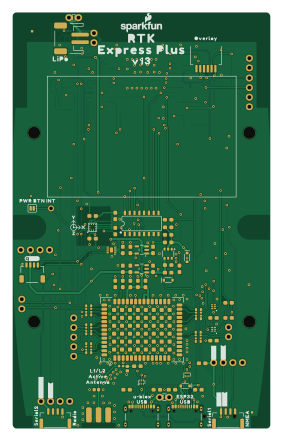
About the Oomlout oomp documentation bot PCB
Oomlout oomp documentation bot is an open source ESP32 PCB design by oomlout, published on GitHub. It is a 4-layer board measuring 68.2 × 110.1 mm, with 164 components from 103 distinct parts.
Its main chip is the ESP-WROOM-3232D, from the ESP32 family. Other key parts include the 74HC4052D, AP2112K-3.3, STLQ015-3.3V, CH340C and MAX17048. By type, the board carries 71 ICs, 31 resistors, 26 capacitors, 19 connectors, 7 diodes and 2 transistors.
From the project
a bot that goes around generating rough documentation for kicad projects

Main components on the Oomlout oomp documentation bot
Oomlout oomp documentation bot bill of materials (BOM)
164 components, 103 distinct parts — part numbers from the project's BOM.
| Qty | Part | Footprint | Refs |
|---|---|---|---|
| 1 | 74HC4052D | SO16 | U1 |
| 1 | AP2112K-3.3 | SOT23-5 | U2 |
| 1 | STLQ015-3.3V | SOT23-5 | U4 |
| 1 | ESP-WROOM-3232D | ESP-WROOM-32D | U5 |
| 1 | CH340C | SO016 | U6 |
| 1 | MAX17048 | DFN-8 | U7 |
| 2 | NC7SZ14-D | SIP6 | U8, U9 |
| 1 | MCP73833 | DFN-10 | U10 |
| 1 | U-BLOX_ZED_F9R | UBLOX_ZED_F9R | U11 |
| 1 | LIS2DH12 | LGA-12-LISDH12 | U13 |
| 1 | — | V130 | U$1 |
| 1 | SPECIAL_INSTRUCTIONS-ORDERING | ORDERING_INSTRUCTIONS | U$2 |
| 1 | — | #TX_RDY#0 | U$3 |
| 1 | — | INT0 | U$4 |
| 2 | — | #3V3#0 | U$5, U$47 |
| 1 | — | L1#L20 | U$6 |
| 2 | — | RTK0 | U$7, U$74 |
| 1 | — | OVERLAY0 | U$8 |
| 1 | — | PWR_BTN1 | U$9 |
| 1 | — | #RTK#1 | U$10 |
Show 83 more
| Qty | Part | Footprint | Refs |
|---|---|---|---|
| 1 | — | #PPS#0 | U$11 |
| 2 | — | EXPRESS_PLUS0 | U$12, U$22 |
| 1 | — | ACTIVE1 | U$13 |
| 1 | — | #RX#2 | U$14 |
| 1 | — | ANTENNA2 | U$15 |
| 1 | — | ZED0 | U$16 |
| 1 | — | ##SAFE##5 | U$17 |
| 1 | — | #3#5#5V#0 | U$23 |
| 1 | — | X0 | U$24 |
| 1 | — | 1553DBK-ENCLOSURE | U$26 |
| 1 | — | LIPO0 | U$27 |
| 1 | — | ##RST##4 | U$28 |
| 1 | — | SERIAL10 | U$29 |
| 2 | — | QWIIC_4MM | U$30, U$93 |
| 1 | — | #FENCE#3 | U$32 |
| 1 | — | CHG2 | U$33 |
| 1 | — | GND3 | U$34 |
| 1 | — | U#BLOX0 | U$35 |
| 2 | — | USB1 | U$36, U$66 |
| 3 | — | #GND#0 | U$38, U$48, U$82 |
| 1 | — | #RX2#2 | U$39 |
| 1 | — | #TX2#1 | U$40 |
| 1 | — | PWR0 | U$41 |
| 1 | — | SETUP1 | U$42 |
| 1 | — | SERIAL20 | U$43 |
| 2 | — | #RX1#2 | U$45, U$68 |
| 2 | — | #TX1#1 | U$46, U$65 |
| 1 | — | NMEA1 | U$49 |
| 1 | — | RADIO0 | U$50 |
| 1 | — | Y1 | U$55 |
| 1 | — | Z2 | U$56 |
| 1 | — | #ESP_RST#0 | U$60 |
| 1 | — | ESP320 | U$67 |
| 1 | — | #GND#2 | U$70 |
| 1 | — | #TX#1 | U$72 |
| 1 | — | MICROSD0 | U$83 |
| 1 | — | #GND#1 | U$84 |
| 1 | — | #3V3#2 | U$85 |
| 1 | — | #SCL#1 | U$86 |
| 1 | — | #SDA#0 | U$87 |
| 1 | — | #D_SEL#0 | U$88 |
| 1 | SIL2308-TP | SOT26 | Q1 |
| 1 | MBT3904DW1T1 | SC70-6 | Q2 |
| 4 | — | 1X02_NO_SILK | J1, J10, J14, J15 |
| 2 | — | JST-4-SMD-1.25MM-LOCKING | J2, J9 |
| 2 | USB Female Type C Connector | USB-C-16P_4LAYER-PADS | J3, J5 |
| 1 | Qwiic Right Angle | JST04_1MM_RA | J4 |
| 1 | — | 1X05_NO_SILK | J6 |
| 3 | — | 1X04_NO_SILK | J7, J11, J12 |
| 1 | — | JST-2-SMD | J8 |
| 1 | Internal | JST04_1MM_RA | J13 |
| 1 | MICRO-SD-PUSH-PUSH-EXT-PIN | MICROSD-EXTERNALPIN | J16 |
| 1 | Qwiic Right Angle | 1X04_NO_SILK | J17 |
| 1 | — | 1X01_NO_SILK | J18 |
| 1 | — | FPC_6_1MM-LIF | J19 |
| 1 | LIPO-OUTLINE1000 | LIPO-1000 | BT1 |
| 1 | SMA | SMA-EDGE | E1 |
| 1 | FRAME-LEDGER | CREATIVE_COMMONS | FRAME2 |
| 1 | FRAME-LEDGERNO_FOOTPRINT | DUMMY | FRAME3 |
| 1 | JUMPER-SMT_2_NO_SILK | SMT-JUMPER_2_NO_SILK | JP1 |
| 2 | JUMPER-COMBO_2_NC_TRACE | COMBO-JUMPER_2_NC_TRACE | MEAS0, MEAS1 |
| 1 | 250mA/100V | SOD-323 | D1 |
| 2 | PRTR5V0U2F | SOT886 | D2, D6 |
| 3 | 3A/10V/280mV | SOD-323 | D3, D7, D9 |
| 1 | PESD0402-0402 | 0402 | D10 |
| 1 | 2.66Ω | 0402-TIGHT | FB1 |
| 1 | 47pF | 0402 | C1 |
| 5 | 1.0uF | 0603 | C2, C4, C6, C17, C18 |
| 14 | 0.1uF | 0603 | C3, C5, C7, C11, C12, C13, C15, C16 +6 |
| 2 | 4.7uF | 0603 | C8, C9 |
| 4 | 10uF | 0603 | C10, C14, C19, C20 |
| 1 | 470 | 0603 | R1 |
| 5 | 33 | 1206_RA | R2, R3, R4, R9, R25 |
| 1 | 0 | 0603 | R5 |
| 7 | 10k | 0603 | R6, R8, R18, R23, R29, R31, R33 |
| 2 | 1k | 0603 | R7, R19 |
| 5 | 100k | 0603 | R13, R15, R20, R22, R26 |
| 1 | 10 | 0603 | R14 |
| 4 | 5.1k | 0603 | R16, R17, R37, R38 |
| 1 | 300k | 0603 | R24 |
| 2 | 27 | 0603 | R27, R28 |
| 1 | 150k | 0603 | R30 |
| 1 | 3.3k | 0603 | R34 |
Oomlout oomp documentation bot design files
The KiCad project lives in the oomlout/oomlout_oomp_documentation_bot repository on GitHub; these links point at the commit this page was built from.
- Layoutprojects/sparkfun/SparkFun_RTK_Express_Plus/oomp_documentation/version_current/working/working.kicad_pcb
- Schematicprojects/sparkfun/SparkFun_RTK_Express_Plus/oomp_documentation/version_current/working/working.kicad_sch
- BOMprojects/sparkfun/SparkFun_RTK_Express_Plus/oomp_documentation/version_current/working/working_bom.csv
Oomlout oomp documentation bot: common questions
What microcontroller does the Oomlout oomp documentation bot use?
The Oomlout oomp documentation bot is built around the ESP-WROOM-3232D, from the ESP32 family.
How big is the Oomlout oomp documentation bot PCB?
The Oomlout oomp documentation bot measures 68.2 × 110.1 mm, has 4 copper layers and is 1.6 mm thick.
How many components are on the Oomlout oomp documentation bot?
164 components, from 103 distinct parts, with part numbers taken from the project's own BOM. The full bill of materials is listed on this page.
Where can I download the Oomlout oomp documentation bot design files?
From the oomlout/oomlout_oomp_documentation_bot repository on GitHub, which has the KiCad layout, the schematic and the BOM; the links under Design files point to each one.
Can I use the Oomlout oomp documentation bot design in my own project?
The repository has no license, so all rights stay with oomlout. Use it as a reference, and ask the author before reusing the design.
Can I test firmware for the Oomlout oomp documentation bot without the hardware?
Yes. HardLabs builds a simulation of the board from its netlist and BOM, so you can run and debug ESP32 firmware against it before you order a PCB.
Similar boards
 ESP32
ESP32Open Book Abridged Edition
joeycastillo
85 × 115 mm65 parts2LCC-BY-SA-4.08.1k ESP32
ESP32Badge
atopile
56.3 × 39 mm239 parts4LMIT4.0k ESP32
ESP32Esp32 minimal
36.2 × 26.8 mm20 parts2LMIT4.0k ESP32
ESP32Racer
StuckAtPrototype
36 × 50.2 mm70 parts4LApache-2.03.8k ESP32
ESP32Controller
29 × 74 mm58 parts4LApache-2.03.8k ESP32
ESP32Bitaxe
skot
56.5 × 99.8 mm86 parts4LCERN-OHL-S-2.01.4k