
Pilot 6 axis

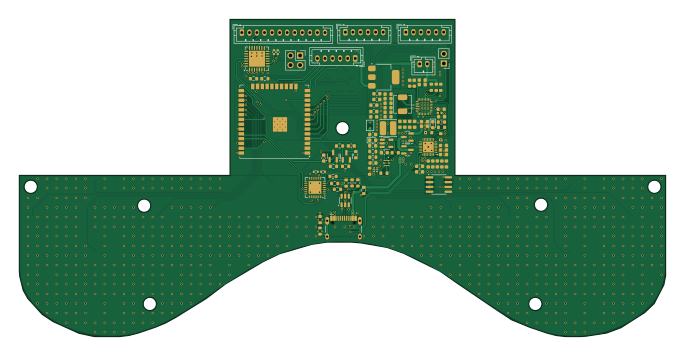
About the Pilot 6 axis PCB
Pilot 6 axis is an open source ESP32 PCB design by X-Lemon-X, published on GitHub under the MIT license. It is a 2-layer board measuring 171 × 83.9 mm, with 125 components from 57 distinct parts.
Its main chip is the ESP32-WROOM-32U, from the ESP32 family. Other key parts include the LM27313XMFX/NOPB, TPS25751SRSMR, BQ25792RQMR, TPS3422EGDRYR and SN74LVC1G74RSE2. By type, the board carries 47 capacitors, 32 resistors, 23 ICs, 8 diodes, 7 connectors and 4 transistors.
It belongs with the iot & wireless and displays & leds designs in this gallery, and the repository also holds 1 earlier revision of it.
From the project
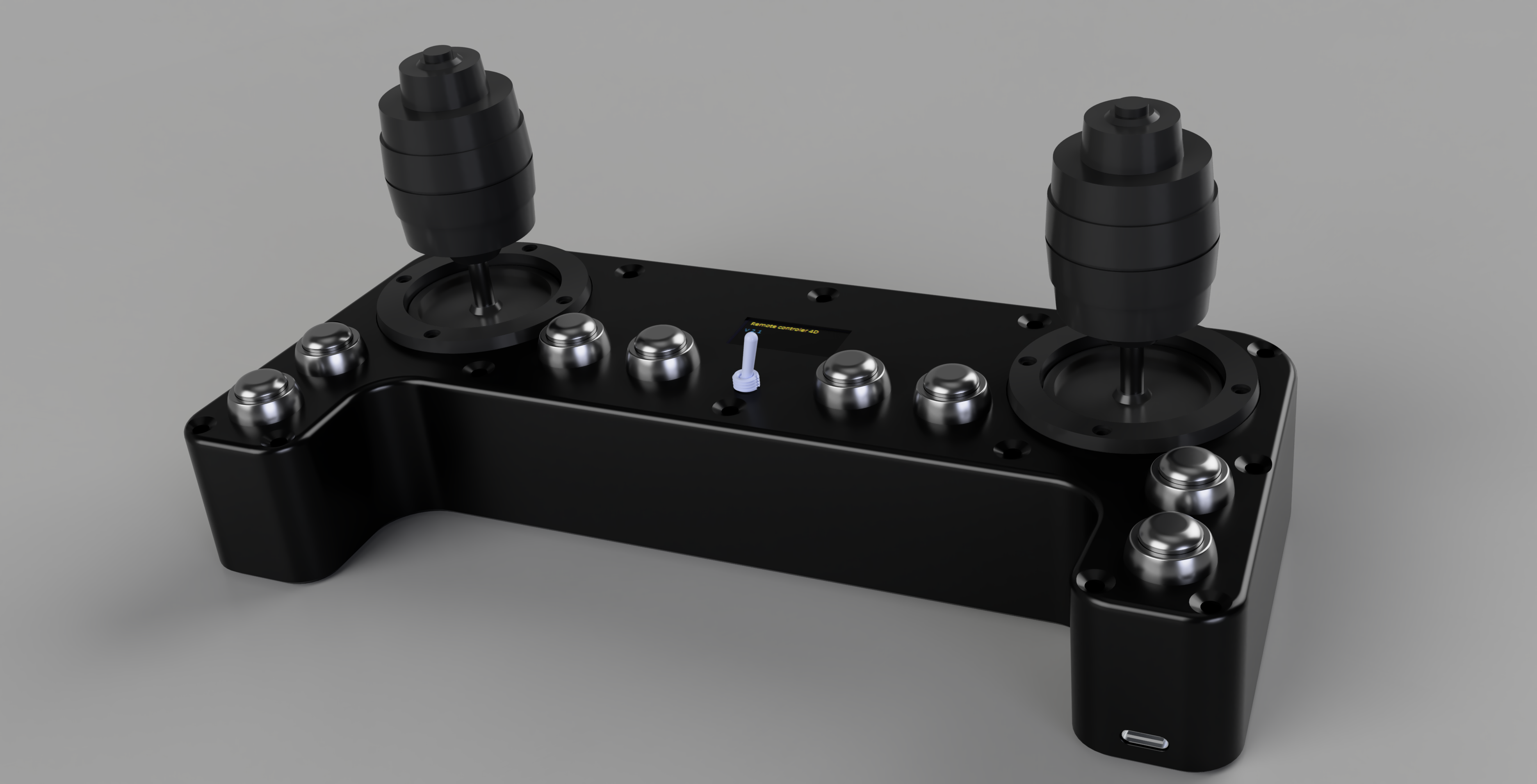
DIY Remote Controler Build
2. Quick version (because you are most likely testing on localhost)
3. For help about arguments, and buttons mapping run:
5. To leave setup mode shut down the Rc and turn it on again. 6. Now the Rc will connect to the network with the highest priority that is available. If it can't connect to any of the saved networks it will keep trying to connect to them. If the Rc is connected to the network it will display the IP address on the LCD and show Connected status. 7. Now setup is done and you can use the Rc.
Main components on the Pilot 6 axis
Pilot 6 axis bill of materials (BOM)
125 components, 57 distinct parts — part numbers from the project's BOM.
| Qty | Part | Footprint | Refs |
|---|---|---|---|
| 1 | LM27313XMFX/NOPB LM27313XMFX_NOPB | SOT-23-5 | IC1 |
| 1 | TPS25751SRSMR | QFN40P400X400X100-33N-D | IC2 |
| 1 | BQ25792RQMR | BQ25792RQMR | IC3 |
| 1 | TPS3422EGDRYR | DRY_R-PUSON-N6_ | IC4 |
| 1 | SN74LVC1G74RSE2 | SN74LVC1G74RSE2 | IC5 |
| 1 | AMS1117-3.3 | SOT-223-3_TabPin2 | U1 |
| 1 | USBLC6-2SC6 | SOT-23-6 | U2 |
| 1 | CP2102N-AXX-XQFN28 CP2102N-Axx-xQFN28 | QFN-28-1EP_5x5mm_P0.5mm_EP3.35x3.35mm | U3 |
| 1 | ESP32-WROOM-32U | ESP32-WROOM-32U | U4 |
| 11 | ~ | ts-1212f | U5, U6, U7, U8, U9, U10, U11, U12 +3 |
| 1 | MCP23017_ML | QFN-28-1EP_6x6mm_P0.65mm_EP4.25x4.25mm | U14 |
| 1 | CAT24C512WI-GT3 | SOIC-8_3.9x4.9mm_P1.27mm | U17 |
| 1 | Power switch | ts-1212f | U18 |
| 2 | S9014 hongjiacheng | Q_SOT-23 | Q1, Q2 |
| 2 | AO3400A Alpha & Omega Semicon | Q_SOT-23 | Q3, Q4 |
| 1 | Battery input | JST_PH_B2B-PH-K_1x02_P2.00mm_Vertical | J1 |
| 1 | USB_C_RECEPTACLE_USB2.0_16P USB_C_Receptacle_USB2.0_16P | USB_C_Receptacle_HCTL_HC-TYPE-C-16P-01A | J3 |
| 3 | CONN_01X06 Conn_01x06 | JST_PH_B6B-PH-K_1x06_P2.00mm_Vertical | J4, J9, J10 |
| 1 | Oled | PinSocket_2x02_P2.54mm_Vertical | J6 |
| 1 | CONN_01X12 Conn_01x12 | JST_PH_B12B-PH-K_1x12_P2.00mm_Vertical | J8 |
Show 37 more
| Qty | Part | Footprint | Refs |
|---|---|---|---|
| 1 | SOLDERJUMPER_2_BRIDGED SolderJumper_2_Bridged | SolderJumper-2_P1.3mm_Open_TrianglePad1.0x1.5mm | JP1 |
| 1 | 10K 10k | PinHeader_1x02_P2.54mm_Vertical | TH1 |
| 1 | MBR0520 | D_0603_1608Metric | D1 |
| 7 | C2286 Red Hubei KENTO Elec | D_0603 | D2, D3, D4, D5, D6, D7, D8 |
| 1 | 10UH 10uH | L_Cenker_CKCS4018 | L1 |
| 1 | 1u | L_APV_APH0420 | L2 |
| 1 | 4.7UF 4.7uF | C_0603_1608Metric | C1 |
| 14 | 10UF 10uF Samsung Electro-Mechanics | C_0603 | C2, C15, C20, C21, C29, C30, C31, C32 +6 |
| 3 | 100N 100nF | C_0603_1608Metric | C3, C7, C46 |
| 3 | 220PF 220pF | C_0603_1608Metric | C4, C23, C24 |
| 5 | 1NF 1nF | C_0603_1608Metric | C5, C6, C13, C14, C47 |
| 1 | 10NF 10nF | R_0603_1608Metric | C8 |
| 2 | 10U 4.7u | R_0603_1608Metric | C9, C44 |
| 3 | 100N 100n | R_0603_1608Metric | C10, C11, C45 |
| 1 | 10U 10u | R_0603_1608Metric | C12 |
| 2 | 4.7UF 4.7uF Samsung Electro-Mechanics | C_0603 | C16, C39 |
| 8 | 100N 100nF YAGEO | C_0603 | C17, C18, C19, C22, C25, C26, C34, C43 |
| 2 | 47NF 47nF Samsung Electro-Mechanics | C_0603 | C27, C28 |
| 2 | 1NF 1nF Samsung Electro-Mechanics | C_0603 | C35, C36 |
| 2 | 100kΩ UNI-ROYAL(Uniroyal Elec) | R_0603 | R1, R24 |
| 1 | 40.5K 40.5k | R_0603_1608Metric | R2 |
| 5 | 13.3K 13.3k | R_0603_1608Metric | R3, R11, R12, R15, R16 |
| 1 | 330Ω UNI-ROYAL(Uniroyal Elec) | R_0603 | R4 |
| 1 | 33K 33k | R_0603_1608Metric | R5 |
| 2 | 22R | R_0603_1608Metric | R6, R7 |
| 1 | 13.3K 22k | R_0402_1005Metric | R8 |
| 1 | 13.3K 43k | R_0402_1005Metric | R9 |
| 1 | 1k | R_0603_1608Metric | R10 |
| 7 | 1kΩ UNI-ROYAL(Uniroyal Elec) | R_0603 | R13, R14, R25, R28, R30, R31, R32 |
| 2 | 13.3K 4k7 | R_0402_1005Metric | R17, R18 |
| 2 | 4.7kΩ UNI-ROYAL(Uniroyal Elec) | R_0603 | R19, R20 |
| 1 | 5.1kΩ UNI-ROYAL(Uniroyal Elec) | R_0402 | R21 |
| 1 | 30kΩ UNI-ROYAL(Uniroyal Elec) | R_0603 | R22 |
| 1 | 127K 127k | R_0603_1608Metric | R23 |
| 1 | 100Ω UNI-ROYAL(Uniroyal Elec) | R_0603 | R26 |
| 1 | 3kΩ UNI-ROYAL(Uniroyal Elec) | R_0603 | R27 |
| 1 | 22Ω UNI-ROYAL(Uniroyal Elec) | R_0603 | R29 |
Pilot 6 axis design files
The KiCad project lives in the X-Lemon-X/Pilot_6_axis repository on GitHub; these links point at the commit this page was built from.
Pilot 6 axis: common questions
What microcontroller does the Pilot 6 axis use?
The Pilot 6 axis is built around the ESP32-WROOM-32U, from the ESP32 family.
How big is the Pilot 6 axis PCB?
The Pilot 6 axis measures 171 × 83.9 mm, has 2 copper layers and is 1.6 mm thick.
How many components are on the Pilot 6 axis?
125 components, from 57 distinct parts, with part numbers taken from the project's own BOM. The full bill of materials is listed on this page.
Where can I download the Pilot 6 axis design files?
From the X-Lemon-X/Pilot_6_axis repository on GitHub, which has the KiCad layout, the schematic and the BOM; the links under Design files point to each one.
Can I use the Pilot 6 axis design in my own project?
Yes, under the terms of its MIT license, which X-Lemon-X chose for the repository.
Can I test firmware for the Pilot 6 axis without the hardware?
Yes. HardLabs builds a simulation of the board from its netlist and BOM, so you can run and debug ESP32 firmware against it before you order a PCB.
Earlier revisions in the repo: Pilot6Axis
Similar boards
 ESP32
ESP32Open Book Abridged Edition
joeycastillo
85 × 115 mm65 parts2LCC-BY-SA-4.08.1k ESP32
ESP32Esp32 minimal
atopile
36.2 × 26.8 mm20 parts2LMIT4.0k ESP32
ESP32Badge
56.3 × 39 mm239 parts4LMIT4.0k ESP32
ESP32Controller
StuckAtPrototype
29 × 74 mm58 parts4LApache-2.03.8k ESP32
ESP32Racer
36 × 50.2 mm70 parts4LApache-2.03.8k ESP32
ESP32Bitaxe
skot
56.5 × 99.8 mm86 parts4LCERN-OHL-S-2.01.4k