
7 open source boards using the KXTJ3-1057
Real designs built with the KXTJ3-1057, from public GitHub projects: a quick way to see how others power, decouple and connect it. Each board comes with its KiCad files, full parts list and a render — and you can simulate its firmware on HardLabs.
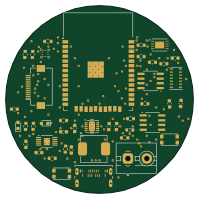 ESP32
12 class notes
bob4o-afk
49.6 × 49.6 mm43 parts2LNo license4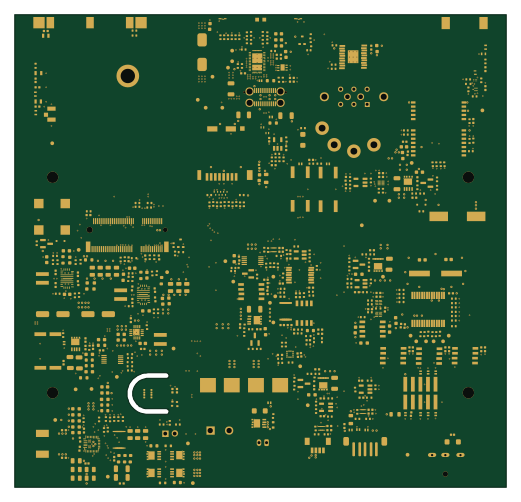
Flatburn lte
MIT-Senseable-City-Lab
130 × 125 mm542 parts4LMIT1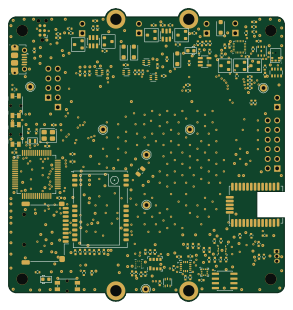 STM32
Ambient pcb dkaiot
LEAT-EDGE
73 × 77.5 mm166 parts2LCERN-OHL-P-2.00- schematic only · 6 partsAVR/Arduino
HardwareFinalExam
Alex-Hamblin
6 partsNo license0 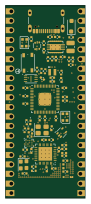 RP2040/RP2350
Pico2350-W-ProLite-R2
zeankundev
21 × 51 mm74 parts4LNo license1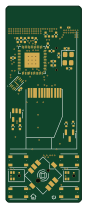 ESP32
Radianite-Buddy2
RadianiteComputers
20 × 52 mm58 parts4LNo license0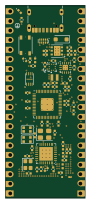 RP2040/RP2350
Pico2350-W-Pro-R2
21 × 51 mm69 parts4LNo license1
How designs wire the KXTJ3-1057
Read from the KiCad layouts of 5 open source designs, one per repository: what each pin of the KXTJ3-1057 connects to, and the resistors, capacitors and other passives placed on it.
- The IO_VDD pins have a decoupling capacitor on 3 of 5 designs, most often 100 nF (then 1 µF).
- The VDD pins have a decoupling capacitor on 3 of 5 designs, most often 1 µF (then 100 nF).
- The INT pin is left unconnected on 3 of 5 designs (a signal on 2).
- The ADDR pin has a resistor to GND on 2 of 5 designs, most often 10 kΩ (then 0 Ω).
| Pin | Connected to | Parts on the pin |
|---|---|---|
| ADDRpin 1 | Connected to: Not connected 40% · GND 20% · a signal 40% |
|
| SDApin 2 | Connected to: The microcontroller 60%, BME280 40% |
|
| IO_VDDpin 3, 11 | Connected to: 3.3V 60% · a signal 30% |
|
| INTpin 5 | Connected to: Not connected 60% · a signal 40% | — |
| GNDpin 6, 8, 9 | Connected to: GND 87% | — |
| VDDpin 7, 10 | Connected to: 3.3V 60% · a signal 30% |
|
| SCLpin 12 | Connected to: The microcontroller 60%, BME280 40% |
|
1 more pin varies from design to design. Connections count pins, parts count designs; values in brackets are how many parts had that value. Designs read include 12 class notes by bob4o-afk, Flatburn lte by MIT-Senseable-City-Lab, Pico2350-W-Pro-R2 by zeankundev and Ambient pcb dkaiot by LEAT-EDGE.
The KXTJ3-1057 in open source designs
The gallery holds 7 open source boards using the KXTJ3-1057 from 6 GitHub repositories; a typical one measures about 35.3 × 51.5 mm and carries around 69 components.
67% use four copper layers or more, and 29% carry an open source license.
The most starred is 12 class notes by bob4o-afk.
Parts used alongside the KXTJ3-1057
Microcontrollers on boards using the KXTJ3-1057
What boards using the KXTJ3-1057 are built for
KXTJ3-1057: common questions
Where can I find a KXTJ3-1057 reference design?
Each of the 7 boards on this page is a real design using the KXTJ3-1057. Open one to see how it is wired up, with the full BOM, a render of the layout and links to its KiCad files.
What decoupling capacitors do designs use on the KXTJ3-1057 IO_VDD pin?
The IO_VDD pins have a decoupling capacitor on 3 of 5 designs, most often 100 nF (then 1 µF). Counted from the KiCad layouts of 5 open source designs using the KXTJ3-1057.
What decoupling capacitors do designs use on the KXTJ3-1057 VDD pin?
The VDD pins have a decoupling capacitor on 3 of 5 designs, most often 1 µF (then 100 nF). Counted from the KiCad layouts of 5 open source designs using the KXTJ3-1057.
How is the KXTJ3-1057 INT pin connected?
The INT pin is left unconnected on 3 of 5 designs (a signal on 2). Counted from the KiCad layouts of 5 open source designs using the KXTJ3-1057.
What parts are used alongside the KXTJ3-1057?
The BME280, ESP32-S3R8, MIC5205-3.3YM5 and TP4057 appear in the most repositories here.
Which microcontrollers do boards using the KXTJ3-1057 use?
Most are built on ESP32 (2), RP2040/RP2350 (2), AVR/Arduino (1) and STM32 (1).
How big is a typical board using the KXTJ3-1057?
The median is 35.3 × 51.5 mm, and 33% are two-layer designs.
What is the most popular open source board using the KXTJ3-1057?
By GitHub stars, 12 class notes by bob4o-afk, with 4 stars.
Can I simulate one of these boards using the KXTJ3-1057 before building it?
Yes. HardLabs turns a board's netlist and BOM into a working simulation, so you can boot and test firmware against it with no hardware on your desk.